
Create and Modify CAD Drawings
Supported CAD Entity Types
| Class Name | Description |
|---|---|
| DbLine | Line |
| DbCurve | Curve |
| Db2dPolyline | 2D Polyline |
| Db3dPolyline | 3D Polyline |
| DbPolyline | Polyline |
| BlockReference | Block Reference |
| DbArc | Arc |
| DbCircle | Circle |
| DbEllipse | Ellipse |
| DbHatch | Hatch |
| Text | Single-line Text |
| DbMText | Multiline Text |
| RasterImage | Raster Image |
| DbShape | Shape Entity |
| Spline | Spline |
| Wipeout | Wipeout Entity |
| Dimension | Dimension |
| Db2LineAngularDimension | Angular Dimension [Two Lines] |
| Db3PointAngularDimension | Angular Dimension [Three Points] |
| DbAlignedDimension | Aligned Dimension |
| DbArcDimension | Arc Dimension |
| DbDiametricDimension | Diametric Dimension |
| DbOrdinateDimension | Ordinate Dimension |
| DbRadialDimension | Radial Dimension |
| DbRadialDimensionLarge | Radial Dimension with Leader |
| DbRotatedDimension | Rotated Dimension |
| DbAttributeDefinition | Attribute Definition |
| DbTable | Table |
| DbMLeader | Leader |
| DbSolid | Solid Entity |
| DbLayer | Layer |
| DbTextStyle | Text Style |
| DbDimStyle | Dimension Style |
| DbLinetypeStyle | Linetype Style |
| DbBlock | Block Definition |
| DbDocument | Database Document |
Create Drawing Example
Create Drawing Code
(async () => {
	// --Create map--Create CAD drawing in backend, then open in frontend
	// js code
	let svc = new vjmap.Service(env.serviceUrl, env.accessToken)
	let doc = new vjmap.DbDocument();
	let entitys = [];
	let line1 = new vjmap.DbLine();
	line1.start = [0, 0]
	line1.end = [0, 15]
	entitys.push(line1)

	let line2 = new vjmap.DbLine();
	line2.start = [0, 14.1]
	line2.end = [2.99, 14.1]
	entitys.push(line2)

	let line3 = new vjmap.DbLine();
	line3.start = [0, 0.9]
	line3.end = [2.99, 0.9]
	entitys.push(line3)

	let line4 = new vjmap.DbLine();
	line4.start = [0, 9.95]
	line4.end = [5.8, 9.95]
	entitys.push(line4)

	let line5 = new vjmap.DbLine();
	line5.start = [0, 5.05]
	line5.end = [5.8, 5.05]

	let hatch = new vjmap.DbHatch();
	hatch.pattern = "SOLID";
	hatch.color = 0xB43F32;
	hatch.points = [line4.start, line4.end, line5.end, line5.start];
	entitys.push(hatch);
	entitys.push(line4)
	entitys.push(line5)

	let line6 = new vjmap.DbLine();
	line6.start = [5.8, 5.05]
	line6.end = [5.8, 9.95]
	entitys.push(line6)

	let arc1 = new vjmap.DbArc();
	arc1.center = [5.7963, 7.504];
	arc1.radius = 1.8014;
	arc1.startAngle = 270 * Math.PI / 180.0;
	arc1.endAngle = 90 * Math.PI / 180.0;
	entitys.push(arc1)

	let arc2 = new vjmap.DbArc();
	arc2.center = [5.7963, 7.504];
	arc2.radius = 1.8014;
	arc2.startAngle = 90 * Math.PI / 180.0;
	arc2.endAngle = 270 * Math.PI / 180.0;
	//arc2.linetype = "DASHED"
	entitys.push(arc2)

	let arc3 = new vjmap.DbArc();
	arc3.center = [1.575, 7.5];
	arc3.radius = 6.75;
	arc3.startAngle = 282 * Math.PI / 180.0;
	arc3.endAngle = 78 * Math.PI / 180.0;
	entitys.push(arc3)

	let block = new vjmap.DbBlock();
	block.name = "ball";
	block.origin = [0, 0]
	block.entitys = entitys;
	doc.appendBlock(block);

	let blockRef1 = new vjmap.DbBlockReference();
	blockRef1.blockname = "ball";
	blockRef1.position = [0, 0];
	doc.appendEntity(blockRef1);

	let blockRef2 = new vjmap.DbBlockReference();
	blockRef2.blockname = "ball";
	blockRef2.position = [28, 15];
	blockRef2.rotation = Math.PI;
	doc.appendEntity(blockRef2);

	let otherEnts = [
		new vjmap.DbLine({
			start: [0, 15],
			end: [28, 15]
		}),
		new vjmap.DbLine({
			start: [0, 0],
			end: [28, 0]
		}),
		new vjmap.DbLine({
			start: [14, 0],
			end: [14, 15],
			colorIndex: 1
		}),
		new vjmap.DbCircle({
			center:[14, 7.5],
			radius: 1.83,
			color: 0xFF0000
		}),
		new vjmap.DbText({
			position: [14, 16],
			contents: "Basketball court diagram",
			colorIndex: 1,
			horizontalMode: 4,
			height: 1,
		})
	]

	doc.appendEntity(otherEnts);

	// js code
	let res = await svc.updateMap({
		mapid: "basketballCourt",
		filedoc: JSON.stringify(doc),
		mapopenway: vjmap.MapOpenWay.Memory,
		style: vjmap.openMapDarkStyle() // Use dark background style when div has dark background
	})
	if (res.error) {
		message.error(res.error)
	}
	let mapExtent = vjmap.GeoBounds.fromString(res.bounds);
	let prj = new vjmap.GeoProjection(mapExtent);

	var map = new vjmap.Map({
		container: 'map', // container ID
		style: svc.rasterStyle(),
		center: prj.toLngLat(mapExtent.center()),
		zoom: 2,
		renderWorldCopies: false
	});
	map.attach(svc, prj);
	map.fitMapBounds();

	map.addControl(new vjmap.NavigationControl());
	map.addControl(new vjmap.MousePositionControl({showZoom: true}));

	map.enableLayerClickHighlight(svc, e => {
		e && message.info(`type: ${e.name}, objectid: ${e.objectid}, layer: ${e.layerindex}`);
	})
})();
Modify, Add, or Delete on Existing Drawing
let doc = new vjmap.DbDocument();
/** Source map. Modifications or additions/deletions are applied on top of this map. Format: mapid/version, e.g. exam/v1 . */
doc.from = "basketballCourt/v1";

// Modify or delete entities by passing `objectid` entity handle. If no `objectid` is passed, it means add new entity
let modifyEnts = [
    /*Modify*/
    new vjmap.DbCircle({
        objectid: "71",// Entity handle. If provided, indicates modify or delete this entity.
        colorIndex: 2
    }),
    /*Delete*/
    new vjmap.DbText({
        objectid: "73",// Entity handle. If provided, indicates modify or delete this entity.
        delete: true // Indicates delete
    }),
    /*Add new (no objectid passed)*/
    new vjmap.DbMText({
        position: [14, -2],
        contents: "I am multiline text",
        colorIndex: 3,
        attachment: 2,
        height: 1,
    })
]
doc.appendEntity(modifyEnts);

// js code
let res = await svc.updateMap({
    mapid: "newBasketballCourt",
    filedoc: JSON.stringify(doc),
    mapopenway: vjmap.MapOpenWay.Memory,
    style: vjmap.openMapDarkStyle() // Use dark background style when div has dark background
})
Obtaining objectid
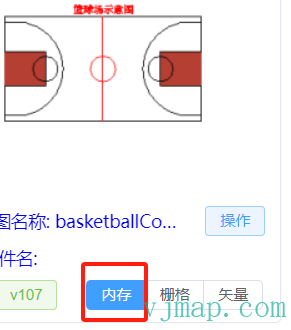
Go to VJMap Cloud Management Platform and open the drawing in Memory mode
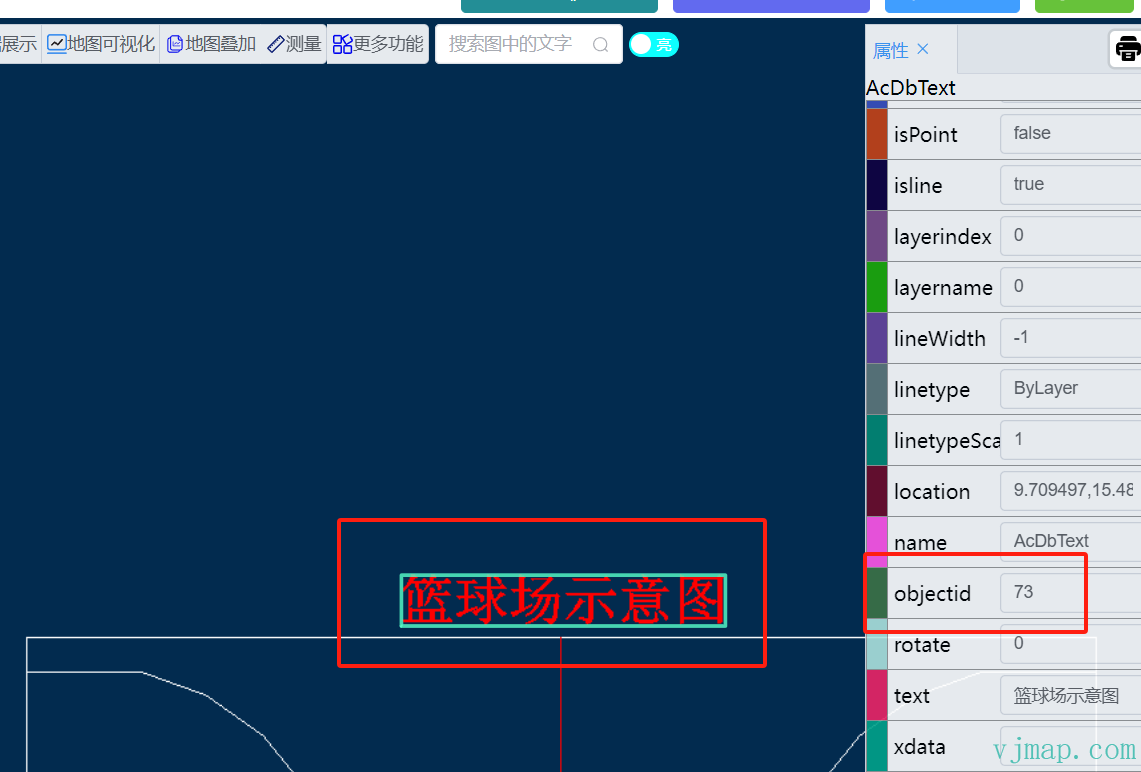
Click the entity you want to inspect and get its objectid from the attributes panel on the right
Create Drawing via Backend REST Request
See documentation Map Service REST API - Create or Open Drawing
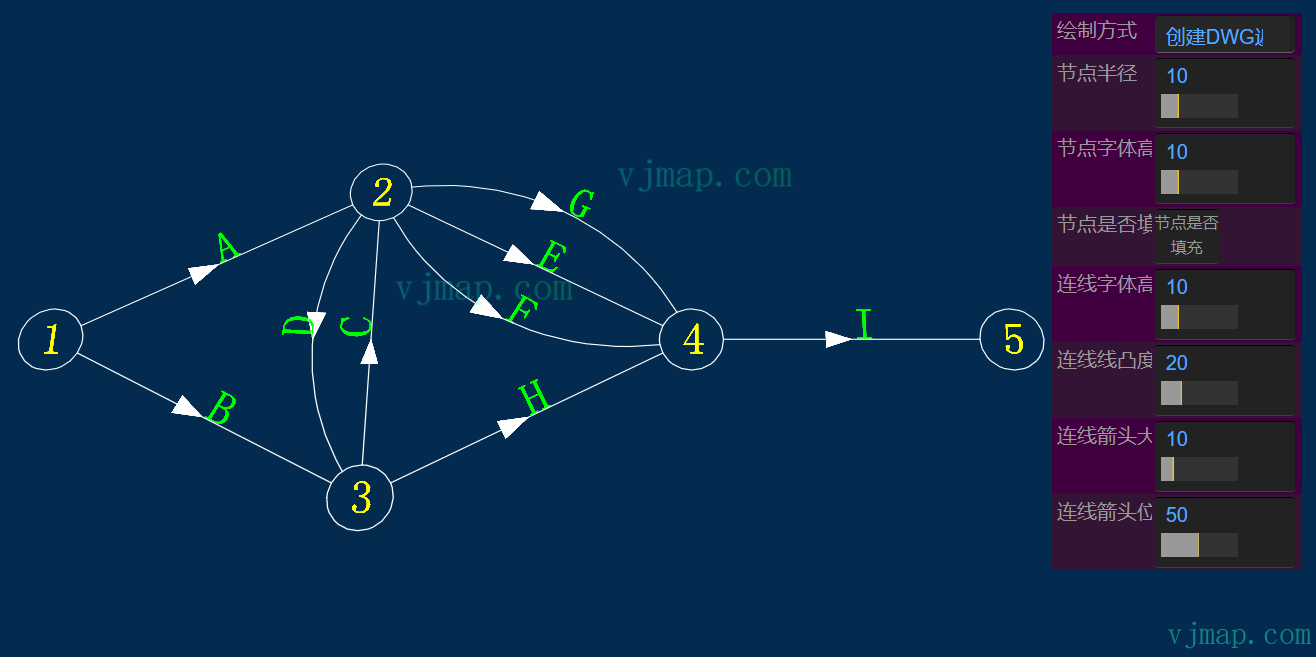
Create Complex Drawings via Geometry Model
Example: Network topology diagram via geometry model Network Topology Diagram
JSON Format for Create, Modify, Delete Drawing
Usage Example
var data = {
    "from": "", /** Source map. Modifications or additions/deletions are applied on top of this map. Format: mapid/version, e.g. exam/v1 . */
    "layers": [
        {
            "name": "test",
            "color": 1
        }
    ],
    "textStyles": [
        {
            "name": "mytext",
            "isShapeFile": false,
            "textSize": 0.0,
            "xScale": 1.0,
            "priorSize": 22,
            "obliquingAngle": 0.0,
            "fileName": "VERDANA.TTF",
            "typeFace": "Verdana",
            "bold": false,
            "italic": false,
            "charset": 0,
            "pitchAndFamily": 34
        }
    ],
    "dimStyles": [
        {
            "name": "mydimstyle",
            "textStyle": "mytext",
            "dimsah": true,
            "dimblk1": "_OBLIQUE",
            "dimblk2": "_DOT"
        }
    ],
    "linetypes": [
        {
            "name": "mylinetype",
            "comments": "--|----",
            "style": [
                {
                    "method": "numDashes",
                    "parameter": 6
                },
                {
                    "method": "patternLength",
                    "parameter": 1.8
                },
                {
                    "method": "dashLengthAt",
                    "parameter": [0, 0.5]
                },
                {
                    "method": "dashLengthAt",
                    "parameter": [1, -0.2]
                },{
                    "method": "dashLengthAt",
                    "parameter": [2, -0.2]
                },
                {
                    "method": "dashLengthAt",
                    "parameter": [3, 0.5]
                },
                {
                    "method": "dashLengthAt",
                    "parameter": [4, -0.2]
                },
                {
                    "method": "dashLengthAt",
                    "parameter": [5, -0.2]
                },
                {
                    "method": "shapeStyleAt",
                    "parameter": [1, "Standard"]
                },
                {
                    "method": "shapeOffsetAt",
                    "parameter": [1, [-0.1,-0.05]]
                },
                {
                    "method": "textAt",
                    "parameter": [1, "HW"]
                },
                {
                    "method": "shapeScaleAt",
                    "parameter": [1, 0.5]
                },{
                    "method": "shapeStyleAt",
                    "parameter": [4, "Standard"]
                },
                {
                    "method": "shapeOffsetAt",
                    "parameter": [4, [-0.1,-0.05]]
                },
                {
                    "method": "shapeNumberAt",
                    "parameter": [4, 131]
                },
                {
                    "method": "shapeScaleAt",
                    "parameter": [4, 0.2]
                },
                {
                    "method": "shapeRotationAt",
                    "parameter": [4, 3.1415926]
                }
            ]
        }
    ],
    "blocks": [
        {
            "name": "myblock",
            "origin": [10, 10],
            "entitys": [
                {
                    "typename": "DbCircle",
                    "center": [10, 10],
                    "radius": 20,
                    "colorIndex": 1
                },
                {
                    "typename": "DbSpline",
                    "fitPoints": [[0,0],[20,10],[30, 0]],
                    "colorIndex": 2
                }
            ]
        }
    ],
    "entitys": [
        {
            "typename": "DbLine",
            "start": [10, 5],
            "end": [2000,3000],
            "matrix":  [
                {
                    "op": "rotate",
                    "angle": 1.5,
                    "origin": [2000, 3000]
                },
                {
                    "op": "scale",
                    "scale": 20,
                    "origin": [2000, 3000]
                },
                {
                    "op": "translation",
                    "vector": [2000, 3000]
                }
            ],
            "layer": "test",
            "linetype": "mylinetype"
        },
        {
            "objectid": "340", // Indicates modify
            "colorIndex": 1,
            "layer": "test"
        },
        {
            "objectid": "33F",
            "delete": true // Indicates delete
        },
        {
            "typename": "DbBlockReference",
            "blockname": "myblock",
            "position": [200,300],
            "rotation": 3.14,
            "scaleFactors": [2,3]
        },
        {
            "typename": "DbBlockReference",
            "ref": "c43eacd46047/v1",
            "position": [500, 1000],
            "rotation": 1.7,
            "scaleFactors": [1,1]
        },
        {
            "typename": "DbText",
            "position": [1000,1000],
            "contents": "Text",
            "height": 100,
            "horizontalMode": 4
        },
        {
            "typename": "Db3PointAngularDimension",
            "dimStyle": "mydimstyle",
            "arcPoint": [1200,1200],
            "centerPoint": [1000,1000],
            "xLine1Point": [500,700],
            "xLine2Point": [800,1500]
        },
        {
            "typename": "DbRasterImage",
            "sourceHttpUrl": "http://xxx/xx.jpg",
            "position": [200, 500],
            "pixelWidth": 440,
            "pixelHeight": 220,
            "width": 300,
            "height": 150
        }
    ]
}

let doc = new vjmap.DbDocument();
let fileDoc = doc.toDoc(data);

// js code
let res = await svc.updateMap({
    mapid: "your_map_id",
    filedoc: fileDoc,
    mapopenway: vjmap.MapOpenWay.Memory,
    style: vjmap.openMapDarkStyle() // Use dark background style when div has dark background
})
Was this page helpful?Thanks for the feedback!