
Map Management
Map Creation
let svc = new vjmap.Service(env.serviceUrl, env.accessToken)
// Create map
let res = await svc.openMap({
    mapid: "your_map_id", // Map ID (ensure this ID does not exist when creating)
    fileid: "fileid_from_upload", // fileid from upload is required for creation
    mapopenway: vjmap.MapOpenWay.GeomRender, // Open with geometry render mode
    style: vjmap.openMapDarkStyle() // Use dark style when div has dark background
})
Map Opening
// Open map
let res = await svc.openMap({
    mapid: "mapid_to_open", // Map ID (ensure this ID exists when opening); fileid not needed for opening
    mapopenway: vjmap.MapOpenWay.GeomRender, // Open with geometry render mode
    style: vjmap.openMapDarkStyle() // Use dark style when div has dark background
})
Map Update
Map update adds a new version to the existing mapid. For example, if the current version is v1, it becomes v2 after update.
let res = await svc.updateMap({
    mapid: "mapid_to_update",
    fileid: "fileid_from_upload", // fileid from upload is required for creation
    mapopenway: vjmap.MapOpenWay.GeomRender,
    style: {
        backcolor: 0 // If div background is light, set to oxFFFFFF
    }
})
Map Version Management
Open a map at a specific version
// Open map
let res = await svc.openMap({
    mapid: env.exampleMapId, // Map ID (ensure this ID exists; upload new graphic to create new ID)
    version: "v1", // Specify version; defaults to latest if not specified
    mapopenway: vjmap.MapOpenWay.GeomRender, // Open with geometry render mode
    style: vjmap.openMapDarkStyle() // Use dark style when div has dark background
})
Delete a specific map version
await svc.cmdDeleteMap(mapid, "v1"); // Delete specified version
Delete Map
await svc.cmdDeleteMap(mapid); // If only map is selected without version, all versions are deleted
Workspace Management
Workspaces provide data isolation. Different workspaces store data in different locations and have different permissions.
// Switch to this workspace; subsequent svc calls operate under this workspace
svc.switchWorkspace('workspace_name');  // Empty name means default workspace
See Map workspace management for usage details.
Map Password Protection
Set Password Protection
let res = await svc.openMap({
    mapid: "your_map_id", // Map ID (ensure this ID does not exist when creating)
    fileid: "fileid_from_upload", // fileid from upload is required for creation
    // For password-protected access, set the secret key
    secretKey: svc.pwdToSecretKey('password') ,
    mapopenway: vjmap.MapOpenWay.GeomRender, // Open with geometry render mode
    style: vjmap.openMapDarkStyle() // Use dark style when div has dark background
})
See Upload new graphic for a concrete example.
Open Password-Protected Map
// --Open password-protected map--Password or AccessKey required to access
// Create map service with service URL and token
let svc = new vjmap.Service(env.serviceUrl, env.accessToken);
// If you have the map password, set it before opening to avoid the password prompt
// secretKey has maximum permissions; do not expose it
// let secretKey = 'xxxxxxx'; // Get value from svc.pwdToSecretKey("your password") in console to avoid plain password in code
//svc.addSecretKey(secretKey);

// Or if you have the accessKey, set it before opening to avoid the password prompt
// accessKey can access the map but with limited permissions (e.g. cannot delete); share with users who need access
//svc.addAccessKey("akxxxxxxxxxxxxxxxx")
// Open map
let res = await svc.openMap({
    mapid: "sys_zp", // Change to a password-protected map id
    mapopenway: vjmap.MapOpenWay.GeomRender, // Open with geometry render mode
    style: vjmap.openMapDarkStyle(), // Use dark style when div has dark background
    // If cbInputPassword is omitted, default prompt dialog is used for password input
    cbInputPassword: async (param) => {
        if (param.tryPasswordCount > 3) return '';// Stop after 3 failed attempts
        // Custom password input UI for password-protected maps; vjgui used here as example
        return new Promise((resolve) => {
            vjgui.init();
            vjgui.prompt(`<span style="color: whitesmoke;">Please enter password or AccessKey</span>`, e=>{
                resolve(e)
            }, {
                value: "",
                title: `Map ${param.mapid}`,
                width: "200px",
                height: "150px"
            })
        })

    }
})
See Open password-protected map for a concrete example.
Remove Password
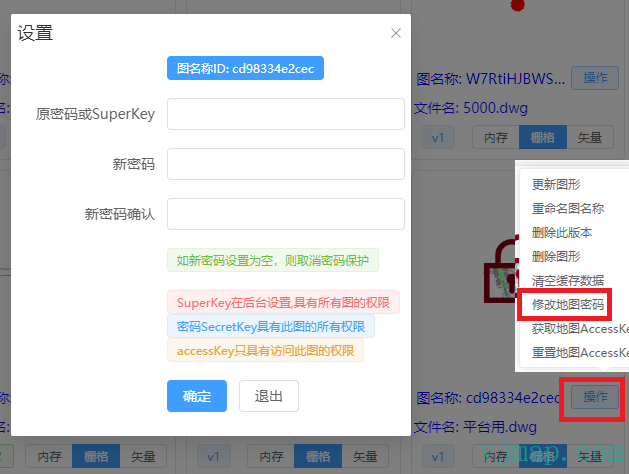
Go to the corresponding map's Operations menu in the VJMap Cloud Management Platform, then set Set Password to empty to remove the password.
Hidden Maps
Maps whose mapid starts with ns_ are invisible in the cloud management platform. Only tokens with root permission can see them.
Temporary Maps
Maps whose mapid starts with ns_temp_30 are temporary; 30 means auto-delete after 30 minutes. You can customize the duration.
/**
 * Get a temporary map id (temporary maps are for quick viewing and auto-delete when expired)
 * @param expireTime Auto-delete time in minutes when not browsed. Default 30
 * @param isVisible Whether visible (visible maps can be listed via ListMaps). Default invisible
 * @return
 */
export  function getTempMapId(expireTime?: number, isVisible?: boolean): string;