
# Mobile and Desktop Development
# Mobile Development
VJMap is fully compatible with mobile viewing. Each example and the cloud platform management include a scan-to-view feature—you can scan the QR code to view the result on your mobile device.
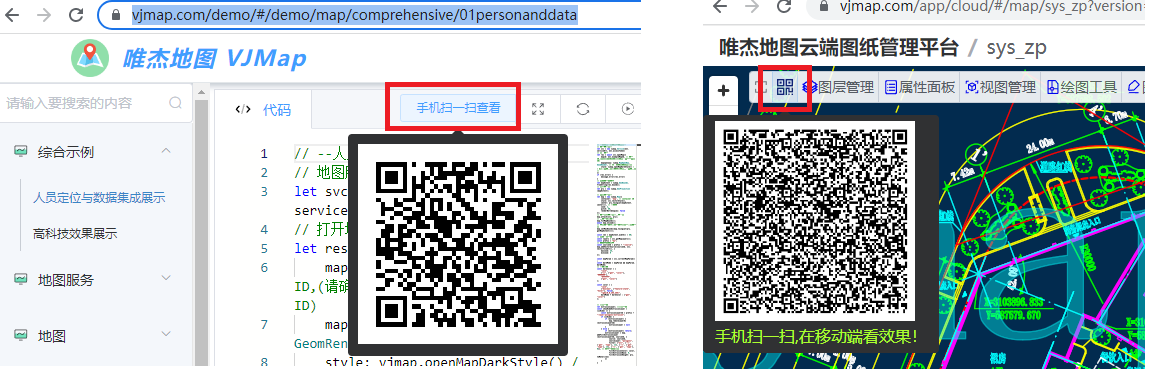
For mobile development, if using native development, use webview based on H5.
Note
When developing mini-programs with uniapp, because the map div performs many DOM operations, you need to use the renderjs mode provided by uniapp. For details, see https://dengzile.com/2020/10/%E5%9C%A8uni-app%E4%B8%AD%E4%BD%BF%E7%94%A8renderjs/ (opens new window)
# Desktop Development (C# Example)
Desktop development is similar to mobile development—use a webview or browser to load HTML.
# Result
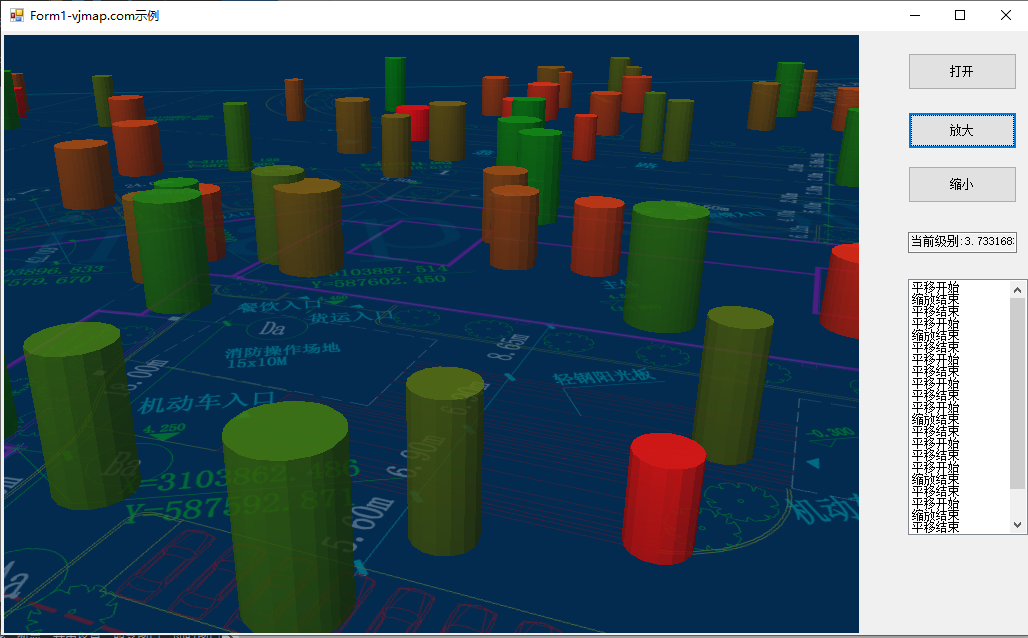
Using C# as an example, the result is as follows:
# Code
using System;
using System.Collections.Generic;
using System.ComponentModel;
using System.Data;
using System.Drawing;
using System.Linq;
using System.Text;
using System.Threading.Tasks;
using System.Windows.Forms;
using CefSharp.WinForms;
using CefSharp;
namespace CefForm
{
    public partial class Form1 : Form
    {

        public class AsyncHostObject
        {
            Form1 m_host;
            public AsyncHostObject(Form1 frm)
            {
                this.m_host = frm;
            }
            public void addMessage(string msg)
            {
                this.m_host.listBox1.Items.Add(msg);
             }

        }

        public Form1()
        {
            InitializeComponent();
            chromiumWebBrowser1.Load("file:///d:/map/index.html");
            ListBox.CheckForIllegalCrossThreadCalls = false;
            // Open developer tools after page load
            /*
            chromiumWebBrowser1.FrameLoadEnd += (s, eve) =>
            {
                var browser = chromiumWebBrowser1.GetBrowser();
                browser.ShowDevTools();
            };*/
            JsObjectResolver();
        }

        private void JsObjectResolver()
        {

            // Triggered by CefSharp.BindObjectAsync from the web page
            chromiumWebBrowser1.JavascriptObjectRepository.ResolveObject += (s, eve) =>
            {
                var repo = eve.ObjectRepository;
                if (eve.ObjectName == "host")
                {
                    repo.Register("host", new AsyncHostObject(this), isAsync: true, options: BindingOptions.DefaultBinder);
                }
            };
        }

        private async void button1_Click(object sender, EventArgs e)
        {
            string strScript = String.Format("openMap('{0}')", "your dwg file path");
            var result = await chromiumWebBrowser1.EvaluateScriptAsync(strScript);
        }

        private void button2_Click(object sender, EventArgs e)
        {
            setZoomDeltaAsync(1);
        }

        private void button3_Click(object sender, EventArgs e)
        {
            setZoomDeltaAsync(-1);
        }

        public async void setZoomDeltaAsync(int z)
        {
            string strScript = String.Format("var zoom = map.getZoom(); zoom += {0}; map.setZoom(zoom); zoom", z);
            var result = await chromiumWebBrowser1.EvaluateScriptAsync(strScript);
            if (result.Result == null) return;
            this.textBox1.Text = "Current level: " + result.Result.ToString();
        }
    }
}
1
2
3
4
5
6
7
8
9
10
11
12
13
14
15
16
17
18
19
20
21
22
23
24
25
26
27
28
29
30
31
32
33
34
35
36
37
38
39
40
41
42
43
44
45
46
47
48
49
50
51
52
53
54
55
56
57
58
59
60
61
62
63
64
65
66
67
68
69
70
71
72
73
74
75
76
77
78
79
80
81
82
83
84
2
3
4
5
6
7
8
9
10
11
12
13
14
15
16
17
18
19
20
21
22
23
24
25
26
27
28
29
30
31
32
33
34
35
36
37
38
39
40
41
42
43
44
45
46
47
48
49
50
51
52
53
54
55
56
57
58
59
60
61
62
63
64
65
66
67
68
69
70
71
72
73
74
75
76
77
78
79
80
81
82
83
84
Frontend-related code
// Map service object
let svc = new vjmap.Service(env.serviceUrl, env.accessToken)
// Open map
let res = await svc.openMap({
    mapid: env.exampleMapId, // Map ID
    mapopenway: vjmap.MapOpenWay.GeomRender, // Open with geometry rendering
    style: vjmap.openMapDarkStyle() // Use dark background style when div has dark background
})
if (res.error) {
    // If open fails
    message.error(res.error)
}
// Get map bounds
let mapExtent = vjmap.GeoBounds.fromString(res.bounds);
// Create geometric projection coordinate system based on map bounds
let prj = new vjmap.GeoProjection(mapExtent);

// Map object
let map = new vjmap.Map({
    container: 'map', // DIV container ID
    style: svc.rasterStyle(), // Style, raster style here
    center: prj.toLngLat(mapExtent.center()), // Set map center
    zoom: 4, // Set map zoom level,
    pitch: 60, // Tilt angle
    renderWorldCopies: false // Do not display multi-screen map
});

// Associate service object and projection object
map.attach(svc, prj);
// Fit map to full extent based on map bounds
//map.fitMapBounds();
await map.onLoad();

await CefSharp.BindObjectAsync("host");
map.on("zoomend", () => host.addMessage("Zoom ended"))
map.on("movestart", () => host.addMessage("Pan started"))
map.on("moveend", () => host.addMessage("Pan ended"))
1
2
3
4
5
6
7
8
9
10
11
12
13
14
15
16
17
18
19
20
21
22
23
24
25
26
27
28
29
30
31
32
33
34
35
36
37
38
2
3
4
5
6
7
8
9
10
11
12
13
14
15
16
17
18
19
20
21
22
23
24
25
26
27
28
29
30
31
32
33
34
35
36
37
38