
# Baidu Map and CAD Map Overlay Display
There are three main coordinate systems in China:
WGS84: A geodetic coordinate system, widely used by GPS. Used by Amap, Tencent Map.
GCJ02: Mars coordinate system, defined by China's State Bureau of Surveying and Mapping. Encrypted from WGS84. Used by OpenStreetMap, Tianditu.
BD09: Baidu coordinate system, encrypted from GCJ02. bd09ll is Baidu lnglat, bd09mc is Baidu Mercator.
Main tile map coordinate systems:
Web Mercator: Google, Amap, Tencent, Sogou, Bing, OpenStreetMap, ArcGIS online, MapQuest, SuperMap, 360 Map
Lnglat direct projection: Google Earth, Tianditu (lnglat direct)
Baidu Mercator: Baidu Map
Baidu uses its own coordinate system. How to load CAD on Baidu Map?
# Implementation
# (1) Baidu Map Overlay Third-Party Standard Layer
Baidu Map JSAPI GL provides XYZLayer for loading WMS, WMTS, TMS, and custom raster layers in EPSG3857. https://lbsyun.baidu.com/index.php?title=jspopularGL/guide/trilateralLayer
WMS layer example:
// Create position point
    var map = new BMapGL.Map("allmap");
    var point = new BMapGL.Point(-99.41413316281799,39.82354027110903);
    map.centerAndZoom(point, 4);
    // tileUrlTemplate contains OGC WMS GetMap parameters
    var wms = BMapGL.XYZLayer({
           tileUrlTemplate: 'https://ahocevar.com/geoserver/wms?REQUEST=GetMap&SERVICE=WMS&layers=topp:states&version=1.3.0&CRS=EPSG:3857&WIDTH=256&HEIGHT=256&FORMAT=image/png&TRANSPARENT=true&BBOX=[b] ',
    });
    map.addTileLayer(wms);
2
3
4
5
6
7
8
9
Any service that supports EPSG3857 WMS can be loaded as a third-party layer via Baidu Map API.
# (2) CAD WMS Layer Implementation
Described in previous posts.
VJMap is a one-stop solution for WebGIS visualization of CAD and custom map formats. Supported formats include AutoCAD DWG, GeoJSON, and other GIS formats. It uses WebGL vector tiles and custom styles for interactive maps.
VJMap https://vjmap.com/ (opens new window) can open CAD DWG directly without conversion and provides WMS service.
Interface documentation:
/**
 * WMS service URL interface
 */
export  interface IWmsTileUrl {
    /** Map ID (empty uses current mapid), array for multiple requests. */
    mapid?: string | string[];
    /** Map version (empty uses current version). */
    version?: string | string[];
    /** Layer name (empty uses current map layer). */
    layers?: string | string[];
    /** Bounds, default {bbox-epsg-3857}. (To get WMS data for a CAD range without coordinate conversion, fill CAD range, leave srs, crs, mapbounds empty).*/
    bbox?: string;
    /** Current coordinate system, default (EPSG:3857). */
    srs?: string;
    /** CAD map coordinate system, empty uses metadata. */
    crs?: string | string[];
    /** Geographic bounds, when set srs is ignored */
    mapbounds?: string;
    /** Width. */
    width?: number;
    /** Height. */
    height?: number;
    /** Whether transparent. */
    transparent?: boolean;
    /** Four parameters (x offset, y offset, scale, rotation radians), optional, for final coordinate correction*/
    fourParameter?: string | string[];
    /** Whether vector tiles. */
    mvt?: boolean;
    /** Whether to consider rotation when converting between coordinate systems. Default auto. */
    useImageRotate?: boolean;
    /** Image processing algorithm when rotating. 1 or 2, default auto (useful when rotating)*/
    imageProcessAlg?: number;
    /** Current web map type WGS84 (84 coords, e.g. Tianditu, OSM), GCJ02 (Mars coords, e.g. Amap, Tencent), BD09LL (Baidu lnglat, e.g. Baidu), BD09MC (Baidu Mercator, e.g. Baidu)*/
    webMapType?: "WGS84" | "GCJ02" | "BD09LL" | "BD09MC";
}
2
3
4
5
6
7
8
9
10
11
12
13
14
15
16
17
18
19
20
21
22
23
24
25
26
27
28
29
30
31
32
33
34
35
36
37
# (3) Implementation
Determine the CAD map coordinate system. Baidu WMS uses EPSG3857, so the WMS layer webMapType parameter can use default WGS84.
let cadEpsg = "EPSG:4544";// CAD map EPSG code
// Add CAD WMS layer
let wmsUrl = svc.wmsTileUrl({
    mapid: mapId, // Map id
    layers: layer, // Layer name
    bbox: '', // bbox not needed here
    srs: "EPSG:3857",
    crs: cadEpsg
})
// tileUrlTemplate contains OGC WMS GetMap parameters
wmsLayer = BMapGL.XYZLayer({
    tileUrlTemplate: wmsUrl + '&BBOX=[b] ',
    useThumbData: false
});
map.addTileLayer(wmsLayer);
2
3
4
5
6
7
8
9
10
11
12
13
14
15
16
Result:
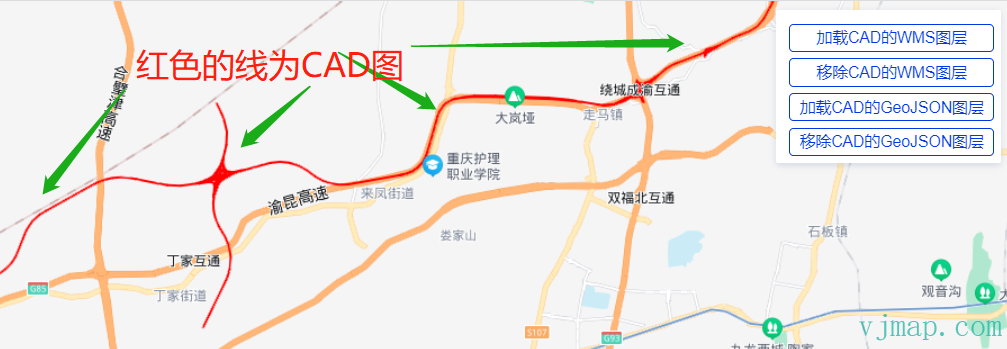
The overlay aligns with Baidu Map at actual coordinates.
# Other
# (1) Overlaying CAD Maps Without Coordinate System
The above assumes the CAD has a coordinate system. Some drawings (e.g. residential or shop floor plans) do not. Use common points: pick two or more points on the CAD and corresponding points on Baidu Map, then compute the transformation parameters from these common points. VJMap WMS supports four-parameter transformation.
Example with common points:
// Points on CAD
let cadPoints = [
    vjmap.geoPoint([587464448.8435846, 3104003685.208661,]),
    vjmap.geoPoint([587761927.7224838, 3104005967.655292]),
    vjmap.geoPoint([587463688.0280377, 3103796743.3798513]),
    vjmap.geoPoint([587760406.0913897, 3103793700.1176634])
];


// Corresponding points on web map (Baidu coordinates)
let webPoints = [
    vjmap.geoPoint([116.49738632967344,39.969244215079016]),
    vjmap.geoPoint([116.50000171663382,39.96753915494187]),
    vjmap.geoPoint([116.49843968869915,39.96613594214925]),
    vjmap.geoPoint([116.49581440721418,39.967790723887404])
]

// Compute four parameters from common points
let epsg3857Points = webPoints.map(w => vjmap.geoPoint(vjmap.transform.convert(w, vjmap.transform.CRSTypes.BD09, vjmap.transform.CRSTypes.EPSG3857)));
let param = vjmap.coordTransfromGetFourParamter(epsg3857Points, cadPoints , false); // Consider rotation
let fourparam = [param.dx, param.dy, param.scale, param.rotate]

// WMS layer URL
const getCadWmsUrl = (transparent) => {
    let wmsUrl = svc.wmsTileUrl({
        mapid: mapId, // Map id
        layers: layer, // Layer name
        bbox: '', // bbox not needed here
        srs: "EPSG:3857", //
        fourParameter: fourparam,
        transparent: transparent,
        backgroundColor: 'rgba(240, 255, 255)' // Effective when not transparent
    })
    return wmsUrl
}
2
3
4
5
6
7
8
9
10
11
12
13
14
15
16
17
18
19
20
21
22
23
24
25
26
27
28
29
30
31
32
33
34
35
36
37
Using common points for a CAD without coordinate system:
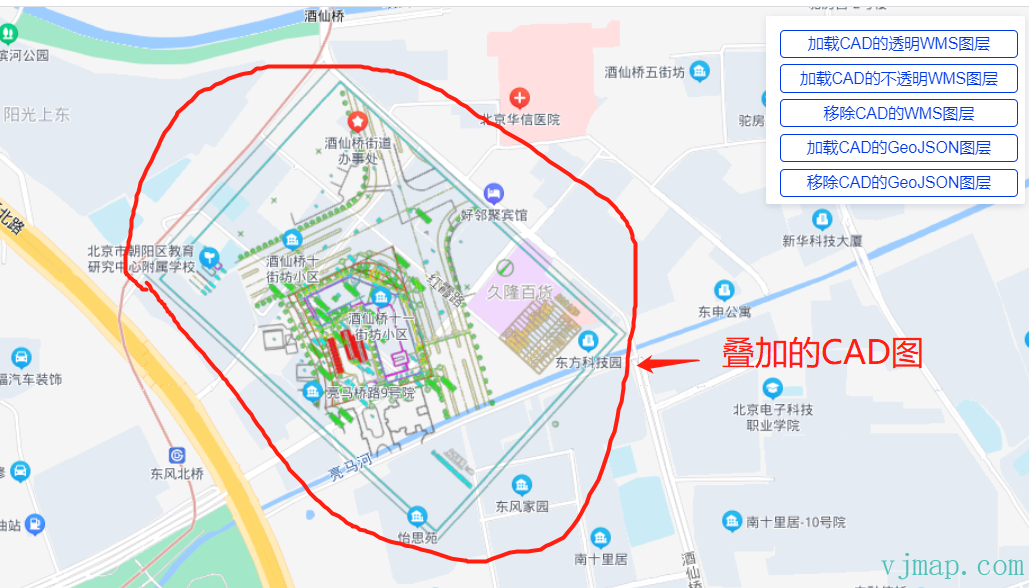
# (2) Transparent WMS Overlay on Baidu Changes Colors
When overlaying WMS on Baidu, if the CAD layer is transparent, colors appear different:
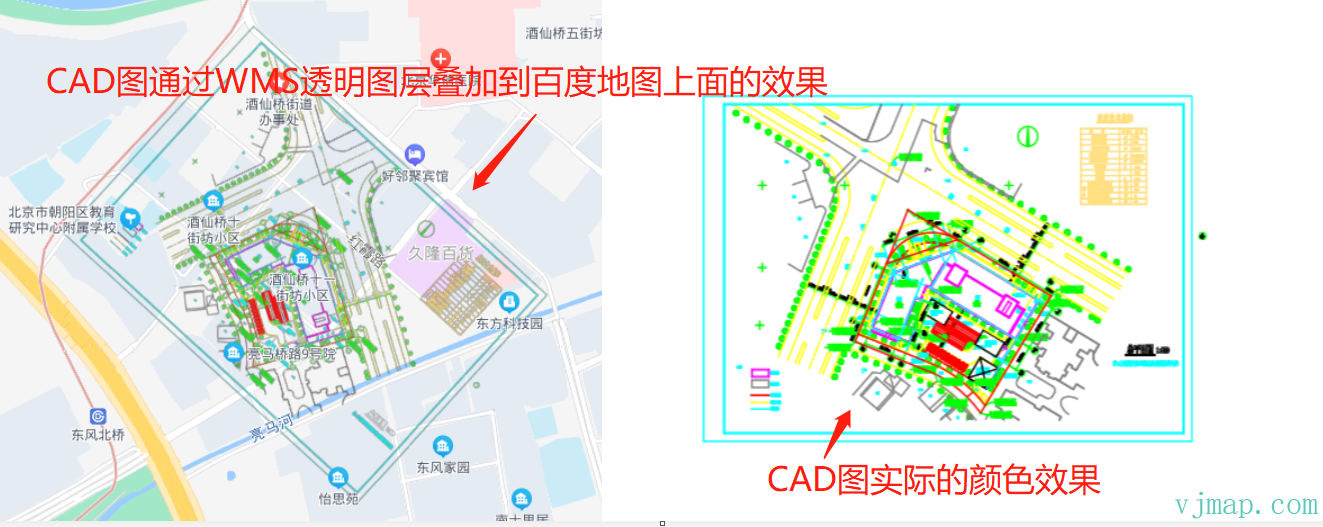
This was not observed with Amap or Cesium. Possible causes are unclear. Baidu docs do not explain it. As a workaround, overlay the WMS as an opaque layer:
let wmsUrl = svc.wmsTileUrl({
    mapid: mapId, // Map id
    layers: layer, // Layer name
    bbox: '', // bbox not needed here
    srs: "EPSG:3857", //
    fourParameter: fourparam,
    transparent: false, // Set to false for opaque background
    backgroundColor: 'rgba(240, 255, 255)' // Effective when not transparent
})
2
3
4
5
6
7
8
9
Result:
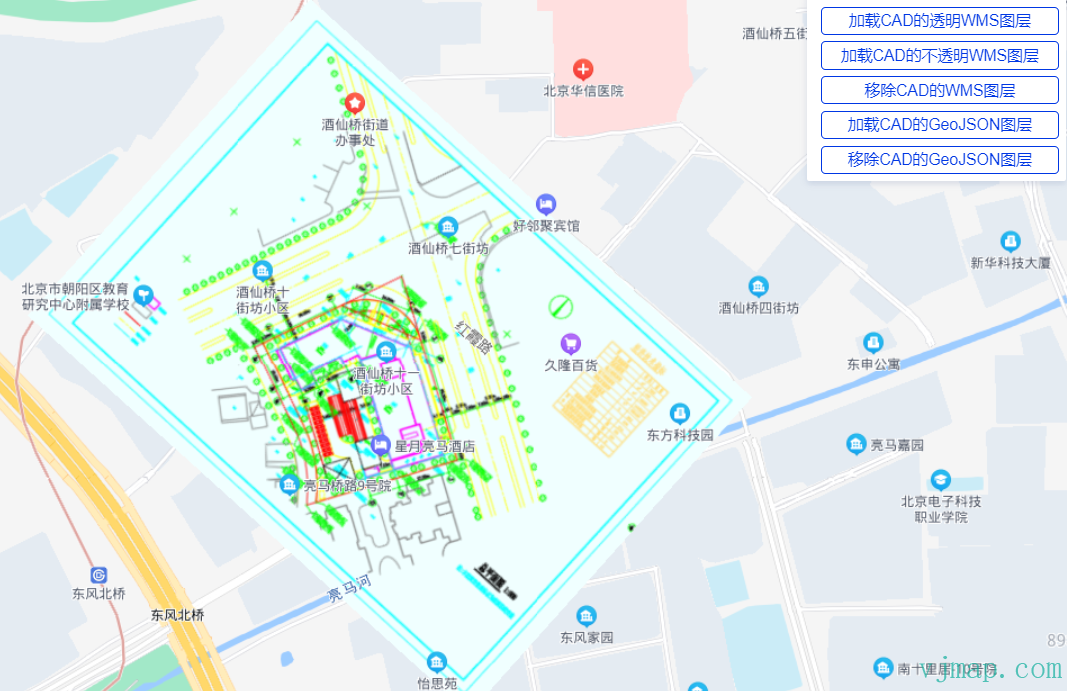
With opaque background, CAD colors match the original. The downside is that content under the CAD layer is hidden.
# (3) GIS Data and WMS Layer Alignment
Because of the above, when opaque, you cannot see content under the CAD. An alternative is to load CAD data as GeoJSON and draw it on the map via Baidu Map SDK.
Baidu Map SDK supports GeoJSON loading.
GeoJSON is commonly used for geographic data. Baidu Map JS API GL provides two ways to load GeoJSON:
GeoJSONParse: parse GeoJSON into Baidu-compatible Overlay data, get Overlay properties and coordinates for custom overlay creation.
GeoJSONLayer: parse GeoJSON directly into overlay layers with interaction.
https://lbsyun.baidu.com/index.php?title=jspopularGL/guide/geoJsonLayer (opens new window)
VJMap can query CAD data and convert it to GeoJSON, then convert to Baidu format.
Example:
// Query CAD GeoJSON from VJMap
async function queryData(svc, cadPrj) {
    let res = await svc.conditionQueryFeature({
        condition: ``, // Only write SQL condition after where, see "Server condition query and expression query" doc
        fields: "",
        includegeom: true, // Return geometry. For performance, when realgeom is false and count > 1, returns bounding boxes; when count is 1, returns real GeoJSON. When realgeom is true, returns real GeoJSON for each
        realgeom: true,
        limit: 100000 // Set large, default is 100
    }, pt => {
        // Callback for each point in result
        let cadPoint = cadPrj.fromMercator(pt);// Convert to CAD coordinate
        return cadToWebCoordinate(cadPoint); // Convert CAD to current map lnglat
    })

    if (res && res.result && res.result.length > 0) {
        let features = [];
        for (let ent of res.result) {
            if (ent.geom && ent.geom.geometries) {
                let clr = vjmap.entColorToHtmlColor(ent.color);
                for (let g = 0; g < ent.geom.geometries.length; g++) {
                    features.push({
                        id: ent.id,
                        type: "Feature",
                        properties: {
                            objectid: ent.objectid + "_" + g,
                            color: clr
                        },
                        geometry: ent.geom.geometries[g]
                    })
                }
            }
        }

        let geom = {
            type: "FeatureCollection",
            features: features
        };

        return geom;
    }
}
// Load GeoJSON layer via Baidu Map SDK
function addGeoJsonData(map, data) {
    var region = data;

    // https://lbsyun.baidu.com/index.php?title=jspopularGL/guide/geoJsonLayer
    var cadLayer = new BMapGL.GeoJSONLayer('cad-child', {
        reference: 'WGS84',
        dataSource: region,
        level: -10,
        polygonStyle: function (properties) {
            var index = properties.join || 0;
            return {
                fillColor: properties.color
            }
        },
        polylineStyle: function (properties) {
            return {
                strokeColor: properties.color
            }
        },
        markerStyle: function (properties) {
            return {
            }
        }
    });

    map.addGeoJSONLayer(cadLayer, {
        maxZoom: 24
    });
    return cadLayer;
}
2
3
4
5
6
7
8
9
10
11
12
13
14
15
16
17
18
19
20
21
22
23
24
25
26
27
28
29
30
31
32
33
34
35
36
37
38
39
40
41
42
43
44
45
46
47
48
49
50
51
52
53
54
55
56
57
58
59
60
61
62
63
64
65
66
67
68
69
70
71
72
73
Result:
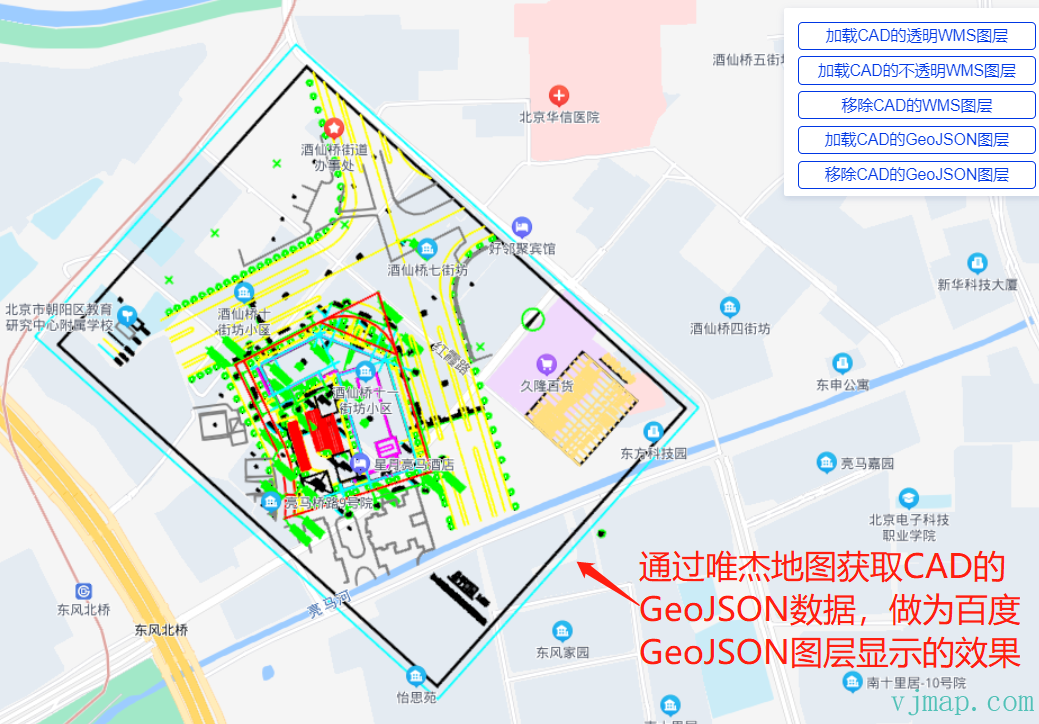
GeoJSON allows transparency and frontend interaction (hover, click, etc.). Downsides: large data, slower loading and rendering.
WMS and GeoJSON displayed together:
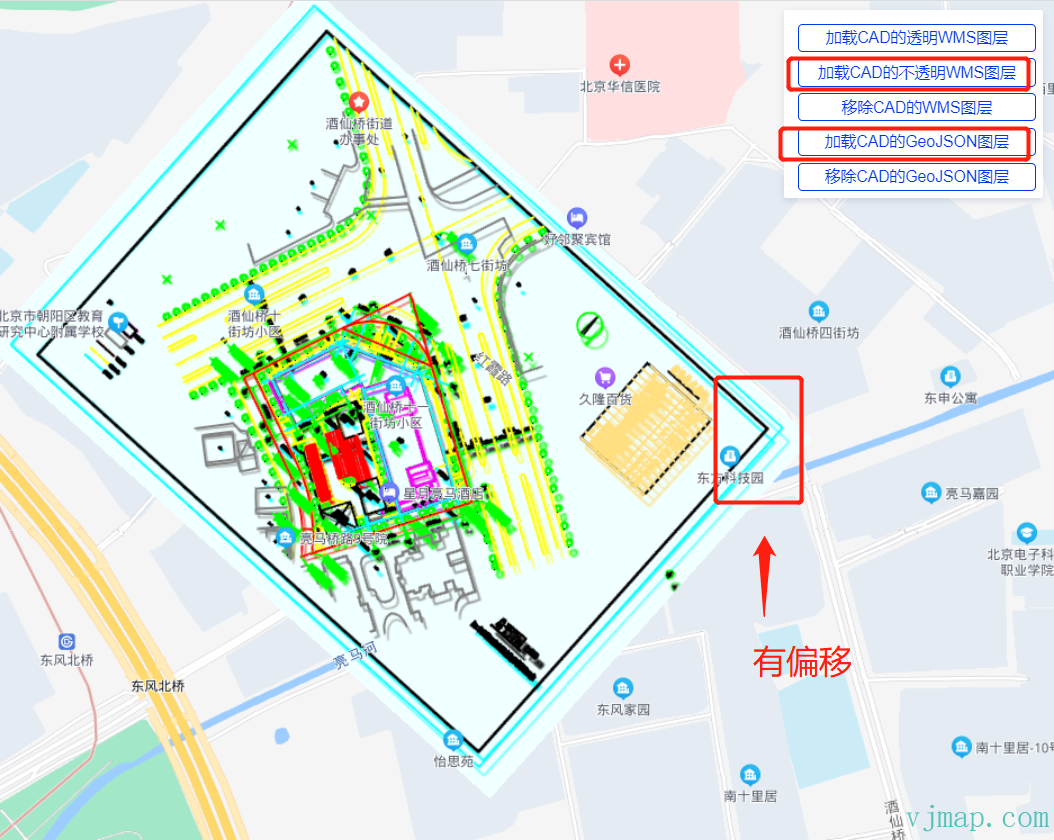
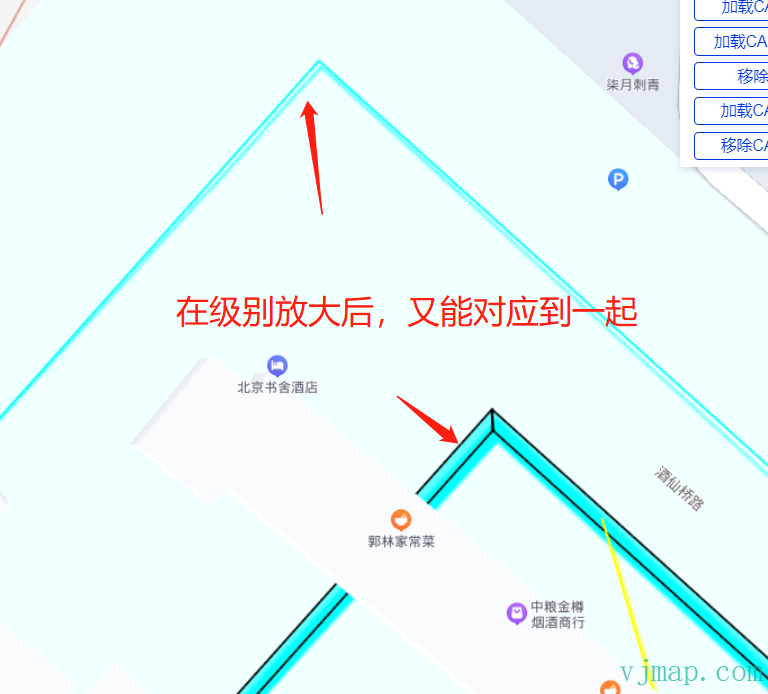
There is an offset between the WMS and GeoJSON layers when both are shown. After panning and zooming, they align better. With Amap (GCJ02) and Tianditu (WGS84), WMS and GeoJSON align perfectly. The cause is unclear; possibly Baidu applies special handling to WMS layers.
# Conclusion
We successfully loaded CAD on Baidu Map via WMS. For CAD without coordinate system, four-parameter overlay works. GeoJSON overlay is also supported. Online demos:
Baidu Map SDK Load CAD Map (opens new window) https://vjmap.com/demo/#/demo/map/web/09baiduCadLayer
Baidu Map SDK Load CAD Map with Common Points (opens new window) https://vjmap.com/demo/#/demo/map/web/09baiduCadLayerFourparam
Unresolved issues:
(1) Transparent CAD WMS overlay causes color changes; cause unknown.
(2) Same coordinate conversion, WMS overlay and GeoJSON overlay have offset; alignment improves after pan/zoom. Cause unknown.