
Amap and CAD Map Overlay Display
Method 1: Load CAD WMS Layer via Amap SDK
Principle
Amap SDK
The Amap SDK provides layer types that conform to OGC standards or common industry specifications.
AMap.TileLayer.WMS
A layer class for loading OGC-compliant WMS map services. Only supports WMS layers in EPSG3857 coordinate system. View WMS OGC Standard.
new AMap.TileLayer.WMS(opts: WMSLayerOptions)
Parameters:
opts (WMSLayerOptions) Default layer parameters
| Name | Description |
|---|---|
opts.url String |
WMTS service URL, e.g. ' https://services.arcgisonline.com/arcgis/rest/services/'+ 'Demographics/USA_Population_Density/MapServer/WMTS/' |
opts.blend Boolean |
Whether to blend images when switching zoom levels. Set false if layer has transparency |
opts.params Object |
OGC WMS GetMap parameters: VERSION, LAYERS, STYLES, FORMAT, TRANSPARENT, etc. Do not add CRS, BBOX, REQUEST, WIDTH, HEIGHT, e.g.: { LAYERS: 'topp:states', VERSION:'1.3.0', FORMAT:'image/png' } |
opts.zooms [Number, Number] (default [2,30]) |
Supported zoom range, default [2-30] |
opts.opacity Number (default 1) |
Opacity, default 1 |
opts.visible Boolean (default true) |
Visibility, default true |
opts.zIndex Number (default 4) |
Layer stacking order, 1 = bottom. Default zIndex: 4 |
CAD WMS Layer
VJMap is a one-stop solution for WebGIS visualization of CAD and custom map formats. Supported formats include AutoCAD DWG, GeoJSON, and other GIS formats. It uses WebGL vector tiles and custom styles for interactive maps, with big data and real-time visualization.
VJMap https://vjmap.com/ can open CAD DWG directly without conversion and provides WMS service.
Interface documentation:
/**
 * WMS service URL interface
 */
export  interface IWmsTileUrl {
    /** Map ID (empty uses current mapid), array for multiple requests. */
    mapid?: string | string[];
    /** Map version (empty uses current version). */
    version?: string | string[];
    /** Layer name (empty uses current map layer). */
    layers?: string | string[];
    /** Bounds, default {bbox-epsg-3857}. (To get WMS data for a CAD range without coordinate conversion, fill CAD range, leave srs, crs, mapbounds empty).*/
    bbox?: string;
    /** Current coordinate system, default (EPSG:3857). */
    srs?: string;
    /** CAD map coordinate system, empty uses metadata. */
    crs?: string | string[];
    /** Geographic bounds, when set srs is ignored */
    mapbounds?: string;
    /** Width. */
    width?: number;
    /** Height. */
    height?: number;
    /** Whether transparent. */
    transparent?: boolean;
    /** Four parameters (x offset, y offset, scale, rotation radians), optional, for final coordinate correction*/
    fourParameter?: string | string[];
    /** Whether vector tiles. */
    mvt?: boolean;
    /** Whether to consider rotation when converting between coordinate systems. Default auto. */
    useImageRotate?: boolean;
    /** Image processing algorithm when rotating. 1 or 2, default auto (useful when rotating)*/
    imageProcessAlg?: number;
    /** Current web map type WGS84 (84 coords, e.g. Tianditu, OSM), GCJ02 (Mars coords, e.g. Amap, Tencent), BD09LL (Baidu lnglat, e.g. Baidu), BD09MC (Baidu Mercator, e.g. Baidu)*/
    webMapType?: "WGS84" | "GCJ02" | "BD09LL" | "BD09MC";
}
Implementation
Refer to Amap WMS example https://developer.amap.com/demo/jsapi-v2/example/thirdlayer/wms-layer . Implementation:
let map = new AMap.Map('map', {
    zoom: 15,
    center: [106.166187, 29.44102]
});
// Call VJMap service object
let svc = new vjmap.Service(env.serviceUrl, env.accessToken)
// Open map
let mapId = "sys_cadcesium";
let res = await svc.openMap({
    mapid: mapId, // Map ID
    mapopenway: vjmap.MapOpenWay.GeomRender, // Open with geometry render mode
    style: vjmap.openMapDarkStyle() // When div has dark background, pass dark background style here
})
if (res.error) {
    // If open fails
    message.error(res.error)
}
let layer = res.layer;// Layer style name


let cadEpsg = "EPSG:4544";// CAD map EPSG code
// Add VJMap CAD WMS layer
let wmsUrl = svc.wmsTileUrl({
    mapid: mapId, // Map id
    layers: layer, // Layer name
    bbox: '', // bbox not needed here
    srs: "EPSG:3857", //
    crs: cadEpsg,
    webMapType: "GCJ02"
})
function getQueryStringArgs(url) {
    let theRequest = {};
    let idx = url.indexOf("?");
    if (idx != -1) {
        let str = url.substr(idx + 1);
        let strs = str.split("&");
        for (let i = 0; i < strs.length; i++) {
            let items = strs[i].split("=");
            theRequest[items[0]] = items[1];
        }
    }
    return theRequest;
}

let wms = new AMap.TileLayer.WMS({
    url: wmsUrl.substr(0, wmsUrl.indexOf("?")),
    blend: true,
    tileSize: 256,
    params: getQueryStringArgs(wmsUrl)
});

wms.setMap(map);
Result:
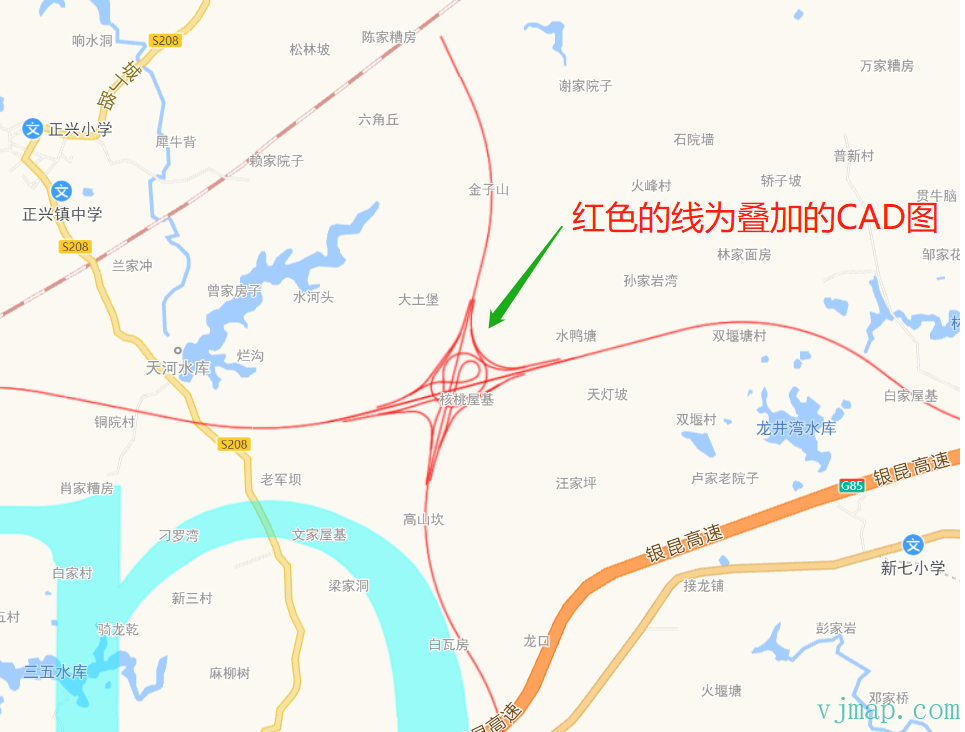
Online demo: https://vjmap.com/demo/#/demo/map/web/08gaodeCadWmsLayer
Pros:
(1) Use Amap SDK; if the project is already Amap-based, less work
(2) Native Amap data, rich and good-looking web map
Cons:
(1) Cannot use VJMap SDK for CAD-related features
(2) Amap zoom levels are limited; CAD cannot zoom beyond a certain level. Large drawings may cause insufficient zoom levels
Method 2: Load CAD Map on Amap via VJMap SDK
Principle
VJMap SDK can also display web maps. Use VJMap to show both Amap and CAD. Web map is base, CAD is a WMS overlay. VJMap has no web map data; it uses online public tile URLs: https://blog.csdn.net/weixin_45728126/article/details/119040004
Implementation
// --Amap and CAD overlay [Amap as base]--Amap and CAD overlay, Amap as coordinate system
let svc = new vjmap.Service(env.serviceUrl, env.accessToken)
// Create lnglat projection coordinate system based on map bounds
let prj = new vjmap.LnglatProjection();

// Map object
let map = new vjmap.Map({
    container: 'map', // DIV container ID
    style: {
        version: svc.styleVersion(),
        glyphs: svc.glyphsUrl(),
        sources: {
            gaode: {
                type: 'raster',
                tiles: ["https://webrd01.is.autonavi.com/appmaptile?lang=zh_cn&size=1&scale=1&style=8&x={x}&y={y}&z={z}"],
            }
        },
        layers: [{
            id: 'gaode',
            type: 'raster',
            source: 'gaode',
        }]
    },
    center: [0, 0],
    zoom: 12,
    pitch: 0,
    renderWorldCopies: false // Do not display multi-screen map
});

// Associate service object and projection object
map.attach(svc, prj);
await map.onLoad();


// Open CAD map first
let mapId = "sys_cadcesium";
let res = await svc.openMap({
    mapid: mapId, // Map ID
    mapopenway: vjmap.MapOpenWay.GeomRender, // Open with geometry render mode
    style: vjmap.openMapLightStyle() // When div has dark background, pass dark background style here
})
if (res.error) {
    // If open fails
    message.error(res.error)
}
let layer = res.layer;// Layer style name

let cadEpsg = "EPSG:4544";// CAD map EPSG code
// Add CAD WMS layer
let wmsUrl = svc.wmsTileUrl({
    mapid: mapId, // Map id
    layers: layer, // Layer name
    srs: "EPSG:3857",
    crs: cadEpsg,
    webMapType: "GCJ02" // Base is Amap, so use GCJ02; for Tianditu, omit this
})
map.addSource('wms-test-source', {
    'type': 'raster',
    'tiles': [
        wmsUrl
    ],
    'tileSize': 256
});
map.addLayer({
        'id': 'wms-test-layer',
        'type': 'raster',
        'source': 'wms-test-source',
        'paint': { "raster-opacity": 1 }
    }
);
Online demo:
https://vjmap.com/demo/#/demo/map/web/04webWmsGaode
Pros:
(1) Use VJMap SDK to load both Amap and CAD
(2) CAD-related features work fully
Cons:
(1) Web map uses public tile URLs, so quality is less than Amap SDK
(2) Amap zoom levels are limited; CAD cannot zoom beyond a certain level. Large drawings may cause insufficient zoom levels
(3) Base is Amap, so coordinate system is Mars. CAD data must be converted to overlay on the map
Method 3: Load Amap on CAD Map via VJMap SDK
Principle
Same as Method 2, but CAD is base and Amap is overlay.
VJMap has no web map data; it uses online public tile URLs. There is no WMS for web maps. Amap tiles must be converted to WMS-like behavior by the backend based on the frontend-provided WMTS tile URL.
Implementation
// --CAD map and web map overlay--CAD and web map overlay, CAD as coordinate system
// Assume CAD full extent corresponds to zoom level 8, so web map still shows when zoomed out
let initZoom = 8;
let style = {
    backcolor: 0, // When div has dark background, pass dark background style here
    clipbounds: Math.pow(2, initZoom) // Value only (no bounds) means scale previous bounds by this factor
}
let svc = new vjmap.Service(env.serviceUrl, env.accessToken)
let res = await svc.openMap({
    mapid: "sys_cad2000",
    mapopenway: vjmap.MapOpenWay.GeomRender, // Open with geometry render mode
    style:  style
})
if (res.error) {
    message.error(res.error)
}
let mapExtent = vjmap.GeoBounds.fromString(res.bounds);
let prj = new vjmap.GeoProjection(mapExtent);
let center = mapExtent.center();
let map = new vjmap.Map({
    container: 'map', // container ID
    style: svc.rasterStyle(),
    center: prj.toLngLat(center),
    zoom: initZoom,
    renderWorldCopies: false
});
map.attach(svc, prj);
await map.onLoad();

// Add Amap base
const addGaodeMap = async (isRoadway) => {
    const tileUrl = svc.webMapUrl({
        tileCrs: "gcj02",
        tileUrl:  isRoadway ? [
                "https://webrd0{s}.is.autonavi.com/appmaptile?lang=zh_cn&size=1&scale=1&style=8&x={x}&y={y}&z={z}"
            ] :
            /* For imagery */
            [
                "https://webst0{s}.is.autonavi.com/appmaptile?lang=zh_cn&size=1&scale=1&style=6&x={x}&y={y}&z={z}",
                "https://webst0{s}.is.autonavi.com/appmaptile?lang=zh_cn&size=1&scale=1&style=8&x={x}&y={y}&z={z}"
            ],
        tileSize: 256,
        tileRetina: 1,
        tileMaxZoom: 18,
        tileShards: "1,2,3,4",
        tileToken: "",
        tileFlipY: false,
        mapbounds: res.bounds,
        srs: "EPSG:4527",// Get via first two digits vjmap.transform.getEpsgParam(vjmap.transform.EpsgCrsTypes.CGCS2000, 39).epsg
        // sys_cad2000 has 6-digit coords without zone, need zone offset before transform https://blog.csdn.net/thinkpang/article/details/124172626
        fourParameterBefore: "39000000,0,1,0"
    })

    map.addSource('web-gaode-source', {
        'type': 'raster',
        'tiles': [
            tileUrl
        ],
        'tileSize': 256
    });
    map.addLayer({
            'id': 'web-gaode-layer',
            'type': 'raster',
            'source': 'web-gaode-source',
            'paint': { "raster-opacity": 1 }
        }
    );
    let layers = map.getStyle().layers
    // Move this layer to the bottom of all layers
    map.moveLayer('web-gaode-layer', layers[0].id)
Web map rotated and overlaid with CAD:
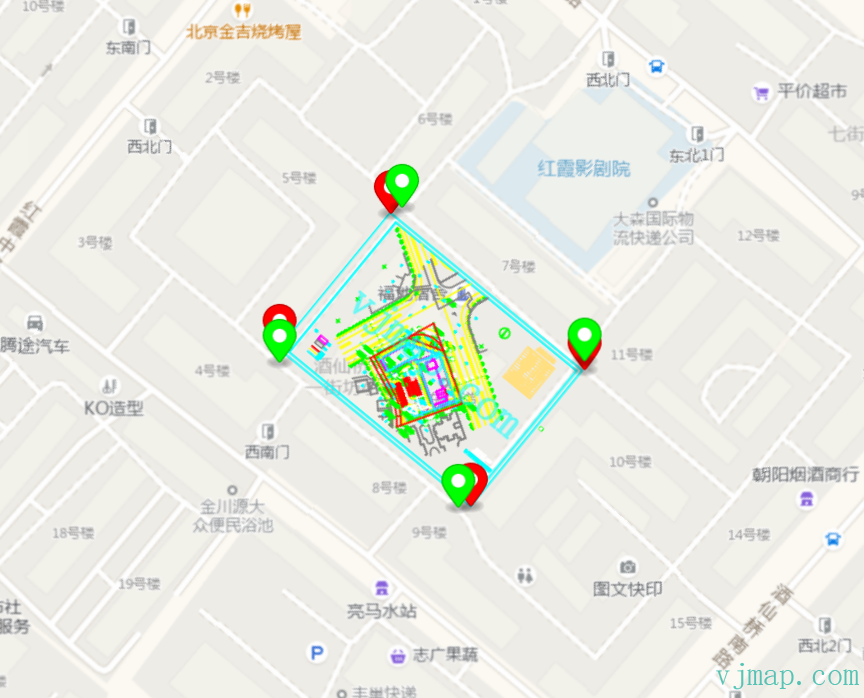
Online demos:
https://vjmap.com/demo/#/demo/map/web/04webcadmap
https://vjmap.com/demo/#/demo/map/web/05fourparamrotatecad
Pros:
(1) Use VJMap SDK to load both Amap and CAD
(2) CAD-related features work fully
(3) CAD is base, so coordinate system is CAD. CAD data can be displayed without conversion
(4) CAD zoom is not limited; large drawings do not cause insufficient zoom levels
Cons:
(1) Web map uses public tile URLs, so quality is less than Amap SDK