
# Internet Map Overlay
When CAD drawings have actual geographic coordinates, such as topographic maps, they sometimes need to be overlaid with internet maps for display. The main requirements are:
- When a CAD drawing has a coordinate system, it can be automatically overlaid onto internet maps
- When a CAD drawing has no coordinate system, several common points can be defined to overlay onto internet maps through these common points
- CAD drawings and internet maps can overlay each other (whichever is the base map determines the coordinate system)
# Theoretical Background
# Common Coordinate Systems in GIS
(1)WGS84 Coordinate System
WGS-84 Coordinate System (World Geodetic System 1984 Coordinate System)
An internationally adopted geocentric coordinate system. The coordinate origin is at the Earth's center of mass, with the Z-axis of its geocentric Cartesian coordinate system pointing toward the Conventional Terrestrial Pole (CTP) defined by BIH (International Time Bureau) 1984.0, the X-axis pointing to the intersection of the BIH 1984.0 zero meridian plane and the CTP equator, and the Y-axis perpendicular to the Z and X axes forming a right-handed coordinate system, known as the 1984 World Geodetic System.
Maps belonging to the WGS84 coordinate system include Tianditu, etc.
(2)WGS84 Web Mercator
Web Mercator was first used by Google in Google Maps in 2005. At that time or earlier, Web Mercator users still called it World Mercator – Spherical Mercator (unofficial deprecated ESRI), code WKID 54004 (in EPSG:54004 or ESRI:54004, unofficial).
On February 9, 2009, EPSG assigned the new code EPSG:3857 and named Google's map projection method "Popular Visualization Pseudo Mercator Projection" (PVPM).
(3)GCJ02 Geographic Projection
GCJ-02 is a geographic information system coordinate system formulated by the National Administration of Surveying, Mapping and Geoinformation of China (G for Guojia/National, C for Cehui/Surveying, J for Ju/Bureau).
It essentially applies artificial offset processing to the real coordinate system. Using a special algorithm, real coordinates are encrypted into false coordinates. This offset is not linear, so the offset varies by location. The encrypted coordinates are often called the "Mars coordinate system."
The coordinate values of this system are in latitude/longitude format, in degrees.
GCJ02 geographic projection here means applying GCJ-02 offset on top of WGS84 latitude/longitude.
For example, Amap uses the GCJ02 coordinate system, commonly known as the Mars coordinate system.
(4)GCJ02 Web Mercator Projection
GCJ-02 is a geographic information system coordinate system formulated by the National Administration of Surveying, Mapping and Geoinformation of China (G for Guojia/National, C for Cehui/Surveying, J for Ju/Bureau).
It essentially applies artificial offset processing to the real coordinate system. Using a special algorithm, real coordinates are encrypted into false coordinates. This offset is not linear, so the offset varies by location. The encrypted coordinates are often called the "Mars coordinate system."
The coordinate values of this system are in Web Mercator format, in meters.
GCJ02 Web Mercator here means applying GCJ-02 offset on top of standard Web Mercator.
(5)BD09 Geographic Projection
BD09 geographic projection belongs to the Baidu coordinate system. It applies GCJ-02 offset on top of standard latitude/longitude, then adds Baidu's own offset algorithm—i.e., two offsets on top of standard latitude/longitude.
The coordinate values of this system are in latitude/longitude format, in degrees.
(6)BD09 Web Mercator Projection
BD09 Web Mercator belongs to the Baidu coordinate system. It applies GCJ-02 offset on top of standard Web Mercator, then adds Baidu's own offset algorithm—i.e., two offsets on top of Web Mercator.
The coordinate values of this system are in Web Mercator format, in meters.
(7)Beijing 54 Coordinate System
After the founding of the People's Republic of China, China's geodetic surveying entered a period of full development. Nationwide formal and comprehensive geodetic surveying and mapping work was carried out, and there was an urgent need to establish a reference geodetic coordinate system. Due to the political orientation at the time, China adopted the Krasovsky ellipsoid parameters of the former Soviet Union and conducted joint surveys with the former Soviet Union's 1942 coordinate system. Through calculation, China's geodetic coordinate system was established and named the 1954 Beijing Coordinate System. Therefore, the 1954 Beijing Coordinate System can be considered an extension of the former Soviet Union's 1942 coordinate system. The origin is not in Beijing but in Pulkovo, former Soviet Union.
Since the establishment of the Beijing 54 coordinate system, local adjustments have been made in many regions within this system, and the results have been widely applied. However, with the continuous development of new theories and technologies in surveying and mapping, many shortcomings were found in this system. Therefore, in 1978, China held the "National Astronomical Geodetic Network Overall Adjustment Conference" in Xi'an and proposed establishing China's own geodetic coordinate system, which later became the 1980 Xi'an coordinate system.
(8)Xi'an 80 Coordinate System
In April 1978, the National Astronomical Geodetic Network Adjustment Conference was held in Xi'an to determine repositioning and establish China's new coordinate system. This led to the 1980 National Geodetic Coordinate System. The 1980 National Geodetic Coordinate System uses the IAG 75 ellipsoid parameters recommended by the 16th General Assembly of the International Union of Geodesy and Geophysics in 1975. The geodetic origin of this coordinate system is located in Yongle Town, Jingyang County, Shaanxi Province, in central China, about 60 km northwest of Xi'an.
(9)CGCS2000 Coordinate System
China Geodetic Coordinate System 2000 (CGCS2000), also known as the 2000 National Geodetic Coordinate System, is China's new-generation geodetic coordinate system and was officially implemented in China in the early 21st century.
# Difference Between 6-Digit and 8-Digit Projected Coordinates
Generally, projected coordinates have X as 8 digits and Y as 7 digits. However, in some maps X has only 6 digits because the first 2 digits (zone number) are omitted. For details, see this blog post: https://blog.csdn.net/thinkpang/article/details/124172626
# What is EPSG
EPSG (The European Petroleum Survey Group, http://www.epsg.org/ ) maintains a dataset of spatial reference objects. In OGC standards, the SRID (Spatial Reference System Identifier) of spatial reference systems is consistent with the EPSG spatial reference system ID.
EPSG was founded in 1986 and was "reorganized" in 2005 into the OGP Surveying and Positioning Committee. It maintains and publishes dataset parameters for coordinate reference systems and coordinate transformation descriptions. The dataset is widely accepted and used, distributed through a web publishing platform, and also provided as Microsoft Access database storage files. It can also be used with databases such as SQL script files, MySQL, Oracle, and PostgreSQL.
The organization publishes a dataset of coordinate reference systems and maintains dataset parameters and coordinate transformation descriptions. The dataset encodes coordinate reference systems collected worldwide.
EPSG query website: https://epsg.io/ (opens new window)
Common EPSG Coordinate System Reference Table:
EPSG is an organization that assigns codes to common coordinate systems. With these codes, you can define coordinate systems directly by number in programming. Common coordinate systems and their EPSG codes include:
# EPSG:4326
Geographic coordinate system with coordinates in latitude/longitude. It is a world geographic coordinate system with the Earth's center of mass as the ellipsoid center. GPS uses this coordinate system.
# EPSG:4490
Geographic coordinate system with coordinates in latitude/longitude. Named CGCS2000 coordinate system, it is the geographic coordinate system best suited for China's geographic location.
# EPSG:3857
Projected coordinate system with coordinates in x, y. Pseudo Mercator projection, also known as Spherical Mercator or Web Mercator. It is based on the Mercator projection.
Common EPSG codes found in maps:
Projected Coordinate System
(Recommended: CGCS2000 projected CRS per national standards)

1. Xian_1980 6-degree zones
EPSG code
2327 Xian_1980_GK_Zone_13
2328 Xian_1980_GK_Zone_14
2329 Xian_1980_GK_Zone_15
2330 Xian_1980_GK_Zone_16
2331 Xian_1980_GK_Zone_17
2332 Xian_1980_GK_Zone_18
2333 Xian_1980_GK_Zone_19
2334 Xian_1980_GK_Zone_20
2335 Xian_1980_GK_Zone_21
2336 Xian_1980_GK_Zone_22
2337 Xian_1980_GK_Zone_23
2338 Xian_1980_GK_CM_75E
2339 Xian_1980_GK_CM_81E
2340 Xian_1980_GK_CM_87E
2341 Xian_1980_GK_CM_93E
2342 Xian_1980_GK_CM_99E
2343 Xian_1980_GK_CM_105E
2344 Xian_1980_GK_CM_111E
2345 Xian_1980_GK_CM_117E
2346 Xian_1980_GK_CM_123E
2347 Xian_1980_GK_CM_129E
2348 Xian_1980_GK_CM_135E

2. Xian_1980 3-degree zones
2349 Xian_1980_3_Degree_GK_Zone_25
2350 Xian_1980_3_Degree_GK_Zone_26
2351 Xian_1980_3_Degree_GK_Zone_27
2352 Xian_1980_3_Degree_GK_Zone_28
2353 Xian_1980_3_Degree_GK_Zone_29
2354 Xian_1980_3_Degree_GK_Zone_30
2355 Xian_1980_3_Degree_GK_Zone_31
2356 Xian_1980_3_Degree_GK_Zone_32
2357 Xian_1980_3_Degree_GK_Zone_33
2358 Xian_1980_3_Degree_GK_Zone_34
2359 Xian_1980_3_Degree_GK_Zone_35
2360 Xian_1980_3_Degree_GK_Zone_36
2361 Xian_1980_3_Degree_GK_Zone_37
2362 Xian_1980_3_Degree_GK_Zone_38
2363 Xian_1980_3_Degree_GK_Zone_39
2364 Xian_1980_3_Degree_GK_Zone_40
2365 Xian_1980_3_Degree_GK_Zone_41
2366 Xian_1980_3_Degree_GK_Zone_42
2367 Xian_1980_3_Degree_GK_Zone_43
2368 Xian_1980_3_Degree_GK_Zone_44
2369 Xian_1980_3_Degree_GK_Zone_45
2370 Xian_1980_3_Degree_GK_CM_75E
2371 Xian_1980_3_Degree_GK_CM_78E
2372 Xian_1980_3_Degree_GK_CM_81E
2373 Xian_1980_3_Degree_GK_CM_84E
2374 Xian_1980_3_Degree_GK_CM_87E
2375 Xian_1980_3_Degree_GK_CM_90E
2376 Xian_1980_3_Degree_GK_CM_93E
2377 Xian_1980_3_Degree_GK_CM_96E
2378 Xian_1980_3_Degree_GK_CM_99E
2379 Xian_1980_3_Degree_GK_CM_102E
2380 Xian_1980_3_Degree_GK_CM_105E
2381 Xian_1980_3_Degree_GK_CM_108E
2382 Xian_1980_3_Degree_GK_CM_111E
2383 Xian_1980_3_Degree_GK_CM_114E
2384 Xian_1980_3_Degree_GK_CM_117E
2385 Xian_1980_3_Degree_GK_CM_120E
2386 Xian_1980_3_Degree_GK_CM_123E
2387 Xian_1980_3_Degree_GK_CM_126E
2388 Xian_1980_3_Degree_GK_CM_129E
2389 Xian_1980_3_Degree_GK_CM_132E
2390 Xian_1980_3_Degree_GK_CM_135E

3. Beijing_1954 3-degree zones
2401 Beijing_1954_3_Degree_GK_Zone_25
2402 Beijing_1954_3_Degree_GK_Zone_26
2403 Beijing_1954_3_Degree_GK_Zone_27
2404 Beijing_1954_3_Degree_GK_Zone_28
2405 Beijing_1954_3_Degree_GK_Zone_29
2406 Beijing_1954_3_Degree_GK_Zone_30
2407 Beijing_1954_3_Degree_GK_Zone_31
2408 Beijing_1954_3_Degree_GK_Zone_32
2409 Beijing_1954_3_Degree_GK_Zone_33
2410 Beijing_1954_3_Degree_GK_Zone_34
2411 Beijing_1954_3_Degree_GK_Zone_35
2412 Beijing_1954_3_Degree_GK_Zone_36
2413 Beijing_1954_3_Degree_GK_Zone_37
2414 Beijing_1954_3_Degree_GK_Zone_38
2415 Beijing_1954_3_Degree_GK_Zone_39
2416 Beijing_1954_3_Degree_GK_Zone_40
2417 Beijing_1954_3_Degree_GK_Zone_41
2418 Beijing_1954_3_Degree_GK_Zone_42
2419 Beijing_1954_3_Degree_GK_Zone_43
2420 Beijing_1954_3_Degree_GK_Zone_44
2421 Beijing_1954_3_Degree_GK_Zone_45
2422 Beijing_1954_3_Degree_GK_CM_75E
2423 Beijing_1954_3_Degree_GK_CM_78E
2424 Beijing_1954_3_Degree_GK_CM_81E
2425 Beijing_1954_3_Degree_GK_CM_84E
2426 Beijing_1954_3_Degree_GK_CM_87E
2427 Beijing_1954_3_Degree_GK_CM_90E
2428 Beijing_1954_3_Degree_GK_CM_93E
2429 Beijing_1954_3_Degree_GK_CM_96E
2430 Beijing_1954_3_Degree_GK_CM_99E
2431 Beijing_1954_3_Degree_GK_CM_102E
2432 Beijing_1954_3_Degree_GK_CM_105E
2433 Beijing_1954_3_Degree_GK_CM_108E
2434 Beijing_1954_3_Degree_GK_CM_111E
2435 Beijing_1954_3_Degree_GK_CM_114E
2436 Beijing_1954_3_Degree_GK_CM_117E
2437 Beijing_1954_3_Degree_GK_CM_120E
2438 Beijing_1954_3_Degree_GK_CM_123E
2439 Beijing_1954_3_Degree_GK_CM_126E
2440 Beijing_1954_3_Degree_GK_CM_129E
2441 Beijing_1954_3_Degree_GK_CM_132E
2442 Beijing_1954_3_Degree_GK_CM_135E

4. Beijing_1954 6-degree zones
21413 Beijing_1954_GK_Zone_13
21414 Beijing_1954_GK_Zone_14
21415 Beijing_1954_GK_Zone_15
21416 Beijing_1954_GK_Zone_16
21417 Beijing_1954_GK_Zone_17
21418 Beijing_1954_GK_Zone_18
21419 Beijing_1954_GK_Zone_19
21420 Beijing_1954_GK_Zone_20
21421 Beijing_1954_GK_Zone_21
21422 Beijing_1954_GK_Zone_22
21423 Beijing_1954_GK_Zone_23
21473 Beijing_1954_GK_Zone_13N
21474 Beijing_1954_GK_Zone_14N
21475 Beijing_1954_GK_Zone_15N
21476 Beijing_1954_GK_Zone_16N
21477 Beijing_1954_GK_Zone_17N
21478 Beijing_1954_GK_Zone_18N
21479 Beijing_1954_GK_Zone_19N
21480 Beijing_1954_GK_Zone_20N
21481 Beijing_1954_GK_Zone_21N
21482 Beijing_1954_GK_Zone_22N
21483 Beijing_1954_GK_Zone_23N

5. WGS_1984 Mercator
3395 WGS_1984_World_Mercator

6. CGCS2000 6-degree zones
4491 CGCS2000_GK_Zone_13
4492 CGCS2000_GK_Zone_14
4493 CGCS2000_GK_Zone_15
4494 CGCS2000_GK_Zone_16
4495 CGCS2000_GK_Zone_17
4496 CGCS2000_GK_Zone_18
4497 CGCS2000_GK_Zone_19
4498 CGCS2000_GK_Zone_20
4499 CGCS2000_GK_Zone_21
4500 CGCS2000_GK_Zone_22
4501 CGCS2000_GK_Zone_23
4502 CGCS2000_GK_CM_75E
4503 CGCS2000_GK_CM_81E
4504 CGCS2000_GK_CM_87E
4505 CGCS2000_GK_CM_93E
4506 CGCS2000_GK_CM_99E
4507 CGCS2000_GK_CM_105E
4508 CGCS2000_GK_CM_111E
4509 CGCS2000_GK_CM_117E
4510 CGCS2000_GK_CM_123E
4511 CGCS2000_GK_CM_129E
4512 CGCS2000_GK_CM_135E

7. CGCS2000 3-degree zones

4513 CGCS2000_3_Degree_GK_Zone_25
4514 CGCS2000_3_Degree_GK_Zone_26
4515 CGCS2000_3_Degree_GK_Zone_27
4516 CGCS2000_3_Degree_GK_Zone_28
4517 CGCS2000_3_Degree_GK_Zone_29
4518 CGCS2000_3_Degree_GK_Zone_30
4519 CGCS2000_3_Degree_GK_Zone_31
4520 CGCS2000_3_Degree_GK_Zone_32
4521 CGCS2000_3_Degree_GK_Zone_33
4522 CGCS2000_3_Degree_GK_Zone_34
4523 CGCS2000_3_Degree_GK_Zone_35
4524 CGCS2000_3_Degree_GK_Zone_36
4525 CGCS2000_3_Degree_GK_Zone_37
4526 CGCS2000_3_Degree_GK_Zone_38
4527 CGCS2000_3_Degree_GK_Zone_39
4528 CGCS2000_3_Degree_GK_Zone_40
4529 CGCS2000_3_Degree_GK_Zone_41
4530 CGCS2000_3_Degree_GK_Zone_42
4531 CGCS2000_3_Degree_GK_Zone_43
4532 CGCS2000_3_Degree_GK_Zone_44
4533 CGCS2000_3_Degree_GK_Zone_45
4534 CGCS2000_3_Degree_GK_CM_75E
4535 CGCS2000_3_Degree_GK_CM_78E
4536 CGCS2000_3_Degree_GK_CM_81E
4537 CGCS2000_3_Degree_GK_CM_84E
4538 CGCS2000_3_Degree_GK_CM_87E
4539 CGCS2000_3_Degree_GK_CM_90E
4540 CGCS2000_3_Degree_GK_CM_93E
4541 CGCS2000_3_Degree_GK_CM_96E
4542 CGCS2000_3_Degree_GK_CM_99E
4543 CGCS2000_3_Degree_GK_CM_102E
4544 CGCS2000_3_Degree_GK_CM_105E
4545 CGCS2000_3_Degree_GK_CM_108E
4546 CGCS2000_3_Degree_GK_CM_111E
4547 CGCS2000_3_Degree_GK_CM_114E
4548 CGCS2000_3_Degree_GK_CM_117E
4549 CGCS2000_3_Degree_GK_CM_120E
4550 CGCS2000_3_Degree_GK_CM_123E
4551 CGCS2000_3_Degree_GK_CM_126E
4552 CGCS2000_3_Degree_GK_CM_129E
4553 CGCS2000_3_Degree_GK_CM_132E
4554 CGCS2000_3_Degree_GK_CM_135E

8. New_Beijing_Gauss 6-degree zones
4568 New_Beijing_Gauss_Kruger_Zone_13
4569 New_Beijing_Gauss_Kruger_Zone_14
4570 New_Beijing_Gauss_Kruger_Zone_15
4571 New_Beijing_Gauss_Kruger_Zone_16
4572 New_Beijing_Gauss_Kruger_Zone_17
4573 New_Beijing_Gauss_Kruger_Zone_18
4574 New_Beijing_Gauss_Kruger_Zone_19
4575 New_Beijing_Gauss_Kruger_Zone_20
4576 New_Beijing_Gauss_Kruger_Zone_21
4577 New_Beijing_Gauss_Kruger_Zone_22
4578 New_Beijing_Gauss_Kruger_Zone_23
4579 New_Beijing_Gauss_Kruger_CM_75E
4580 New_Beijing_Gauss_Kruger_CM_81E
4581 New_Beijing_Gauss_Kruger_CM_87E
4582 New_Beijing_Gauss_Kruger_CM_93E
4583 New_Beijing_Gauss_Kruger_CM_99E
4584 New_Beijing_Gauss_Kruger_CM_105E
4585 New_Beijing_Gauss_Kruger_CM_111E
4586 New_Beijing_Gauss_Kruger_CM_117E
4587 New_Beijing_Gauss_Kruger_CM_123E
4588 New_Beijing_Gauss_Kruger_CM_129E
4589 New_Beijing_Gauss_Kruger_CM_135E

9. New_Beijing_Gauss 3-degree zones
4652 New_Beijing_3_Degree_Gauss_Kruger_Zone_25
4653 New_Beijing_3_Degree_Gauss_Kruger_Zone_26
4654 New_Beijing_3_Degree_Gauss_Kruger_Zone_27
4655 New_Beijing_3_Degree_Gauss_Kruger_Zone_28
4656 New_Beijing_3_Degree_Gauss_Kruger_Zone_29
4766 New_Beijing_3_Degree_Gauss_Kruger_Zone_30
4767 New_Beijing_3_Degree_Gauss_Kruger_Zone_31
4768 New_Beijing_3_Degree_Gauss_Kruger_Zone_32
4769 New_Beijing_3_Degree_Gauss_Kruger_Zone_33
4770 New_Beijing_3_Degree_Gauss_Kruger_Zone_34
4771 New_Beijing_3_Degree_Gauss_Kruger_Zone_35
4772 New_Beijing_3_Degree_Gauss_Kruger_Zone_36
4773 New_Beijing_3_Degree_Gauss_Kruger_Zone_37
4774 New_Beijing_3_Degree_Gauss_Kruger_Zone_38
4775 New_Beijing_3_Degree_Gauss_Kruger_Zone_39
4776 New_Beijing_3_Degree_Gauss_Kruger_Zone_40
4777 New_Beijing_3_Degree_Gauss_Kruger_Zone_41
4778 New_Beijing_3_Degree_Gauss_Kruger_Zone_42
4779 New_Beijing_3_Degree_Gauss_Kruger_Zone_43
4780 New_Beijing_3_Degree_Gauss_Kruger_Zone_44
4781 New_Beijing_3_Degree_Gauss_Kruger_Zone_45
4782 New_Beijing_3_Degree_Gauss_Kruger_CM_75E
4783 New_Beijing_3_Degree_Gauss_Kruger_CM_78E
4784 New_Beijing_3_Degree_Gauss_Kruger_CM_81E
4785 New_Beijing_3_Degree_Gauss_Kruger_CM_84E
4786 New_Beijing_3_Degree_Gauss_Kruger_CM_87E
4787 New_Beijing_3_Degree_Gauss_Kruger_CM_90E
4788 New_Beijing_3_Degree_Gauss_Kruger_CM_93E
4789 New_Beijing_3_Degree_Gauss_Kruger_CM_96E
4790 New_Beijing_3_Degree_Gauss_Kruger_CM_99E
4791 New_Beijing_3_Degree_Gauss_Kruger_CM_102E
4792 New_Beijing_3_Degree_Gauss_Kruger_CM_105E
4793 New_Beijing_3_Degree_Gauss_Kruger_CM_108E
4794 New_Beijing_3_Degree_Gauss_Kruger_CM_111E
4795 New_Beijing_3_Degree_Gauss_Kruger_CM_114E
4796 New_Beijing_3_Degree_Gauss_Kruger_CM_117E
4797 New_Beijing_3_Degree_Gauss_Kruger_CM_120E
4798 New_Beijing_3_Degree_Gauss_Kruger_CM_123E
4799 New_Beijing_3_Degree_Gauss_Kruger_CM_126E
4800 New_Beijing_3_Degree_Gauss_Kruger_CM_129E
4822 New_Beijing_3_Degree_Gauss_Kruger_CM_135E
2
3
4
5
6
7
8
9
10
11
12
13
14
15
16
17
18
19
20
21
22
23
24
25
26
27
28
29
30
31
32
33
34
35
36
37
38
39
40
41
42
43
44
45
46
47
48
49
50
51
52
53
54
55
56
57
58
59
60
61
62
63
64
65
66
67
68
69
70
71
72
73
74
75
76
77
78
79
80
81
82
83
84
85
86
87
88
89
90
91
92
93
94
95
96
97
98
99
100
101
102
103
104
105
106
107
108
109
110
111
112
113
114
115
116
117
118
119
120
121
122
123
124
125
126
127
128
129
130
131
132
133
134
135
136
137
138
139
140
141
142
143
144
145
146
147
148
149
150
151
152
153
154
155
156
157
158
159
160
161
162
163
164
165
166
167
168
169
170
171
172
173
174
175
176
177
178
179
180
181
182
183
184
185
186
187
188
189
190
191
192
193
194
195
196
197
198
199
200
201
202
203
204
205
206
207
208
209
210
211
212
213
214
215
216
217
218
219
220
221
222
223
224
225
226
227
228
229
230
231
232
233
234
235
236
237
238
239
240
241
242
243
244
245
246
247
248
249
250
251
252
253
254
255
256
257
258
259
260
261
262
263
264
265
266
267
268
269
270
271
272
273
274
275
276
277
278
# Coordinate Transformation
# Conversion Between WGS84, Mars Coordinates (GCJ-02), and Baidu Coordinates (BD-09)
Github: https://github.com/wandergis/coordtransform (opens new window)
npm: https://www.npmjs.com/package/coordtransform (opens new window)
Usage:
<!DOCTYPE html>
<html lang="en">
<head>
    <meta charset="UTF-8">
    <title>coordTransform</title>
</head>
<body>
<h1>Press F12 to open console and view results</h1>
<script src="index.js"></script>
<script>
    // GCJ02 (Mars, e.g. Amap), BD09 (Baidu), WGS84 (Google and most international maps)
    // Baidu lng/lat -> GCJ02
    var bd09togcj02 = coordtransform.bd09togcj02(116.404, 39.915);
    // GCJ02 -> Baidu lng/lat
    var gcj02tobd09 = coordtransform.gcj02tobd09(116.404, 39.915);
    // WGS84 -> GCJ02
    var wgs84togcj02 = coordtransform.wgs84togcj02(116.404, 39.915);
    // GCJ02 -> WGS84
    var gcj02towgs84 = coordtransform.gcj02towgs84(116.404, 39.915);
    console.log(bd09togcj02);
    console.log(gcj02tobd09);
    console.log(wgs84togcj02);
    console.log(gcj02towgs84);
    //result
    //bd09togcj02:   [ 116.39762729119315, 39.90865673957631 ]
    //gcj02tobd09:   [ 116.41036949371029, 39.92133699351021 ]
    //wgs84togcj02:  [ 116.41024449916938, 39.91640428150164 ]
    //gcj02towgs84:  [ 116.39775550083061, 39.91359571849836 ]
</script>
</body>
</html>
2
3
4
5
6
7
8
9
10
11
12
13
14
15
16
17
18
19
20
21
22
23
24
25
26
27
28
29
30
31
# Conversion Between Different EPSG Coordinate Systems
Proj4js is a JavaScript library whose main function is to convert point coordinates from one coordinate system to another. There are three ways to add Proj4js on the frontend:
Download from http://trac.osgeo.org/proj4js/wiki/Download (opens new window) and get the dist/proj4.js file from the package.
Include Proj4js from CDN: https://cdnjs.com/libraries/proj4js.
Or install directly with npm install proj4.
Usage:
First, define the coordinate systems to be converted:
proj4.defs([["EPSG:4549","+proj=tmerc +lat_0=0 +lon_0=120 +k=1 +x_0=500000 +y_0=0 +ellps=GRS80 +units=m +no_defs"]])
Call the proj4 method:
proj4("EPSG:4326", "EPSG:4549", [lat, lng]);
Conversion complete!
Note: Due to different ellipsoids in different coordinate systems, direct conversion may have some error!!!
# Implementation Approach for CAD and Internet Map Overlay
# I. CAD Drawings with Coordinate Systems: Automatic Overlay onto Internet Maps
# 1. Internet Map Overlaying CAD Drawing
The process is as follows:
(1) Determine the internet map coordinate system. If it is not WGS84 (e.g., Mars or Baidu coordinates), convert to WGS84 (EPSG:4326);
(2) Determine the CAD drawing coordinate system by using the first two digits of X to get the EPSG. Code example:
     // Using first two digits of X as 39
     // Beijing 54 coordinate
     vjmap.transform.getEpsgParam(vjmap.transform.EpsgCrsTypes.Beijing54, 39).epsg
     // Xi'an 80 coordinate
     vjmap.transform.getEpsgParam(vjmap.transform.EpsgCrsTypes.Xian80, 39).epsg
     // CGCS2000 coordinate
     vjmap.transform.getEpsgParam(vjmap.transform.EpsgCrsTypes.CGCS2000, 39).epsg
2
3
4
5
6
7
8
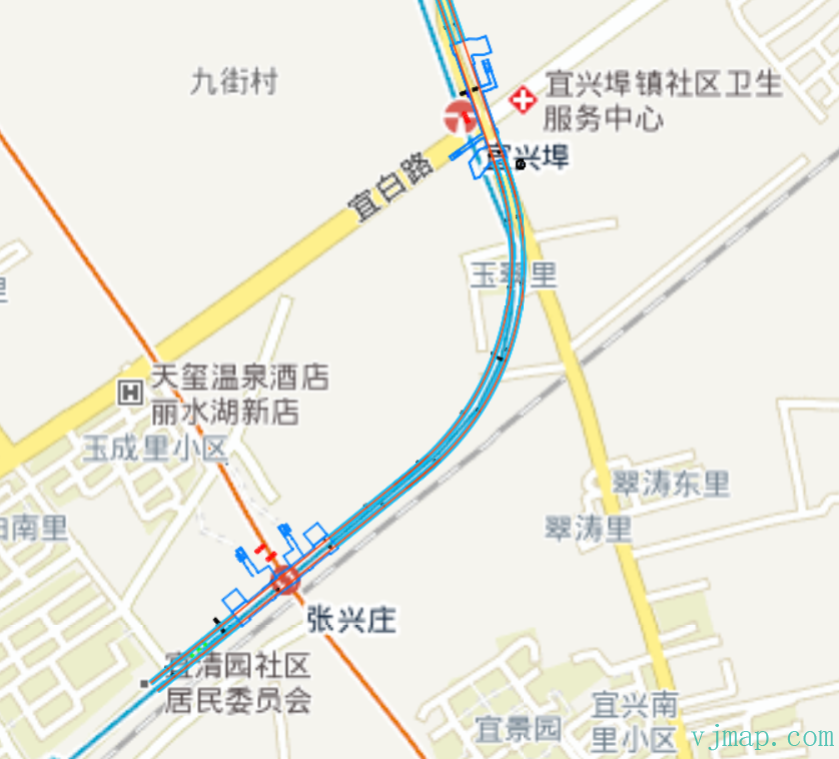
(3) Use Proj4js to convert internet map coordinates to CAD coordinates
(4) Use CAD coordinates to fetch the corresponding tile image via WMS on the backend and overlay it.
Effect: https://vjmap.com/demo/#/demo/map/web/04webWms
# 2. CAD Drawing Overlaying Internet Map
The process is as follows:
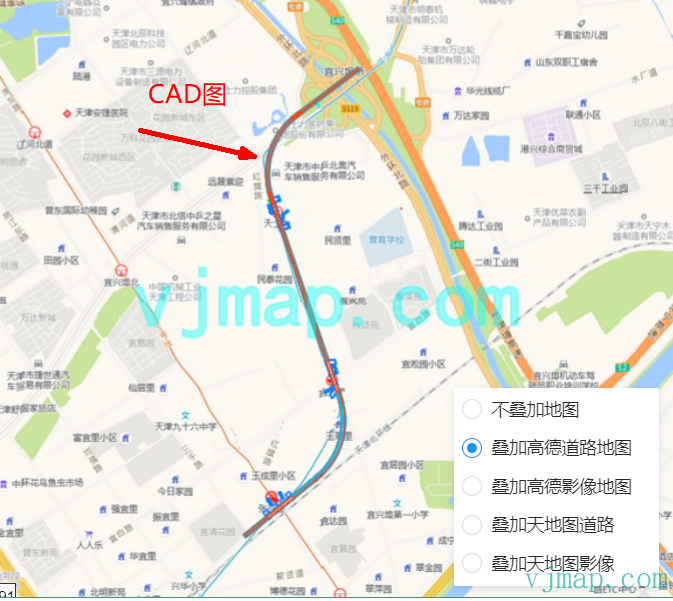
(1) Determine the CAD drawing coordinate system by using the first two digits of X to get the EPSG. Same method as above.
(2) Use Proj4js to convert CAD coordinates to WGS84 (EPSG:4326);
(3) Determine the internet map coordinate system. If it is not WGS84 (e.g., Mars or Baidu coordinates), convert WGS84 to Mars or Baidu coordinates.
(4) Use internet coordinates to fetch tiles for that extent. However, most internet maps only provide WMTS, not WMS, so custom backend services would be needed to implement this.
In VJMap, you can use the following code:
    // Add Tianditu base map
    const addTiandituMap = (isRoadway) => {
        const tileUrl = svc.webMapUrl({
            tileCrs: "wgs84",
            tileUrl: [
                isRoadway ? "https://t{s}.tianditu.gov.cn/DataServer?T=vec_w&X={x}&Y={y}&L={z}&tk={t}" :
                /* For imagery */ "https://t{s}.tianditu.gov.cn/DataServer?T=img_w&X={x}&Y={y}&L={z}&tk={t}",
                "https://t{s}.tianditu.gov.cn/DataServer?T=cva_w&X={x}&Y={y}&L={z}&tk={t}"
            ],
            tileSize: 256,
            tileRetina: 1,
            tileMaxZoom: 18,
            tileShards: "1,2,3,4,5,6",
            tileToken: [
                "6d53378dc5f7dbef8d84ffdd2b54139b", // Multiple tokens; if one fails due to rate limit, next is tried
                "69eb2fa0de3b2a668f1ef603a3f8bc73"
            ],
            tileFlipY: false,
            mapbounds: res.bounds,
            srs: "EPSG:4527", // From first two digits: vjmap.transform.getEpsgParam(vjmap.transform.EpsgCrsTypes.CGCS2000, 39).epsg
            // Map has 6-digit coords without zone; apply zone offset before transform: https://blog.csdn.net/thinkpang/article/details/124172626
            fourParameterBefore: "39000000,0,1,0"
        })

        map.addSource('web-tdt-source', {
            'type': 'raster',
            'tiles': [
                tileUrl
            ],
            'tileSize': 256
        });
        map.addLayer({
                'id': 'web-tdt-layer',
                'type': 'raster',
                'source': 'web-tdt-source',
                'paint': { "raster-opacity": 1 }
            }
        );
        let layers = map.getStyle().layers
        // Move this layer to the bottom
        map.moveLayer('web-tdt-layer', layers[0].id)
    }
2
3
4
5
6
7
8
9
10
11
12
13
14
15
16
17
18
19
20
21
22
23
24
25
26
27
28
29
30
31
32
33
34
35
36
37
38
39
40
41
42
Effect: https://vjmap.com/demo/#/demo/map/web/04webcadmap (opens new window)
# II. CAD Drawings Without Coordinate Systems: Overlay onto Internet Maps
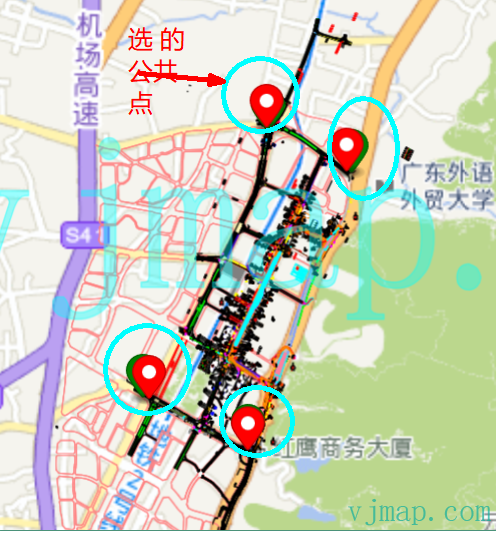
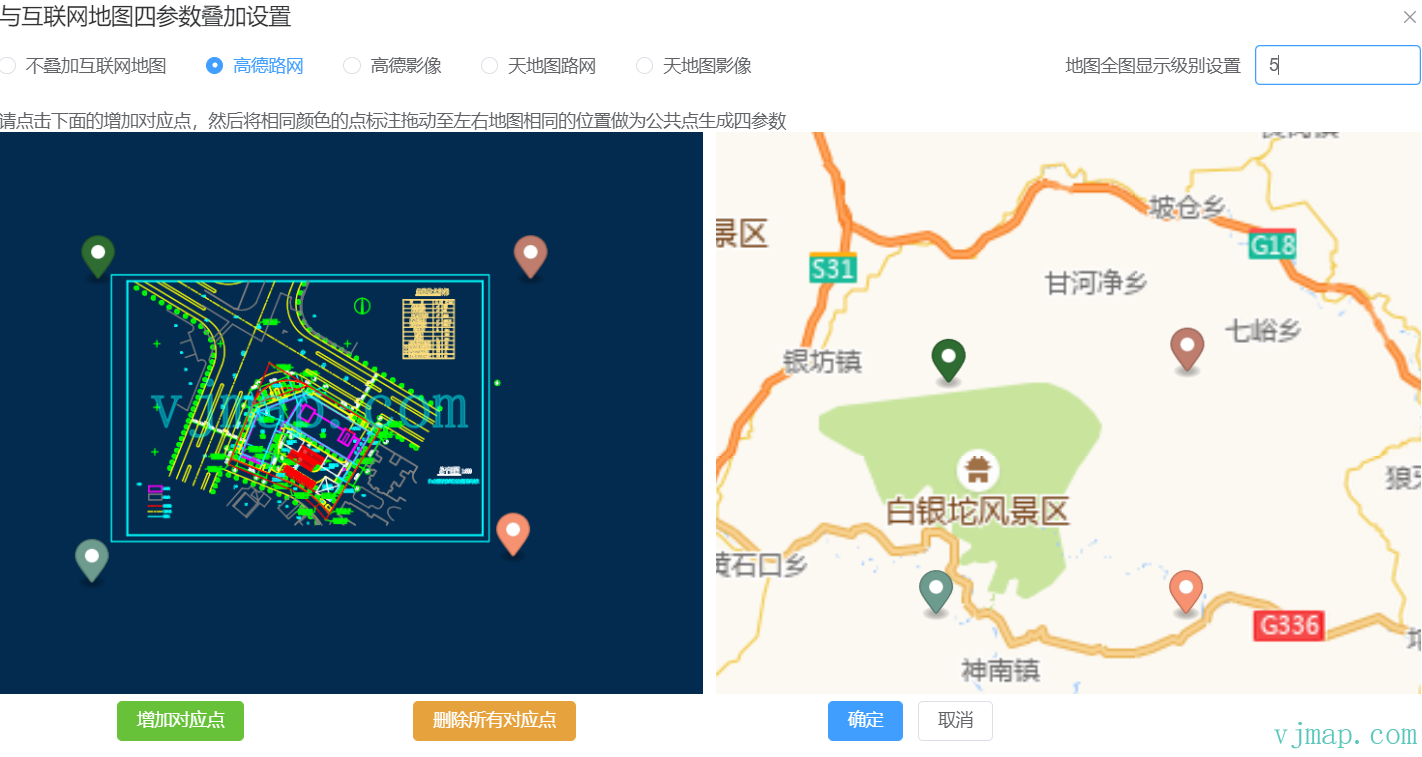
For drawings without coordinate systems, geographic coordinate conversion cannot be used. Instead, common corresponding points must be selected manually, and then translation, rotation, and scale are calculated through four-parameter transformation for overlay.
For the theory of four-parameter calculation, see this blog post: https://blog.csdn.net/qq_42811161/article/details/107809777 (opens new window)
In VJMap, you can use the following code:
// CAD point coordinates
let cadPoints = [
    vjmap.geoPoint([39760.07407, 237424.52134]),
    vjmap.geoPoint([39006.60468, 237808.49494749]),
    vjmap.geoPoint([38823.92918, 235003.98994]),
    vjmap.geoPoint([37885.55424, 235452.80893])
];

// Corresponding points picked on Baidu map (one-to-one with cadPoints)
let baiduPoints = [
    vjmap.geoPoint([113.292983, 23.206979]),
    vjmap.geoPoint([113.285631, 23.210304]),
    vjmap.geoPoint([113.283897, 23.185047]),
    vjmap.geoPoint([113.274716, 23.188962])
]

// Baidu -> WGS84. If picked on Amap use CRSTypes.GCJ02; if on Tianditu, already WGS84.
let wgs84Points = baiduPoints.map(e => vjmap.geoPoint(vjmap.transform.convert([e.x, e.y],vjmap.transform.CRSTypes.BD09, vjmap.transform.CRSTypes.WGS84)));

// Solve four-parameter from point pairs
let fourparam = vjmap.coordTransfromGetFourParamter(wgs84Points, cadPoints, true); // no rotation here

let wmsurl = svc.wmsTileUrl({
    mapid: cadMapId,
    version:"v1",
    layers: style.stylename,
    srs: "EPSG:3857", // base map is Tianditu CRS
    crs: "EPSG:4326", // four-param input is WGS84, so 3857 -> 4326 first
    fourParameter: [fourparam.dx, fourparam.dy, fourparam.scale, fourparam.rotate] // then four-param to CAD
})
2
3
4
5
6
7
8
9
10
11
12
13
14
15
16
17
18
19
20
21
22
23
24
25
26
27
28
29
30
31
32
Effect: https://vjmap.com/demo/#/demo/map/web/05fourparam (opens new window)
# Online Demo
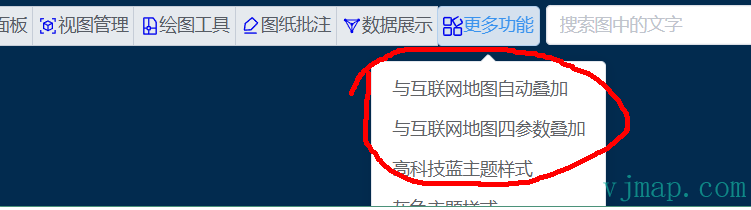
(1) Open VJMap Cloud Drawing Management Platform (opens new window) https://vjmap.com/app/cloud)
(2) Upload and open CAD drawings
(3) In the toolbar, select "Auto overlay with internet map" or "Four-parameter overlay"
(4) Parameter settings

- (5) Effect
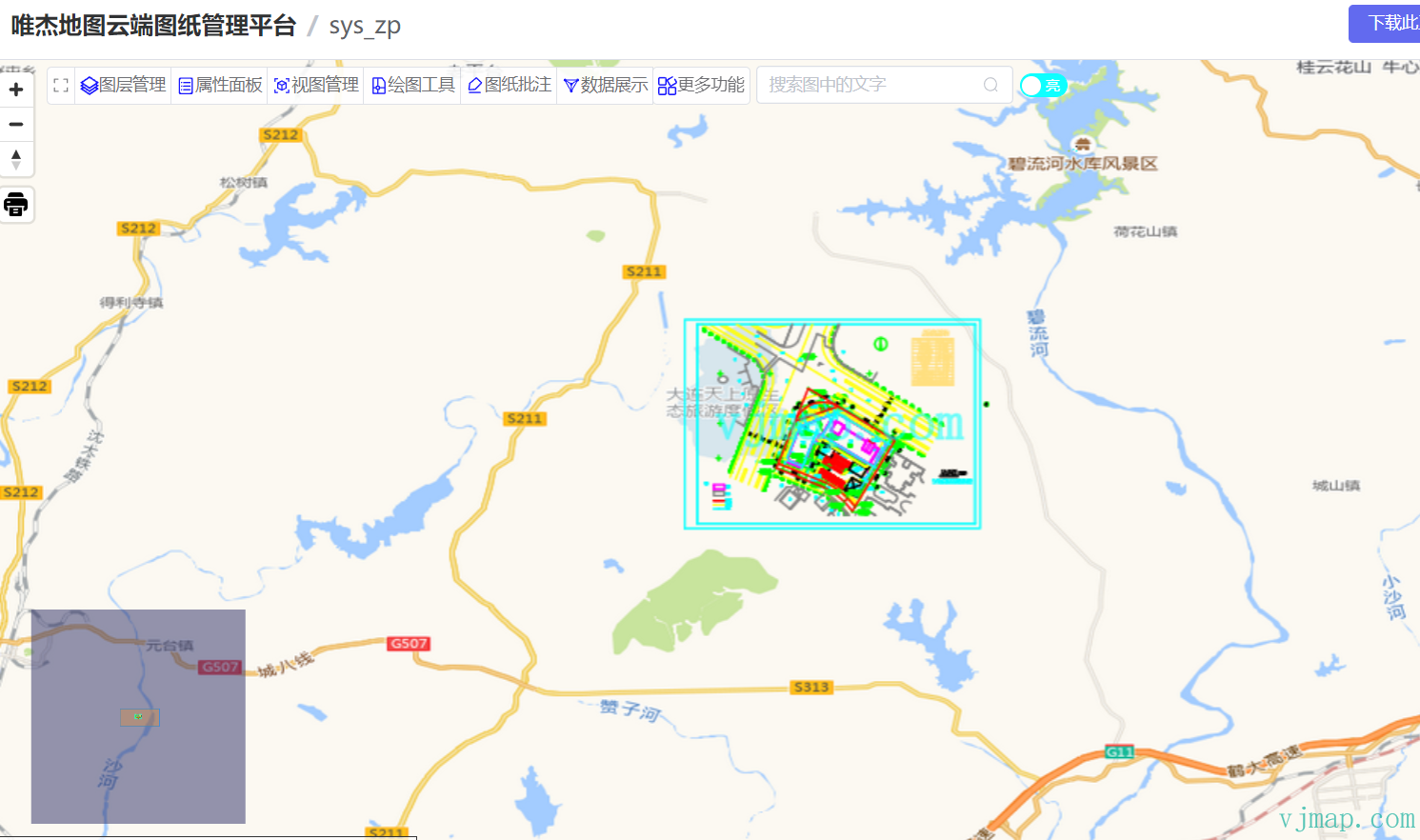
You can upload CAD drawings you want to overlay and try it online at VJMap Cloud Drawing Management Platform (opens new window)!