
Drawing Annotations
Drawing annotations are an important part of drawing review work. The following describes how to implement online web-based drawing annotation functionality.
Implementation Preview
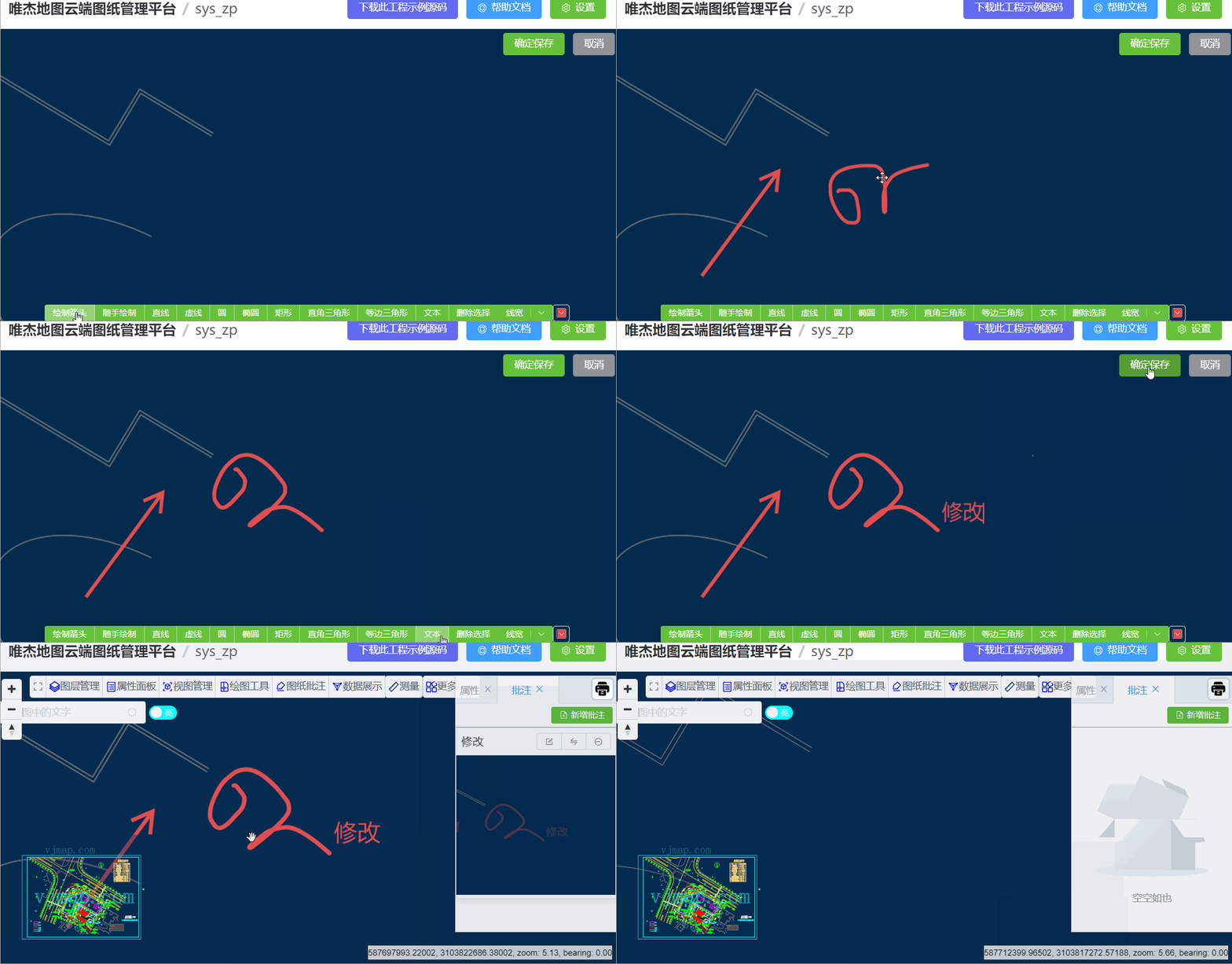
Drawing Annotation Approach Comparison
Drawing annotation functionality, as a layer for displaying drawings on the web, can generally be implemented in two ways: overlaying annotation content onto the map layer through vector graphics drawing or SVG graphics. The pros and cons of both approaches are as follows:
Vector Graphics Drawing:
Advantages: High performance, good overlay effect, supports infinite zoom without distortion;
Disadvantages: Limited editing capabilities, limited content expression
SVG Graphics:
Advantages: Strong editing capabilities, rich content expression
Disadvantages: Large numbers of SVG graphics can cause performance degradation, distortion at certain zoom levels
Summary: Given that drawing annotation requirements emphasize rich content expression while typically not involving very large data volumes, the SVG graphics overlay approach is a good choice.
Drawing Annotation Implementation
SVG Graphics Editing Library Selection
The SVG graphics editing library used is Fabric.js, an open-source library on GitHub with over 22k stars.
Fabric.js is a powerful and concise canvas library. It provides a series of APIs for manipulating canvas, making it easy to work with canvas. It also provides SVG to canvas and canvas to SVG parsers.
Fabric.js official site: http://fabricjs.com/ , GitHub repository: https://github.com/fabricjs/fabric.js
Drawing Annotation Code
//Drawing method
    function drawing() {
        if (drawingObject) {
            canvas.remove(drawingObject);
        }
        var canvasObject = null;
        switch (drawType) {
            case "arrow": //arrow
                canvasObject = new fabric.Path(drawArrow(mouseFrom.x, mouseFrom.y, mouseTo.x, mouseTo.y, 30, 30), {
                    stroke: strokeColor.value,
                    fill: "rgba(255,255,255,0)",
                    strokeWidth: strokeWidth.value
                });
                break;
            case "line": //line
                canvasObject = new fabric.Line([mouseFrom.x, mouseFrom.y, mouseTo.x, mouseTo.y], {
                    stroke: strokeColor.value,
                    strokeWidth: strokeWidth.value
                });
                break;
            case "dottedline": //dashed line
                canvasObject = new fabric.Line([mouseFrom.x, mouseFrom.y, mouseTo.x, mouseTo.y], {
                    strokeDashArray: [3, 1],
                    stroke: strokeColor.value,
                    strokeWidth: strokeWidth.value
                });
                break;
            case "circle": //circle
                var left = mouseFrom.x,
                    top = mouseFrom.y;
                var radius = Math.sqrt((mouseTo.x - left) * (mouseTo.x - left) + (mouseTo.y - top) * (mouseTo.y - top)) / 2;
                canvasObject = new fabric.Circle({
                    left: left,
                    top: top,
                    stroke: strokeColor.value,
                    fill: "rgba(255, 255, 255, 0)",
                    radius: radius,
                    strokeWidth: strokeWidth.value
                });
                break;
            case "ellipse": //ellipse
                var left = mouseFrom.x,
                    top = mouseFrom.y;
                var radius = Math.sqrt((mouseTo.x - left) * (mouseTo.x - left) + (mouseTo.y - top) * (mouseTo.y - top)) / 2;
                canvasObject = new fabric.Ellipse({
                    left: left,
                    top: top,
                    stroke: strokeColor.value,
                    fill: "rgba(255, 255, 255, 0)",
                    originX: "center",
                    originY: "center",
                    rx: Math.abs(left - mouseTo.x),
                    ry: Math.abs(top - mouseTo.y),
                    strokeWidth: strokeWidth.value
                });
                break;
            case "rectangle": //rectangle
                var path =
                    "M " +
                    mouseFrom.x +
                    " " +
                    mouseFrom.y +
                    " L " +
                    mouseTo.x +
                    " " +
                    mouseFrom.y +
                    " L " +
                    mouseTo.x +
                    " " +
                    mouseTo.y +
                    " L " +
                    mouseFrom.x +
                    " " +
                    mouseTo.y +
                    " L " +
                    mouseFrom.x +
                    " " +
                    mouseFrom.y +
                    " z";
                canvasObject = new fabric.Path(path, {
                    left: left,
                    top: top,
                    stroke: strokeColor.value,
                    strokeWidth: strokeWidth.value,
                    fill: "rgba(255, 255, 255, 0)"
                });
                //Can also use fabric.Rect
                break;
            case "rightangle": //right triangle
                var path = "M " + mouseFrom.x + " " + mouseFrom.y + " L " + mouseFrom.x + " " + mouseTo.y + " L " + mouseTo.x + " " + mouseTo.y + " z";
                canvasObject = new fabric.Path(path, {
                    left: left,
                    top: top,
                    stroke: strokeColor.value,
                    strokeWidth: strokeWidth.value,
                    fill: "rgba(255, 255, 255, 0)"
                });
                break;
            case "equilateral": //equilateral triangle
                var height = mouseTo.y - mouseFrom.y;
                canvasObject = new fabric.Triangle({
                    top: mouseFrom.y,
                    left: mouseFrom.x,
                    width: Math.sqrt(Math.pow(height, 2) + Math.pow(height / 2.0, 2)),
                    height: height,
                    stroke: strokeColor.value,
                    strokeWidth: strokeWidth.value,
                    fill: "rgba(255,255,255,0)"
                });
                break;
            case "text":
                textbox = new fabric.Textbox("", {
                    left: mouseFrom.x - 60,
                    top: mouseFrom.y - 20,
                    width: 150,
                    fontSize: 30,
                    borderColor: "yellow",
                    fill: strokeColor.value,
                    hasControls: true
                });
                canvas.add(textbox);
                textbox.enterEditing();
                textbox.hiddenTextarea.focus();
                break;
            case "remove":
                break;
            default:
                break;
        }
        if (canvasObject) {
            canvas.add(canvasObject);
            drawingObject = canvasObject;
        }
    }
SVG Graphics Overlay on Map
The vjmap SDK provides a DivOverlay class that creates a div overlay within a geographic bounds that scales with zoom. Its type definition is as follows:
/**
 * Create a div overlay within a geographic bounds that scales with zoom
 * Note: For SVG, set viewBox="0 0 width height" preserveAspectRatio="xMinYMin meet", and set updateDivSize option to true
 **/
export  class DivOverlay {
    options: DivOverlayOptions;
    _map?: Map;
    isShow: boolean;
    minZoom: number;
    maxZoom: number;
    isRemoved: boolean;
    parentContainer?: HTMLElement;
    constructor(options: DivOverlayOptions);
    addTo(map: Map, insertId?: string | HTMLElement): void;
    private _isShow;
    private _add;
    private _remove;
    /**
     * Set visibility
     * @param visible Whether to show
     * @param isDisplay If true, use style display to control visibility; dom remains in document. If false, dynamically add/remove from document
     */
    setVisible(visible?: boolean, isDisplay?: boolean): void;
    remove(): void;
    updateBounds(bounds: [GeoPointLike, GeoPointLike, GeoPointLike, GeoPointLike] | GeoBounds): void;
    updateSize(width: number, height: number): void;
    private _updateZoom;
    private _updateDivSize;
    private _adjustCoord;
    private _update;
}

export  interface DivOverlayOptions {
    /** Bounds, four corner coordinates */
    bounds: [GeoPointLike, GeoPointLike, GeoPointLike, GeoPointLike] | GeoBounds;
    /** HTML element */
    element: HTMLElement;
    /** Element width */
    width: number;
    /** Element height */
    height: number;
    /** Maximum zoom level to display */
    minZoom?: number;
    /** Minimum zoom level to display */
    maxZoom?: number;
    /** Auto-update div size (set to true if SVG needs to scale) */
    updateDivSize?: boolean;
    /** Maximum div size when scaling, beyond which pixel scaling is used */
    maxDivSize?: number;
}
Export the graphics drawn in Fabric.js as SVG, then overlay them onto the map via DivOverlay. Related code:
 export const createDivSvg = (map: Map, eleId: string, pt1: GeoPoint, pt2: GeoPoint, width: number, height: number, svg: string) => {
    svg = svg.substring(svg.indexOf("<desc>"));
    const div = document.createElement( "div" );
    div.id = eleId;
    div.innerHTML = `
        <svg viewBox="0 0 ${width} ${height}" preserveAspectRatio="xMinYMin meet" version="1.1" xmlns="http://www.w3.org/2000/svg">
            ${svg}
        </svg>
    `;
    div.style.position = 'absolute';
    div.style.pointerEvents = "none"
    div.style.width = width + "px";
    div.style.height = height + "px";
    //div.style.opacity = '0.8';

    const divOverlay = new DivOverlay({
        bounds: [[pt1.x, pt2.y], [pt1.x, pt1.y], [pt2.x, pt1.y], [pt2.x, pt2.y]],
        element: div,
        width: width,
        height: height,
        updateDivSize: true // Add this parameter if SVG needs to scale
    })
    divOverlay.addTo(map);
    return divOverlay;
}
let center = map.getCenter();
let anno = {
    mapId: app.curMapId,
    version: app.curVersion,
    name: name,
    darkTheme: svc.currentMapParam()?.darkMode === true ? true : false,
    imgSrc: img,
    zoom: map.getZoom(),
    centerX: center.lng,
    centerY: center.lat,
    bearing: map.getBearing(),
    pitch: map.getPitch(),
    id: id,
    pt1: canvasCoord1,
    pt2: canvasCoord2,
    width: canvasWidth,
    height: canvasHeight,
    svg: fabricCanvas.toSVG(),
    json: fabricCanvas.toJSON(),
}
// Add divSvg
let divOverlay = createDivSvg(map, id, canvasCoord1, canvasCoord2, canvasWidth, canvasHeight, anno.svg);
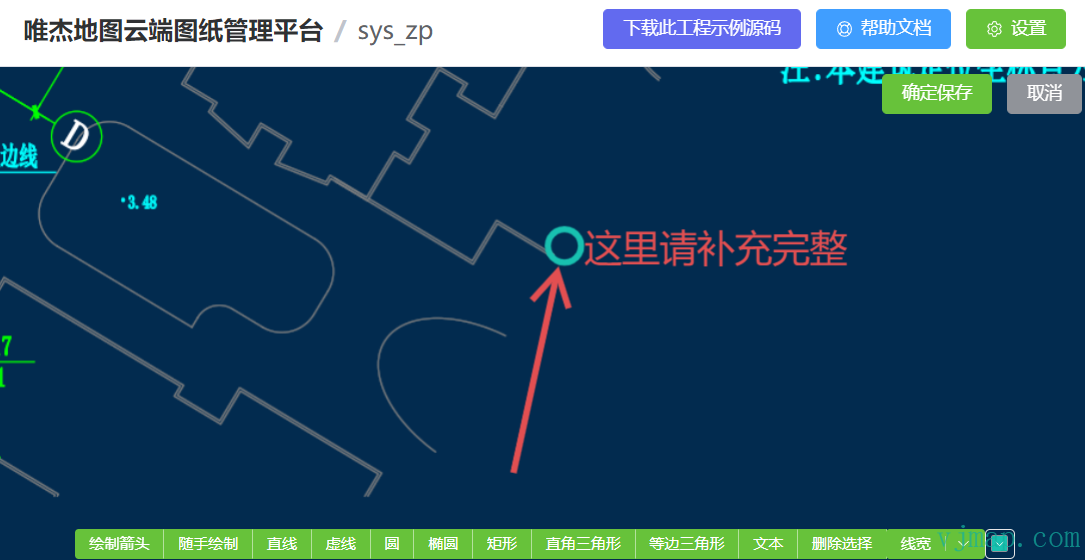
The case code above is open source. Visit (VJMap Cloud Drawing Management Platform https://vjmap.com/app/cloud) and click Download Case Source Code to get it.