
Text
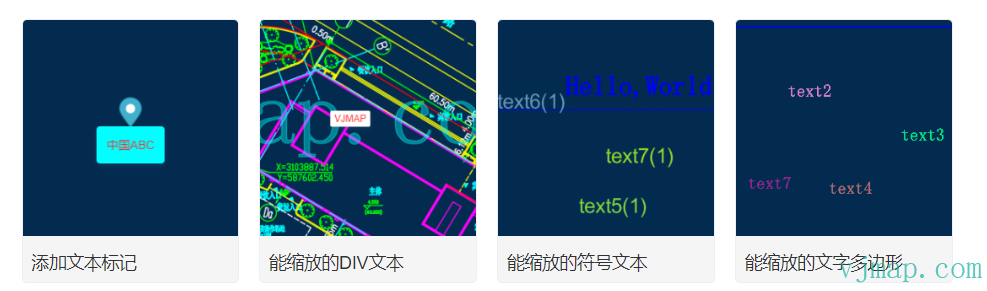
Text creates a text component using div and internally uses the Marker object.
Type Definitions
/**
 * Create text component.
 *
 * @param {Object} [options]
 * @param {object}  [options.text] Text content
 * @param {object}  [options.style] Text style
 * @param {HTMLElement} [options.element] DOM element to use as text.
 * @param {string} [options.anchor='center'] A string indicating which part of the marker should be placed closest to the coordinates. Options are "center", "top", "bottom", "left", "right", "top-left", "top-right", "bottom-left", and "bottom-right".
 * @param {PointLike} [options.offset] Offset in pixels relative to element center. Negative values indicate left and up.
 * @param {string} [options.color='#3FB1CE'] If `options.element` is not provided.
 * @param {number} [options.scale=1] Scale for default text if `options.element` is not provided.
 * @param {boolean} [options.draggable=false] A boolean indicating whether the text can be dragged to a new position on the map.
 * @param {number} [options.clickTolerance=0] Maximum pixels the mouse pointer can move during a click to be considered a valid click (as opposed to text drag). Default inherits map's `clickTolerance`.
 * @param {number} [options.rotation=0] Rotation angle of text relative to its "rotationAlignment" setting (in degrees). Positive values rotate text clockwise.
 * @param {string} [options.pitchAlignment='auto'] `map` aligns `Text` with map plane. `viewport` aligns `Text` with viewport plane. `auto` matches `rotationAlignment` value.
 * @param {string} [options.rotationAlignment='auto'] `map` aligns `Text` rotation relative to map, maintaining orientation when map rotates. `viewport` aligns `Text` rotation relative to viewport, independent of map rotation. `auto` equals `viewport`.
 * @example
 * // Create a new Text.
 * const text = new vjmap.Text({text: "abc"})
 *     .setLngLat([30.5, 50.5])
 *     .addTo(map);
 * @example
 * // Set text options.
 * const text = new vjmap.Text({
 *     text: "abc",
 *     draggable: true
 * }).setLngLat([30.5, 50.5])
 *     .addTo(map);
 */
 class Text extends Evented {
    private readonly _marker;
    _textContainerDom: HTMLElement;
    _style: object;
    /**
     * Constructor
     * @param options
     */
    constructor(options?: {
        /** Text content. */
        text?: string;
        /** Text style. */
        style?: object;
        /** DOM element for marker. Default is light blue, droplet-shaped SVG marker */
        element?: HTMLElement | undefined;

        /** Offset in pixels as PointLike object relative to element center. Negative values indicate left and up.*/
        offset?: PointLike | undefined;

        /** A string indicating which part of the marker should be placed closest to the anchor via Marker.setLngLat.
         * Options are `'center'`, `'top'`, `'bottom'`, `'left'`, `'right'`, `'top-left'`, `'top-right'`, `'bottom-left'`, and `'bottom-right'`.
         * The default value is `'center'`
         */
        anchor?: Anchor | undefined;

        /** Default marker color if options.element is not provided. Default is light blue (#3FB1CE) */
        color?: string | undefined;

        /** A boolean indicating whether the marker can be dragged to a new position on the map. Default is false */
        draggable?: boolean | undefined;

        /**
         * Maximum pixels the mouse pointer can move during a marker click to be considered a valid click
         * (as opposed to marker drag). Default (0) inherits map's clickTolerance.
         */
        clickTolerance?: number | null | undefined;

        /** Marker rotation angle relative to "rotation alignment" setting (degrees). Positive values rotate marker clockwise.
         * The default value is 0.
         */
        rotation?: number | undefined;

        /** map aligns Marker rotation relative to map, maintaining orientation when map rotates.
        *`viewport` aligns Marker rotation relative to viewport, independent of map rotation.
        *`auto` equals `viewport`.
        */
        rotationAlignment?: Alignment | undefined;

        /** map aligns Marker with map plane.
         * `viewport` aligns Marker with viewport plane.
         * `auto` matches `rotationAlignment` value`
         * The default value is `auto`.
         */
        pitchAlignment?: Alignment | undefined;

        /** Default marker scale if options.element is not provided.
         * Default scale (1) corresponds to height "41px" and width "27px"`.
         */
        scale?: number | undefined;
    });
    /**
     * Attach `Text` to `Map` object.
     *
     * @param {Map}  map to add the text to.
     * @returns {Text} Returns itself to allow for method chaining.
     * @example
     * const text = new vjmap.Text({text: "abc"})
     *     .setLngLat([30.5, 50.5])
     *     .addTo(map); // add the text to the map
     */
    addTo(map: Map): Text;
    /**
     * Remove text from map.
     *
     * @example
     * const text = new vjmap.Text().addTo(map);
     * text.remove();
     * @returns {Text} Returns itself to allow for method chaining.
     */
    remove(): Text;
    /**
     * Get longitude and latitude
     * @return {any}
     */
    getLngLat(): LngLatLike;
    /**
     * Set longitude and latitude
     * @param lnglat
     * @return {this}
     */
    setLngLat(lnglat: LngLatLike): Text;
    /**
     * Return the HTML element of `Text`.
     *
     * @returns {HTMLElement} Returns the text element.
     * @example
     * const element = text.getElement();
     */
    getElement(): HTMLElement;
    /**
     * Return the Marker object of `Text`.
     */
    getMarker(): Marker;
    /**
     * Binds a `Popup` to the `Text`
     * @param popup
     * @return {this}
     */
    setPopup(popup?: Popup): Text;
    /**
     * Return the `Popup` instance bound to `Text`.
     *
     * @returns {Popup} Returns the popup.
     */
    getPopup(): Popup;
    /**
     * Open or close the `Popup` instance bound to `Text` based on its current state.
     *
     * @returns {Text} Returns itself to allow for method chaining.
     */
    togglePopup(): Text;
    /**
     * Get text offset.
     *
     * @returns {Point} The text's screen coordinates in pixels.
     */
    getOffset(): number;
    /**
     * Set text offset.
     *
     * @param {PointLike} offset Offset in pixels as PointLike object relative to element center. Negative values indicate left and up.
     * @returns {Text} Returns itself to allow for method chaining.
     */
    setOffset(offset: PointLike): Text;
    /**
     * Set the `draggable` property and functionality of text.
     *
     * @param {boolean} [shouldBeDraggable=false] Turns drag functionality on/off.
     * @returns {Text} Returns itself to allow for method chaining.
     */
    setDraggable(shouldBeDraggable: boolean): Text;
    /**
     * Return true if text is draggable.
     *
     * @returns {boolean} True if the text is draggable.
     */
    isDraggable(): boolean;
    /**
     * Sets the `rotation` property of the text.
     *
     * @param {number} [rotation=0] Rotation angle of text relative to its setting (clockwise, in degrees).
     * @returns {Text} Returns itself to allow for method chaining.
     */
    setRotation(rotation: number): Text;
    /**
     * Return the current rotation angle of text (in degrees).
     *
     * @returns {number} The current rotation angle of the text.
     */
    getRotation(): number;
    /**
     * Set the `rotationAlignment` property of text.
     *
     * @param {string} [alignment='auto'] Set the `rotationAlignment` property of text.
     * @returns {Text} Returns itself to allow for method chaining.
     */
    setRotationAlignment(alignment: string): this;
    /**
     * Return the current `rotationAlignment` property of text.
     *
     * @returns {string} The current rotational alignment of the text.
     */
    getRotationAlignment(): string;
    /**
     * Set the `pitchAlignment` property of text.
     *
     * @param {string} [alignment] Set the `pitchAlignment` property of text. If alignment is 'auto', it matches 'rotationAlignment'.
     * @returns {Text} Returns itself to allow for method chaining.
     */
    setPitchAlignment(alignment: string): Text;
    /**
     * Return the current `pitchAlignment` property of text.
     *
     * @returns {string} The current pitch alignment of the text in degrees.
     */
    getPitchAlignment(): string;
    /**
     * Set animation
     * @param animationType
     * MAP_ANIMATION_NONE No animation
     * MAP_ANIMATION_BOUNCE Bounce
     * MAP_ANIMATION_DROP Drop
     */
    setAnimation(animationType: string): void;
    /**
     * Show
     */
    show(): void;
    /**
     * Hide
     */
    hide(): void;
    /**
     * Set cursor
     * @param cur Cursor name
     */
    setCursor(cur: string): void;
    /**
     * Set text content
     * @param txt
     */
    setText(txt: string): Text;
    /**
     * Get text content
     */
    getText(): string;
    /**
     * Set text style
     * @param style
     */
    setStyle(style?: object): Text;
    /**
     * Get text style
     */
    getStyle(): object;
}
Usage
let text = new vjmap.Text({
    text: "ChinaABC",
    anchor: "top",
    draggable: true,
    offset: [0, 0], // Pixel offset in x, y direction
    style:{     // Custom style
        'cursor': 'pointer',
        'opacity': 1,
        'padding': '12px',
        'border-radius': '4px',
        'background-color': '#0ff',
        'border-width': 0,
        'box-shadow': '0px 2px 6px 0px rgba(97,113,166,0.2)',
        'text-align': 'center',
        'font-size': '14px',
        'color': '#F33'
    }
});
text.setLngLat(map.getCenter()).addTo(map);
Runs in a sandbox against the VJMAP public demo service
// --Add text marker-- This is basic DOM text marker, for large numbers of text use symbol for better performance
// Map service object
let svc = new vjmap.Service(env.serviceUrl, env.accessToken)
// Open map
let res = await svc.openMap({
    mapid: env.exampleMapId, // Map ID
    mapopenway: vjmap.MapOpenWay.GeomRender, // Open with geometry data rendering
    style: vjmap.openMapDarkStyle() // Use dark background style when div has dark background
})
if (res.error) {
    // If open fails
    message.error(res.error)
}
// Get map extent
let mapExtent = vjmap.GeoBounds.fromString(res.bounds);
// Create geometric projection coordinate system based on map extent
let prj = new vjmap.GeoProjection(mapExtent);
// Map object
let map = new vjmap.Map({
    container: 'map', // DIV container ID
    style: svc.rasterStyle(), // Style, raster style here
    center: prj.toLngLat(mapExtent.center()), // Set map center
    zoom: 2, // Set map zoom level
    renderWorldCopies: false // Do not display multi-screen map
});
// Associate service object and projection object
map.attach(svc, prj);
// Scale map to full extent based on map bounds
map.fitMapBounds();
let mapBounds = map.getGeoBounds();
await map.onLoad();
let marker = new vjmap.Marker();
marker.setLngLat(map.getCenter()).addTo(map);
let text = new vjmap.Text({
    text: "ChinaABC",
    anchor: "top",
    draggable: true,
    offset: [0, 0], // Pixel offset in x, y direction
    style:{     // Custom style
        'cursor': 'pointer',
        'opacity': 1,
        'padding': '12px',
        'border-radius': '4px',
        'background-color': '#0ff',
        'border-width': 0,
        'box-shadow': '0px 2px 6px 0px rgba(97,113,166,0.2)',
        'text-align': 'center',
        'font-size': '14px',
        'color': '#F33'
    }
});
text.setLngLat(map.getCenter()).addTo(map);
// Set some custom attributes
let customAttr = { "item": "test"};
text.customAttr = customAttr;
text.on('dragstart', (e) => {
    console.log("dragstart", e);
});
text.on('click', (e) => {
    // Get custom attribute
    let txt = e.target;
    console.log("click", txt.customAttr.item);
});
text.on('mouseover', (e) => {
    console.log("mouseover", e);
});
text.on('mouseleave', (e) => {
    console.log("mouseleave", e);
});
text.on('dblclick', (e) => {
    console.log("dblclick", e);
});
text.on('contextmenu', (e) => {
    console.log("contextmenu", e);
});
text.on('mousedown', (e) => {
    console.log("mousedown", e);
});
text.on('mouseup', (e) => {
    console.log("mouseup", e);
});
Examples
Was this page helpful?Thanks for the feedback!