
VJMAP3D
Lift CAD drawings and maps
into 3D
A three.js-based 3D visualization engine: use it on its own for data visualization, product showcases, digital twins and 3D GIS, or as the 3D layer of VJMAP. Since v2 it supports both WebGL and WebGPU with one codebase, falling back automatically when WebGPU is unavailable.
npm i vjmap3d threeor via importmap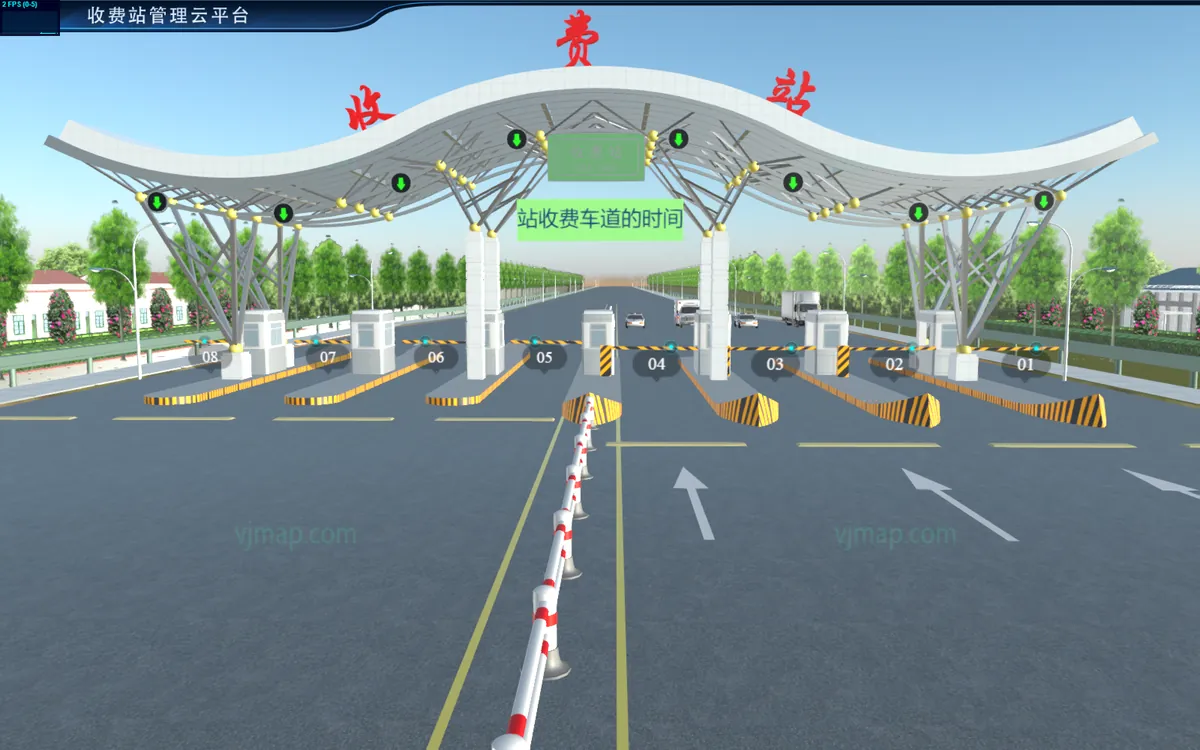
One codebase, auto fallback
glTF, FBX, IFC, 3D Tiles…


Everything 3D visualization needs, built in
ThreeJS Ecosystem
Write standard three.js code and reuse community resources, materials and models directly.
WebGL & WebGPU
Switch between WebGL / WebGPU with one option, with automatic fallback when the browser lacks support.
VJMAP Compatible
One codebase: use it as a 3D layer on 2D maps, or on its own.

CAD as 3D Ground

MapViewEntity maps a DWG drawing onto 3D ground, with pickable drawing data.
Internet Map Overlay
Overlay CAD drawings with internet maps and terrain, with clipping support.
Rich Entities
Polygons, polylines, extruded massing models, sprites, symbols, instancing and more.

Particle System
Fire, smoke, rain, snow, flow and other particle effects, batchable and configurable.
Post-Processing

Bloom, outline, depth of field, SSAO and other common effects, or write your own.
3D Tiles
Load 3D Tiles with internet maps overlaid automatically.
Physics & Algorithms
Physics engine plugin, geometric Boolean operations, and 2D CAD drawings generated from 3D models.
Interactive UI
Marker2D / 3D, Popup2D, context menus and settings panels.
Animation & Behaviors
Tween, path and keyframe animation, plus behavior components.
Turn a CAD drawing into 3D ground

Create a Service and an App, open the drawing, use MapViewEntity as the 3D ground, then add entities and effects on top.
- 1Create the app
vjmap3d.App, optionally with thewebgpuengine - 2Open the drawing
app.svc.openMapwith geometry rendering - 3CAD as groundAdd
MapProvider+MapViewEntityto the scene
let svc = new vjmap3d.Service(env.serviceUrl, env.accessToken);
let app = new vjmap3d.App(svc, {
    render: { engine: "webgpu" },   // falls back to WebGL if unsupported
    container: "map",
    camera: { viewHelper: { enable: true } }
})
await app.whenReady();
let res = await app.svc.openMap({
    mapid: env.exampleMapId,
    mapopenway: vjmap3d.MapOpenWay.GeomRender, // open with geometry rendering
    style: vjmap3d.openMapDarkStyle()
});
let provider = new vjmap3d.MapProvider([{ url: app.svc.rasterTileUrl() }], { transparent: true });
let mapBounds = vjmap3d.GeoBounds.fromString(res.bounds)
let mapviewEnt = new vjmap3d.MapViewEntity({
    provider,
    baseScale: 100,
    mapBounds: mapBounds.toArray()
});
mapviewEnt.addTo(app);
// Convert between CAD and 3D world coordinates
let cadLen = mapBounds.width() / 50;
let len = vjmap3d.toDist(cadLen);
let box = new THREE.BoxGeometry(len, len, len)
let mesh = new THREE.Mesh(box, new THREE.MeshStandardMaterial({ color: "#f00" }));
let cadPos = [mapBounds.center().x, mapBounds.center().y, cadLen];
mesh.position.copy(vjmap3d.toWorld(cadPos));
// Wrap as an entity to make it pickable and animatable
let entity = vjmap3d.Entity.fromObject3d(mesh);

362 examples, ready to run
162 original examples, plus 200 official three.js examples
Use Cases

Show live personnel positions and track history in 3D tunnels, and find the nearest exit.

Generate pipes and tunnels automatically from CAD 3D polylines, with junctions handled for you.
3D visualization dashboards and operations platforms for wind farms, toll stations and more.

Query polylines from CAD drawings and extrude them into 3D massing models and walls.

Load IFC, FBX, GLTF and other models for product showcases and indoor walkthroughs.

3D scenes combining CAD drawings with internet maps, terrain and 3D Tiles.
FAQ
How do I install it? Can I use a script tag?
Install vjmap3d and three with npm / pnpm, or load them as ES modules via importmap. Loading directly with <script src> is not supported.
Can I use it with 2D VJMAP?
Yes. VJMAP3D is compatible with VJMAP: use it as a 3D layer on 2D maps, or build standalone 3D apps.
Which data and model formats are supported?
CAD drawings (DWG) can serve as 3D ground, and GLTF, FBX, IFC, 3DS, 3D Tiles and more are supported; the plugin loaders handle 39 formats in total.
What are the browser requirements?
WebGPU requires Chrome / Edge 113 or later, served over HTTPS or localhost; otherwise it falls back to WebGL automatically.
Is on-premises deployment available?
The free trial connects directly to our hosted service, is watermarked and cannot be deployed on-premises. Contact us for private deployment of the commercial version.
How do I get a license and a quote?
Contact us via the WeChat official account or support WeChat at the bottom of this page.
Related Products
Take your drawings 3D
Start from an example and have your first 3D scene running in ten minutes.