
VJMAP Server
The server foundation
for CAD / GIS drawings
Parse DWG / DXF / images into storage and publish them as web maps with raster or MVT vector tiles. On top of that: query, styling, geometric analysis, table and centerline extraction, PDF / DXF export, plus workspaces, KV storage, symbol libraries and full-text indexing. Your data never leaves your intranet, so it stays secure and under your control.
Auth & access control
Write tools off by default
One foundation powers every product
Frontend products and business systems access drawings through the same service
Frontends & Business Apps
- vjmap.js / VJMAP3D
- WebCAD Editor
- AI Visualization / Agent Platform
- Python / Node.js SDK
Go Web Gateway
- JWT auth + Casbin
- Routing & caching
- Workspace URL rewriting
- MCP & AI proxy
C++ Graphics Engine
- DWG / DXF parsing
- Rendering & tile generation
- Geometric analysis & extraction
- PDF / DXF / DWG export
Storage & Indexing
- One database per drawing
- KV, workspaces, symbol libraries
- Bleve full-text index
- Vector store (optional)
AI (optional)
Vector similarity search, an FAQ knowledge base and an OpenAI-compatible LLM proxy. Everything else works normally when AI is disabled.
Standard Service Output
XYZ raster tiles, MVT vector tiles and WMS, with single- or multi-drawing overlays on internet maps.
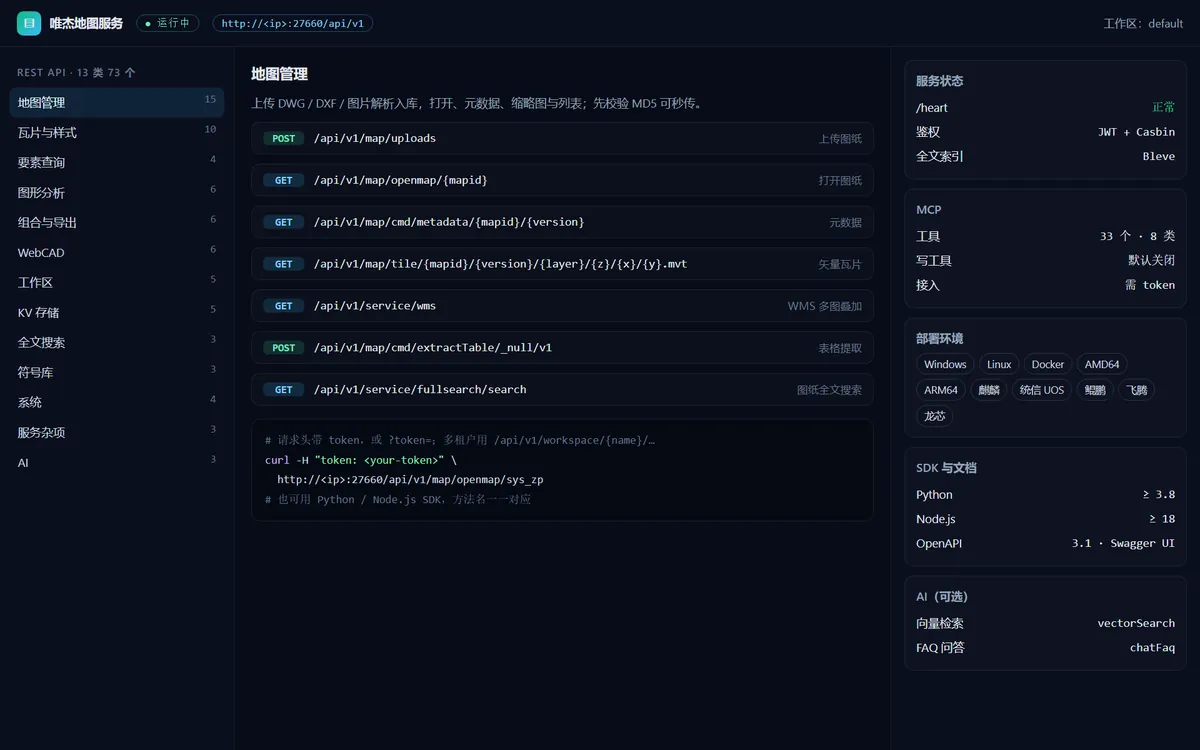
73 APIs in 13 categories
Described in OpenAPI 3.1 with Swagger UI for live testing; Python and Node.js SDK methods map one-to-one to the APIs
Map Management · 15
Upload, open, metadata, thumbnails and listing; an MD5 pre-check enables instant uploads.
POST /api/v1/map/uploadsGET /api/v1/map/openmap/{mapid}
Tiles & Styles · 10
Raster XYZ, MVT and WMS with single / multi-drawing overlays, plus styles and tile caching.
GET /api/v1/map/tile/…/{z}/{x}/{y}.mvtGET /api/v1/service/wms
Feature Query · 4
Entity query, geometry construction, coordinate transformation and WKT to PROJ4.
/cmd/queryFeatures/cmd/coordtransform
Graphic Analysis · 6
Pixel diff, entity comparison, table extraction, centerlines, object matching and SVG / image to DWG.
/cmd/mapDiff/cmd/extractTable
Compose & Export · 6
Compose new drawings, split, export layouts / PDF / DXF and build offline tile packages.
/cmd/composeNewMap/cmd/saveOfflineTileDb
WebCAD · 6
List, read and save incremental patches for WebCAD drawings, plus conversion and DWG export.
/cmd/saveWebcadPatch/cmd/exportWebCAD
Workspaces · 5
Multi-tenant namespaces that isolate drawings, symbols, KV data and full-text indexes.
/api/v1/workspace/{name}/…
KV · Symbols · Full-text Search
5 KV storage APIs, 3 symbol library APIs and 3 Bleve-based full-text search APIs for CAD text.
/api/v1/service/data/{key}/api/v1/service/fullsearch/search
AI · 3 (optional)
Vector similarity search, FAQ Q&A and vector document export.
/api/v1/service/vectorSearch/api/v1/service/chatFaq
Minimum Server Requirements
Minimum configuration for a private deployment of VJMAP Server. Add memory and disk for large drawing volumes or high concurrency.
Operating System
Linux (Docker supported) or Windows Server 2016 and later; compatible with domestic Chinese operating systems such as Kylin and UnionTech UOS.
CPU Architecture
AMD64 or ARM64 (domestic Chinese CPUs such as Kunpeng and Phytium are supported).
CPU Cores
4 cores or more.
Memory
16 GB or more.
Disk Space
Depends on your workload; allow more space for many drawings (drawings, tile cache and indexes are all stored locally).
Deployment & Security
| Item | Details |
|---|---|
| Deployment Options | Public cloud, private cloud, on-premises appliance or Docker; data stays on your intranet |
| OS & Architecture | Windows, Linux; AMD64, ARM64; one core runs on every platform |
| Xinchuang Platforms | Kylin, UnionTech UOS, Kunpeng, Phytium and Loongson, meeting Xinchuang compliance requirements |
| Endpoint | Public cloud: https://vjmap.com/server/api/v1; with private deployment, use your own service URL with the same /api/v1 path |
| Auth & Permissions | HS256 JWT (refreshable) and Casbin access control; pass the token in the token header or as ?token= |
| Data Security | Per-drawing keys for encrypted drawings, a global accessKey and workspace isolation |
| MCP | Off by default with write tools disabled; a token is required; supports tool allowlists / blocklists |
| Offline Use | Export offline tile packages for use without network access |
FAQ
Which programming languages are supported?
Official SDKs are available for Python (≥ 3.8) and Node.js (≥ 18), along with an OpenAPI 3.1 spec and Swagger UI. Any language that can send HTTP requests can call the APIs.
How do I pass the token?
Preferably in the token request header, or as the ?token= query parameter. Authorization: Bearer is used only for MCP routes.
Does it support multi-tenancy?
Yes. Use workspaces, with URLs like /api/v1/workspace/{name}/…; drawings, symbols, KV data and full-text indexes are isolated between workspaces.
What are the server requirements for private deployment?
Minimum: Linux (Docker supported) or Windows Server 2016 and later; an AMD64 or ARM64 CPU with 4+ cores; 16 GB+ of memory; disk size depends on drawing volume, so allow more for many drawings.
Can it be deployed on an intranet or offline?
Yes. It can be deployed privately on your intranet and can export offline tile packages; it is compatible with AMD64 / ARM64 and domestic Chinese operating systems.
Are the AI features required?
No. The AI APIs are enabled on demand and need a separately deployed embedding model; all other features work normally without them.
How do I get a private deployment plan?
Contact us through the WeChat official account or support WeChat at the bottom of the page, and we will propose a plan based on your environment and scale.
Products Built on VJMAP Server
Run the drawing service on your own servers
Tell us your deployment environment and scale to get a private deployment plan.