
# Frontend Open-Source Geometry Libraries
# JSTS
JSTS is an ECMAScript library of spatial predicates and functions for processing geometry conforming to the Open Geospatial Consortium's SQL Simple Feature specification. JSTS is also a port of the mature Java library JTS.
The main goal of the project is to provide web mapping applications with a complete library for processing and analyzing simple geometries, but JSTS can also be used as a standalone geometry library.
JSTS was produced through AST-to-AST transformation preserving the JTS API using the original JTS (opens new window) Java source, except for I/O-related classes, which have been selectively manually ported with support for WKT, GeoJSON, and OpenLayers 3+.
GitHub: https://github.com/bjornharrtell/jsts (opens new window)
Core features:
- Geometry models (points, lines, areas)
- Geometry operations (e.g., intersection, union, within, etc.)
- Geometry construction
- Measurement functions (e.g., Cartesian 2D distance, Hausdorff distance)
- Spatial algorithms (e.g., buffer creation, line offset, line simplification)
- Geometry math functions (e.g., angle, distance, etc.)
- Spatial structures (e.g., quadtree and R-tree, Delaunay triangulation)
- Input/output (e.g., WKT, GML)
- High-precision arithmetic
Usage: http://bjornharrtell.github.io/jsts/ (opens new window)
var reader = new jsts.io.WKTReader()
var a = reader.read('POINT (-20 0)')
var b = reader.read('POINT (20 0)')
// Buffer A and B by 40 units
a = a.buffer(40)
b = b.buffer(40)
// Intersection of A and B
var intersection = a.intersection(b)
// Difference of A and B
var difference = a.difference(b)
// Union of A and B
var union = a.union(b)
// Symmetric difference of A and B
var symDifference = a.symDifference(b)
2
3
4
5
6
7
8
9
10
11
12
13
14

JSTS basic concepts are the same as JTS. JTS basic concepts and usage: https://blog.csdn.net/runing9/article/details/51890350 (opens new window)
Advantages:
- Powerful open-source library
- Supports planar coordinate systems, not limited to geographic coordinate systems
Disadvantages:
- Lacks documentation and examples
# Turf
Turf.js is a JavaScript spatial analysis library. Turf implements common spatial analysis operations such as buffer generation, contour calculation, TIN creation, etc. Analysis features that were once only available in desktop GIS can now be used in the browser. Turf is written in JavaScript and uses npm for package management. Its modular design allows Turf to be used not only in the browser but also on the server via Node.js. Turf natively supports GeoJSON vector data. GeoJSON's advantages are its simple structure and support from all web map APIs;
GitHub: https://github.com/Turfjs/turf (opens new window)
Main features:
- Measurement
- Coordinate Mutation
- Transformation
- Feature Conversion
- Misc
- Helper data utilities
- Random data generation
- Interpolation
- Joins
- Grids
- Classification
- Aggregation
- Meta metadata usage
- Assertions type validation
- Booleans
- Unit Conversion
Usage: http://turfjs.org/ (opens new window)
In frontend build tools or Node environment:
var collect = require('@turf/collect');
// or in ES6
import collect from '@turf/collect';
// Usage
collect(points, polys, 'population', 'populationValues');

// Full import

import * as turf from '@turf/turf'
2
3
4
5
6
7
8
9
Direct use in browser
<script src='https://unpkg.com/@turf/turf@6/turf.min.js'></script>
<script>
  var bbox = turf.bbox(features);
</script>
2
3
4
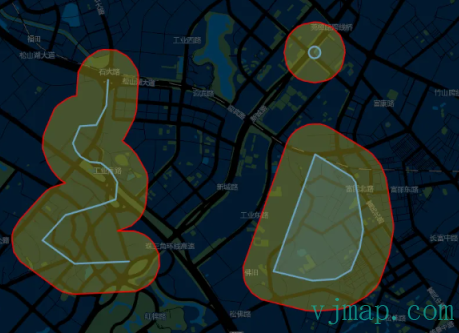
Turf buffer analysis
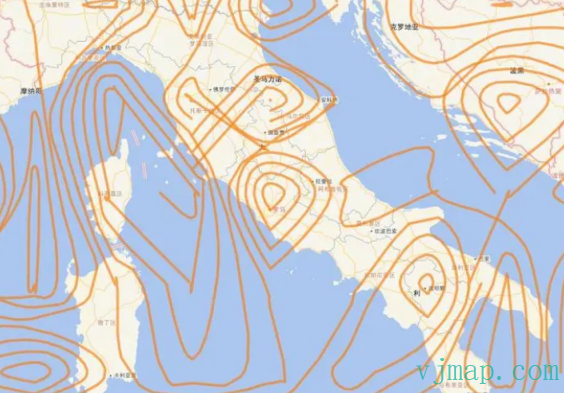
Turf contour drawing
Advantages:
- Powerful GIS open-source library with ongoing updates
- Complete documentation and many examples
Disadvantages:
- turf.js only supports 3857 and 4326 coordinate systems. Other coordinate systems are not supported
# geometric
geometric is a JavaScript library for processing geometry. Very lightweight.
GitHub: https://github.com/HarryStevens/geometric (opens new window)
Features: Provides point, line, polygon, and intersection algorithms.
# Web Browser
In the original, geometric is exported globally. You can use the latest version from unpkg.
<script src="https://unpkg.com/geometric@2.5.0/build/geometric.js"\></script\>
<script src="https://unpkg.com/geometric@2.5.0/build/geometric.min.js"\></script\>
2
Or
npm i geometric -S
Usage
const geometric = require("geometric");
var first_draw = 1;
var width = 960, height = 500;
var initial_separation = 200;
var rect_width = 40, rect_height = 20;

var data = [[-initial_separation + width / 2, height / 2], [initial_separation + width / 2, height / 2]], full_datum, half_datum, full_translate, half_translate;
var angle = geometric.lineAngle([data[0], data[1]]);
var full_distance = geometric.lineLength([data[0], data[1]]);
var half_distance = full_distance / 2;
2
3
4
5
6
7
8
9
10
11
Example code https://bl.ocks.org/HarryStevens/c4eddfb97535e8e01643325cb43175ff (opens new window) 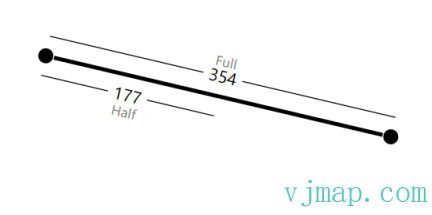
https://bl.ocks.org/HarryStevens/5fe49df19892c04dfb9883c217571409 (opens new window)
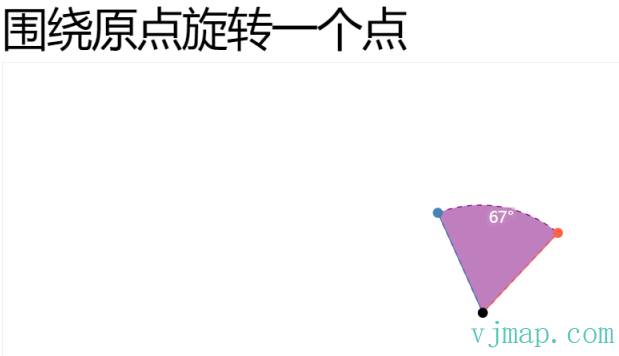
Advantages:
- Small and focused
- Code is highly readable with a low learning curve, very suitable for borrowing code from
Disadvantages:
- Only geometry computation features; GIS spatial analysis support is insufficient