
绘图编辑拾取工具
实现原理
工具Tool有一个“状态图”,即StateNode,其中包含工具(例如选择工具或绘制工具)的逻辑。用户交互(例如移动光标)将根据哪些节点处于活动状态而产生不同的状态变化。
每个节点都可以处于活动状态或非活动状态。每个状态节点也可能有零个或多个子节点。当某个状态处于活动状态时,如果该状态有子节点,则其子节点中必须有一个(且只有一个)处于活动状态。当状态节点从其父节点接收到事件时,它有机会在将事件传递给其活动子节点之前处理该事件。节点可以以任何方式处理事件:它可以忽略事件、更新存储中的记录或运行转换,以更改哪些状态节点处于活动状态。
当用户交互通过App将事件方法发送到工具时,此事件将被发送到工具的根状态节点rootState,然后向下传递通过下面的活动状态,直到到达叶节点或其中一个节点响应。
Tool工具
vjmap3d 编辑器带有一些内置核心工具:缺省工具、绘图工具、拾取工具和变换控制器工具。这些工具始终添加到状态图中。
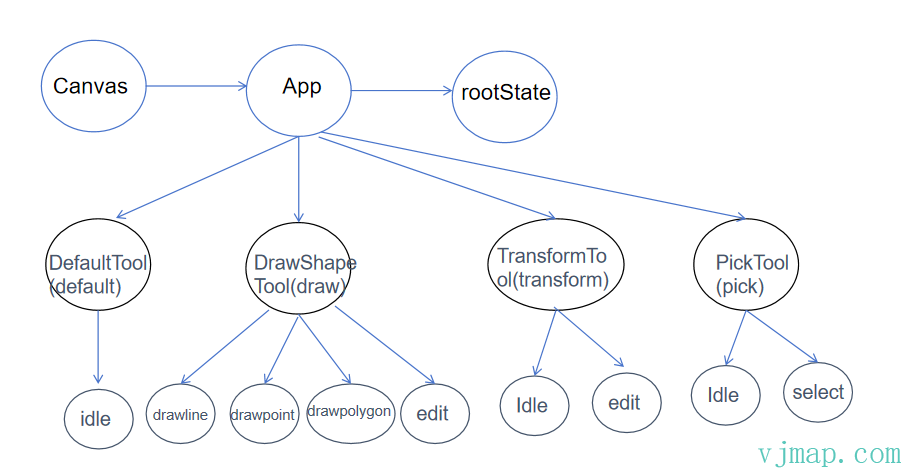
工具切换
您可以使用app.setCurrentTool更改当前活动工具。
app.setCurrentTool('draw')
您可以使用活动工具 ID 的路径进行工具状态切换。如直接进入绘制线工具状态
app.setCurrentTool('draw.drawline')
工具实现规范
每个工具都有一个id。这用于在状态图中识别它。
class MyTool extends StateNode {
	static override id = 'my-tool'
}
工具可以包含子项。例如,绘图工具的子状态有:idle、drawpoint、drawline、drawpolygon和drawedit。如果某个状态有子项,那么它也必须有一个initial状态,这样它才知道从哪个状态开始。
class MyIdleState extends StateNode {
	static override id = 'my-idle-state'
}

class MyPointingState extends StateNode {
	static override id = 'my-pointing-state'
}

class MyTool extends StateNode {
	static override id = 'my-tool'
	static override initial = 'my-idle-state'
	// children 必须是返回类数组的函数;写成数组会在构造时抛 "children is not a function"
	static override children = () => [MyIdleState, MyPointingState]
}
事件处理
从根节点开始,每个节点将首先处理事件,然后将事件传递给其当前活动的子状态。此过程持续到以下任一情况:在没有任何子节点的状态下处理事件;或者以产生转换的方式处理事件。
父节点会在子节点前处理事件
class MyIdleState extends StateNode {
	static override id = 'my-idle-state'

	onPointerDown(info) {
		console.log('world')
	}
}

class MyTool extends StateNode {
	static override id = 'my-tool'
	static override initial = 'my-idle-state'
	static override children = () => [MyIdleState]

	onPointerDown(info) {
		console.log('hello')
	}
}
使用上面的例子,当前工具为MyTool的MyIdleState时,有点击事件onPointerDown发生时,将事件传递给MyTool,则将首先调用MyTool.onPointerDown的方法,然后再调用的MyIdleState.onPointerDown的方法。
class MyIdleState extends StateNode {
	static override id = 'my-idle-state'

	onPointerDown = (info) => {
		console.log("this won't run")
	}
}

class MyTool extends StateNode {
	static override id = 'my-tool'
	static override initial = 'my-idle-state'
	static override children = () => [MyIdleState]

	onPointerDown = (info) => {
		// 注意:'select' 是 pick 工具的子状态而非根工具,setCurrentTool('select') 会抛
		// "root - no child state exists with the id select"。应写 'pick' 或 'pick.select'。
		this.app.setCurrentTool('pick') // StateNode 内通过 this.app(或 this.editor)访问 App
	}
}
如果MyTool的onPointerDown处理程序产生了转换(改变了任何活动状态),那么事件链条将停止,并且不会处理该事件MyIdleState。
Path
您可以通过app.getStatePath 获取当前的活动状态“路径” 。
您可以通过 检查一条路径是否处于活动状态app.stateIsIn,或者通过 检查多条路径是否处于活动状态app.stateInAny。(这些都是 app 实例上的方法,不是静态方法。)
⚠️ 运行时限制:状态节点的当前子状态存放在响应式
ref里,经代理读取时下层子状态取不到——getStatePath()实际只返回顶层工具 id(如'draw',未设置过任何工具时为undefined),stateIsIn/stateInAny传带点的子路径(如'pick.idle'、'draw.drawpoint')恒为 false。判断子状态是否激活请用app.getStateDescendant(path)?.getIsActive()(按children逐级查找,结果可靠)。setCurrentTool('draw.drawpoint')这类带点路径的切换不受影响。
app.getStatePath() // 'draw'(只有顶层工具 id)

app.stateIsIn('draw') // true
app.stateInAny('draw', 'pick') // true(只用顶层 id)
app.getStateDescendant('draw.drawpoint')?.getIsActive() // 判断子状态
App.getCurrentToolId可以获取当前选择的工具。
常用工具
缺省工具
缺省工具下不会执行任何动作。
- 缺省工具id: "default"
- 子状态节点: "idle"
绘图工具
- 缺省工具id: "draw"
| 子状态节点id | 描述 |
|---|---|
| idle | 初始空闲 |
| drawpoint | 绘制点 |
| drawline | 绘制线 |
| drawpolygon | 绘制多边形 |
| drawedit | 编辑 |
拾取工具
- 缺省工具id: "pick"
| 子状态节点id | 描述 |
|---|---|
| idle | 初始空闲 |
| select | 选择对象 |
变换控制器工具
- 缺省工具id: "transform"
| 子状态节点id | 描述 |
|---|---|
| idle | 初始空闲 |
| edit | 控制物体变换 |
示例
绘制点
app.setCurrentTool("draw.drawpoint", {
    color: 0xffffff,
    size: 20
})
绘制线
app.setCurrentTool("draw.drawline", {
    color: Math.random() * 0xffffff,
    lineWidth: +((Math.random() * 6).toFixed(0)) + 1
})
绘制多边形
app.setCurrentTool("draw.drawpolygon", {
    color: Math.random() * 0xffffff
})
编辑形状
app.setCurrentTool("draw.drawedit")
控制物体变换
app.setCurrentTool("transform")
拾取对象
 let opts = {
    pickCallBack: (param) => {
        console.log(param.oldPick) // ⚠️ 运行时恒为 null(实现缺陷),需要上一次拾取结果请自行记录 curPick
        console.log(param.curPick)
        if (param.curPick) app.logInfo("拾取到了", "success")
    }
}
app.setCurrentTool("pick", opts)
取消操作
app.setCurrentTool("default")
let svc = new vjmap3d.Service(env.serviceUrl, env.accessToken);
let app = new vjmap3d.App(svc, {
    container: "map", // 容器id
    stat: { show: true, left: "0" },
    scene: {
        gridHelper: { visible: true } // 是否显示坐标网格
    },
    camera: {  // 相机设置
        viewHelper: { enable: true, position: "leftBottom" } // 是否显示视角指示器
    }
})
for(let i = 0; i < 3; i++) {
    let box = new THREE.BoxGeometry(Math.random() * 3 + 0.5, Math.random() * 3 + 0.5, Math.random() * 3 + 0.5)
    const material = new THREE.MeshStandardMaterial({
        color: vjmap3d.randColor()
    });
    let mesh = new THREE.Mesh(box, material);
    mesh.position.copy(vjmap3d.toVector3(vjmap3d.randPoint3D({maxX: 5, maxY: 2, maxZ: 5, minX: -5, minY: -2, minZ: -5})))
    let entity = vjmap3d.Entity.fromObject3d(mesh);
    entity.addTo(app);
}
const ui = await app.getConfigPane({ title: "工具", style: { width: "250px"}});
let gui = new vjmap3d.UiPanelJsonConfig();
gui.addButton("绘制点", () => {
    app.setCurrentTool("draw.drawpoint", {
        color: 0xffffff,
        size: 20
    })
})
gui.addButton("绘制线", () => {
    app.setCurrentTool("draw.drawline", {
        color: Math.random() * 0xffffff,
        lineWidth: +((Math.random() * 6).toFixed(0)) + 1
    })
})
gui.addButton("绘制多边形", () => {
    app.setCurrentTool("draw.drawpolygon", {
        color: Math.random() * 0xffffff
    })
})
gui.addButton("编辑形状", () => {
    app.setCurrentTool("draw.drawedit")
})
gui.addButton("控制物体变换", () => {
    app.setCurrentTool("transform")
})
gui.addButton("拾取对象", () => {
    let opts = {
        pickCallBack: (param) => {
            console.log(param.oldPick) // ⚠️ 运行时恒为 null
            console.log(param.curPick)
            if (param.curPick) app.logInfo("拾取到了", "success")
        }
    }
    app.setCurrentTool("pick", opts)
})
gui.addButton("取消操作", () => {
    app.setCurrentTool("default")
})
gui.toJson().forEach(c => ui.appendChild(c));
封装的工具函数
为了异步编程,简单代码逻辑,针对上面的工具,封装了如下常用工具函数:
| 方法名 | 描述 |
|---|---|
| isFreeStatus | 当前应该是否处于自由状态 |
| isFreeStatusRef | 自由状态响应式对象 |
| pickPoint | 拾取一个点 |
| pickEntity | 拾取实体 |
| drawSelectBox | 绘制一个选择框 |
| actionDrawPoint | 绘制一个点,获取点坐标 |
| actionDrawLineSting | 绘制一条线,获取线坐标 |
| actionDrawPolygon | 绘制一个多边形,获取多边形坐标 |
| actionDrawEdit | 编辑绘制的对象 |
| actionPickSelect | 选中一个实体对象,返回 {isCancel, info, select}。⚠️ 右键和 ESC 都结束选择且 isCancel=false(之前点选过对象时 select 仍保留);按 Enter 反而 isCancel=true |
| getDrawLayer | 通过图层名称获取当前绘图层的实体 |
| transformObject | 对一个物体进行变换控制器操作。⚠️ ESC 与 Enter 都只是结束操作,不会还原已做的变换(ESC 仅在拖拽进行中时撤销当前这一次拖拽) |
返回值形状:
| 方法 | resolve 的结果 |
|---|---|
pickPoint(opts) |
{cancel: false, point, intersectObject, event};ESC 为 {cancel: true, reason: "escCancel"},rightClickCancel: true 时右键为 {cancel: true, reason: "rightClickCancel"}。beforeConfirm 不返回 true 时本次点击不确认、继续拾取 |
pickEntity(opts) |
{cancel, entities, clearHighlight}(ESC 时另有 reason: "escCancel")。⚠️ 传了 beforeConfirm/onResult 时,它们必须返回 true 才会结束——否则包括 ESC 在内的所有确认/取消都被拦下,Promise 永不 resolve |
drawSelectBox(style?, shiftSelectBox?) |
框选完成为屏幕坐标 [左上 Vector2, 右下 Vector2];未框选就结束(如 ESC)为 null |
actionDrawPoint/LineSting/Polygon(opts) |
{isCancel, data}。⚠️ 默认 isAddToApp: false——只返回数据、不加入绘图层(而 setCurrentTool('draw.*') 默认会加入),需要保留请传 isAddToApp: true |
actionDrawEdit(opts) |
{}(空对象,编辑结果直接写回 editEntity 的数据) |
actionPickSelect(opts) |
{isCancel, info, select}(取消语义见上表) |
示例
let svc = new vjmap3d.Service(env.serviceUrl, env.accessToken);
let app = new vjmap3d.App(svc, {
    container: "map", // 容器id
    stat: { show: true, left: "0" },
    scene: {
        gridHelper: { visible: true } // 是否显示坐标网格
    },
    camera: {  // 相机设置
        viewHelper: { enable: true, position: "leftBottom" } // 是否显示视角指示器
    }
})
let firstEntity;
for(let i = 0; i < 3; i++) {
    let box = new THREE.BoxGeometry(Math.random() * 3 + 0.5, Math.random() * 3 + 0.5, Math.random() * 3 + 0.5)
    const material = new THREE.MeshStandardMaterial({
        color: vjmap3d.randColor()
    });
    let mesh = new THREE.Mesh(box, material);
    mesh.position.copy(vjmap3d.toVector3(vjmap3d.randPoint3D({maxX: 5, maxY: 2, maxZ: 5, minX: -5, minY: -2, minZ: -5})))
    let entity = vjmap3d.Entity.fromObject3d(mesh);
    entity.addTo(app);
    if (i == 0) firstEntity = entity;
}
const ui = await app.getConfigPane({ title: "工具", style: { width: "250px"}});
let gui = new vjmap3d.UiPanelJsonConfig();
gui.addButton("第一个实体变换", async () => {
    app.logInfo("请按Enter或ESC结束操作(ESC不会撤销已做的变换)")
    let options = {
        target: firstEntity.node,
        clickNoSelfEntityExit: false,
        clickNoEntityExit: false,
        transformSize: 1,
    }
    let res = await app.transformObject(options)
    console.log(res)
    app.logInfo("实体变换操作完成", "success")
})
gui.addButton("选择多个进行变换", async () => {
    app.logInfo("请左键选择要变换的对象,右键结束确定选择")
    app.setCurrentTool(); // 取消之前的工具操作
    let res = await app.pickEntity({
        rightClickConfirm: true,
        highlightUseBoxHelper: true
    });
    if (res.entities?.length == 0) return;
    let entities = res.entities || [];
    let positions = entities.map(p => p.position.clone())
    let options = {
        target: entities[entities.length - 1].position,
        pressEKeyModeRotate: false,
        pressRKeyModeScale: false,
        clickEntityAttach: false,
        clickNoSelfEntityExit: false,
        clickNoEntityExit: false,
        rightClickConfirmExit: true,
        editAsCommand: true,
        dragCallBack: (param) => {
            if (param.isReset) {
                // 重新开始了
                positions = entities.map(p => p.position.clone())
            } else if (param.isOnceFinish && param.command) {
                // 一次完成,加入命令
                for(let n = 0; n < entities.length; n++) {
                    param.command.addCommand(new vjmap3d.SetPositionCommand(entities[n].node, entities[n].position, positions[n]));
                }
            }
            res.entities?.forEach(ent => {
              ent.position.add(param.deltaPosition)
            })
            for(let n = 0; n < entities.length; n++) {
                entities[n].position.copy(positions[n].clone().add(param.deltaPosition));
            }
        },
        // onExitCallBack(node, context) {
        //     if (node.id != "edit") return;
        //     app.setCurrentTool()
        // },
    }
    await app.transformObject(options)
    res.clearHighlight();
})
gui.addButton("自定义绘制多边形", async () => {
    app.logInfo("绘制过程中按 Ctrl+I 输入坐标,右键弹出菜单", 5000)
    let lastPoint;
    let drawRes = await app.actionDrawPolygon({
        isAddToApp: true,
        //pointMaxCount: 3, // 三个点结束
        updateCoordinate(point, isMoveing, data) {
            let text;
            text = `当前坐标:${point.x.toFixed(2)}, ${point.y.toFixed(2)}, ${point.z.toFixed(2)}`
            if (!isMoveing) {
                lastPoint = point;
            }
            if (lastPoint) {
                text += `
距离上一个点: ${point.distanceTo(lastPoint).toFixed(2)}`
            }
            app.popup2d.show()
            app.popup2d.setHTML(text)
            app.popup2d.setPosition(point)
        },
        onKeyUp(info, context) {
            let isCtrl = vjmap3d.isCtrlKeyDown(info);
            let keyCode = vjmap3d.eventKeyCode(info) ;
            if (isCtrl && keyCode == 73) {
                // Ctrl + I
                let info = prompt("请输入坐标,格式x,y,z如 10,0,20");
                let pts = info?.split(",").map(p => +p);
                // @ts-ignore
                context.addPoint(new THREE.Vector3().fromArray(pts))
            }
        },
        onContextMenu(info, context) {
            new vjmap3d.ContextMenu({
                // @ts-ignore
                event: info.event.originalEvent,
                theme: "dark", //light
                width: "250px",
                items: [
                    {
                        label: '取消',
                        onClick: () => {
                                context.cancel()
                        }
                    }
                ]
            });
        },
        onComplete() {
            app.popup2d.hide()
        }
    })
    console.log(drawRes)
    if (drawRes.isCancel) {
        app.logInfo("取消绘制", "warn")
    } else {
        app.logInfo("绘制完成", "success")
    }
});
gui.addButton("编辑绘制的第一个多边形", async () => {
    let res = await app.actionDrawEdit({
        editEntity: app.getDrawLayer()?.polygons(),
        editIndex: 0,
        //editShowVertex: false,
        onUnEditEntity(ent, ctx) {
            ctx.complete()
        }
    })
    console.log(res)
    app.logInfo("编辑完成", "success")
});
gui.addButton("第一个多边形显示或隐藏", async () => {
    let  polygons = app.getDrawLayer()?.polygons()
    let data = polygons.getData()
    data[0].hidden = !data[0].hidden;
    polygons.setData(data)
});
gui.addButton("删除第一个多边形", async () => {
    let  layer = app.getDrawLayer()
    // id 是实体内自增的字符串、删除后不复用,不要写死 "0",从当前数据里取
    let first = layer.polygons()?.getData()[0]
    if (first) layer.deletePolygonData({
        id: first.id,
        coordinates: []
    })
});
gui.addButton("更新第一个多边形坐标", async () => {
    let  layer = app.getDrawLayer()
    let first = layer.polygons()?.getData()[0]
    // update*Data 按 id 整项替换,未带的字段(颜色等)会被重置,先展开原数据
    if (first) layer.updatePolygonData({
        ...first,
        coordinates: [vjmap3d.randPoint3D(),vjmap3d.randPoint3D(), vjmap3d.randPoint3D()]
    })
});
gui.addButton("给定坐标进行编辑坐标", async () => {
    let data = [];
    data.push({
        coordinates: [vjmap3d.randPoint3D(), vjmap3d.randPoint3D(), vjmap3d.randPoint3D()],
        color: "#00ff00",
        lineWidth: 3,
        dashScale: 2,
        dashOffset: 0,
        dashSize: 3,
        gapSize: 3,
        dashed: true
    })
    let polylines = new vjmap3d.PolylinesEntity({
        data: data
    })
    polylines.addTo(app)
    await app.actionDrawEdit({
        editEntity: polylines,
        queryEntities: [polylines],
        editIndex: 0,
        onUnEditEntity(ent, ctx) {
           ctx.complete()
        }
    })
    console.log(polylines.getData())
    polylines.remove();
    app.logInfo("完成", "success")
});
gui.addButton("选择对象进行删除", async () => {
    app.logInfo("选择要删除的对象,按右键进行删除,ESC取消")
    let escPressed = false;
    let res = await app.actionPickSelect({
        // 默认 ESC 与右键都返回 isCancel=false(会照样删除),这里把 ESC/Enter 交给 onKeyUp 自行区分
        enterEscConfirmExit: false,
        onKeyUp(info, ctx) {
            if (vjmap3d.isEscKey(info)) { escPressed = true; ctx.complete(); }
        },
        onPointerMove(info, context, oldHover, newHover) {
            if (oldHover?.target == newHover?.target) return;
            if (oldHover?.target) oldHover.target.selected = false;
            if (newHover?.target) newHover.target.selected = true;
        },
    });
    if (escPressed || res.isCancel || !res.select) return;
    res.select.target.remove()
});
gui.addButton("选择物体移动", async () => {
    app.logInfo("请选择物体,按右键结果选择,移动位置按 Ctrl+I 可输入坐标", 5000)
    let res = await app.actionPickSelect({
        onPointerMove(info, context, oldHover, newHover) {
            if (oldHover?.target == newHover?.target) return;
            if (oldHover?.target) oldHover.target.selected = false;
            if (newHover?.target) newHover.target.selected = true;
        }
    });
    if (res.isCancel || !res.select) return;
    let ent = res.select.target;
    let pos = ent.position.clone()
    let ptRes = await app.actionDrawPoint({
        updateCoordinate(point, isMoveing, data, symbol) {
            ent.position.copy(point)
        },onKeyUp(info, context) {
            let isCtrl = vjmap3d.isCtrlKeyDown(info);
            let keyCode = vjmap3d.eventKeyCode(info) ;
            if (isCtrl && keyCode == 73) {
                // Ctrl + I
                let info = prompt("请输入坐标,格式x,y,z如 10,0,20");
                let pts = info?.split(",").map(p => +p);
                // @ts-ignore
                context.addPoint(new THREE.Vector3().fromArray(pts))
            }
        }
    })
    ent.selected = false;
    if(ptRes.isCancel) {
        ent.position.copy(pos)
        app.logInfo("取消", "warn")
    } else {
        app.logInfo("完成", "success")
    }
});
gui.addButton("绘制矩形", async () => {
    let rect = new vjmap3d.PolylinesEntity({
        data: []
    })
    let ptRes1 = await app.actionDrawPoint();
    console.log(ptRes1)
    if (ptRes1.isCancel) return
    let pt = ptRes1.data.position
    rect.setData([{
        coordinates: [pt, pt, pt, pt, pt]
    }])
    rect.addTo(app)
    let ptRes2 = await app.actionDrawPoint({
        updateCoordinate(point, isMoveing, data, symbol) {
            let pt2 = [pt[0], pt[1], point.z]
            let pt3 = point.toArray();
            let pt4 = [point.x, point.y, pt[2]]
            rect.setData([{
                coordinates: [pt, pt2, pt3, pt4, pt]
            }])
        },
    })
    console.log(ptRes2)
    let data = rect.getData()[0];
    rect.remove()
    if (ptRes2.isCancel) {
        return
    }
    let drawLayer = app.getDrawLayer("", {});
    drawLayer.addPolylineData(data)
});
gui.toJson().forEach(c => ui.appendChild(c));
第一个实体变换
 app.logInfo("请按Enter或ESC结束操作(ESC不会撤销已做的变换)")
let options = {
    target: firstEntity.node,
    clickNoSelfEntityExit: false,
    clickNoEntityExit: false,
    transformSize: 1,
}
let res = await app.transformObject(options)
console.log(res)
app.logInfo("实体变换操作完成", "success")
选择多个进行变换
app.logInfo("请左键选择要变换的对象,右键结束确定选择")
app.setCurrentTool(); // 取消之前的工具操作
let res = await app.pickEntity({
    rightClickConfirm: true,
    highlightUseBoxHelper: true
});
if (res.entities?.length == 0) return;
let entities = res.entities || [];
let positions = entities.map(p => p.position.clone())
let options = {
    target: entities[entities.length - 1].position,
    pressEKeyModeRotate: false,
    pressRKeyModeScale: false,
    clickEntityAttach: false,
    clickNoSelfEntityExit: false,
    clickNoEntityExit: false,
    rightClickConfirmExit: true,
    editAsCommand: true,
    dragCallBack: (param) => {
        if (param.isReset) {
            // 重新开始了
            positions = entities.map(p => p.position.clone())
        } else if (param.isOnceFinish && param.command) {
            // 一次完成,加入命令
            for(let n = 0; n < entities.length; n++) {
                param.command.addCommand(new vjmap3d.SetPositionCommand(entities[n].node, entities[n].position, positions[n]));
            }
        }
        res.entities?.forEach(ent => {
            ent.position.add(param.deltaPosition)
        })
        for(let n = 0; n < entities.length; n++) {
            entities[n].position.copy(positions[n].clone().add(param.deltaPosition));
        }
    },
    // onExitCallBack(node, context) {
    //     if (node.id != "edit") return;
    //     app.setCurrentTool()
    // },
}
await app.transformObject(options)
res.clearHighlight();
自定义绘制多边形
app.logInfo("绘制过程中按 Ctrl+I 输入坐标,右键弹出菜单", 5000)
let lastPoint;
let drawRes = await app.actionDrawPolygon({
    isAddToApp: true,
    //pointMaxCount: 3, // 三个点结束
    updateCoordinate(point, isMoveing, data) {
        let text;
        text = `当前坐标:${point.x.toFixed(2)}, ${point.y.toFixed(2)}, ${point.z.toFixed(2)}`
        if (!isMoveing) {
            lastPoint = point;
        }
        if (lastPoint) {
            text += `<br/>距离上一个点: ${point.distanceTo(lastPoint).toFixed(2)}`
        }
        app.popup2d.show()
        app.popup2d.setHTML(text)
        app.popup2d.setPosition(point)
    },
    onKeyUp(info, context) {
        let isCtrl = vjmap3d.isCtrlKeyDown(info);
        let keyCode = vjmap3d.eventKeyCode(info) ;
        if (isCtrl && keyCode == 73) {
            // Ctrl + I
            let info = prompt("请输入坐标,格式x,y,z如 10,0,20");
            let pts = info?.split(",").map(p => +p);
            // @ts-ignore
            context.addPoint(new THREE.Vector3().fromArray(pts))
        }
    },
    onContextMenu(info, context) {
        new vjmap3d.ContextMenu({
            // @ts-ignore
            event: info.event.originalEvent,
            theme: "dark", //light
            width: "250px",
            items: [
                {
                    label: '取消',
                    onClick: () => {
                            context.cancel()
                    }
                }
            ]
        });
    },
    onComplete() {
        app.popup2d.hide()
    }
})
console.log(drawRes)
if (drawRes.isCancel) {
    app.logInfo("取消绘制", "warn")
} else {
    app.logInfo("绘制完成", "success")
}
编辑绘制的第一个多边形
let res = await app.actionDrawEdit({
    editEntity: app.getDrawLayer()?.polygons(),
    editIndex: 0,
    //editShowVertex: false,
    onUnEditEntity(ent, ctx) {
        ctx.complete()
    }
})
console.log(res)
app.logInfo("编辑完成", "success")
第一个多边形显示或隐藏
let  polygons = app.getDrawLayer()?.polygons()
let data = polygons.getData()
data[0].hidden = !data[0].hidden;
polygons.setData(data)
删除第一个多边形
let  layer = app.getDrawLayer()
// id 是实体内自增的字符串、删除后不复用,不要写死 "0",从当前数据里取
let first = layer.polygons()?.getData()[0]
if (first) layer.deletePolygonData({
    id: first.id,
    coordinates: []
})
更新第一个多边形坐标
let  layer = app.getDrawLayer()
let first = layer.polygons()?.getData()[0]
// update*Data 按 id 整项替换,未带的字段(颜色等)会被重置,先展开原数据
if (first) layer.updatePolygonData({
    ...first,
    coordinates: [vjmap3d.randPoint3D(),vjmap3d.randPoint3D(), vjmap3d.randPoint3D()]
})
给定坐标进行编辑坐标
let data = [];
data.push({
    coordinates: [vjmap3d.randPoint3D(), vjmap3d.randPoint3D(), vjmap3d.randPoint3D()],
    color: "#00ff00",
    lineWidth: 3,
    dashScale: 2,
    dashOffset: 0,
    dashSize: 3,
    gapSize: 3,
    dashed: true
})
let polylines = new vjmap3d.PolylinesEntity({
    data: data
})
polylines.addTo(app)
await app.actionDrawEdit({
    editEntity: polylines,
    queryEntities: [polylines],
    editIndex: 0,
    onUnEditEntity(ent, ctx) {
        ctx.complete()
    }
})
console.log(polylines.getData())
polylines.remove();
app.logInfo("完成", "success")
选择对象进行删除
app.logInfo("选择要删除的对象,按右键进行删除,ESC取消")
let escPressed = false;
let res = await app.actionPickSelect({
    // 默认 ESC 与右键都返回 isCancel=false(会照样删除),这里把 ESC/Enter 交给 onKeyUp 自行区分
    enterEscConfirmExit: false,
    onKeyUp(info, ctx) {
        if (vjmap3d.isEscKey(info)) { escPressed = true; ctx.complete(); }
    },
    onPointerMove(info, context, oldHover, newHover) {
        if (oldHover?.target == newHover?.target) return;
        if (oldHover?.target) oldHover.target.selected = false;
        if (newHover?.target) newHover.target.selected = true;
    },
});
if (escPressed || res.isCancel || !res.select) return;
res.select.target.remove()
选择物体移动
app.logInfo("请选择物体,按右键结果选择,移动位置按 Ctrl+I 可输入坐标", 5000)
let res = await app.actionPickSelect({
    onPointerMove(info, context, oldHover, newHover) {
        if (oldHover?.target == newHover?.target) return;
        if (oldHover?.target) oldHover.target.selected = false;
        if (newHover?.target) newHover.target.selected = true;
    }
});
if (res.isCancel || !res.select) return;
let ent = res.select.target;
let pos = ent.position.clone()
let ptRes = await app.actionDrawPoint({
    updateCoordinate(point, isMoveing, data, symbol) {
        ent.position.copy(point)
    },onKeyUp(info, context) {
        let isCtrl = vjmap3d.isCtrlKeyDown(info);
        let keyCode = vjmap3d.eventKeyCode(info) ;
        if (isCtrl && keyCode == 73) {
            // Ctrl + I
            let info = prompt("请输入坐标,格式x,y,z如 10,0,20");
            let pts = info?.split(",").map(p => +p);
            // @ts-ignore
            context.addPoint(new THREE.Vector3().fromArray(pts))
        }
    }
})
ent.selected = false;
if(ptRes.isCancel) {
    ent.position.copy(pos)
    app.logInfo("取消", "warn")
} else {
    app.logInfo("完成", "success")
}
绘制矩形
let rect = new vjmap3d.PolylinesEntity({
    data: []
})
let ptRes1 = await app.actionDrawPoint();
console.log(ptRes1)
if (ptRes1.isCancel) return
let pt = ptRes1.data.position
rect.setData([{
    coordinates: [pt, pt, pt, pt, pt]
}])
rect.addTo(app)
let ptRes2 = await app.actionDrawPoint({
    updateCoordinate(point, isMoveing, data, symbol) {
        let pt2 = [pt[0], pt[1], point.z]
        let pt3 = point.toArray();
        let pt4 = [point.x, point.y, pt[2]]
        rect.setData([{
            coordinates: [pt, pt2, pt3, pt4, pt]
        }])
    },
})
console.log(ptRes2)
let data = rect.getData()[0];
rect.remove()
if (ptRes2.isCancel) {
    return
}
let drawLayer = app.getDrawLayer("", {});
drawLayer.addPolylineData(data)