
Popup
Popup的样式与常规的css样式一致,不过唯一需要注意的是,如何
针对某个特定图层或者是特定marker添加对应的Popup事件。
构造函数参数
| 名称 | 类型 | 描述 |
|---|---|---|
| options.closeButton | boolean(default true) | 该popup的右上角的关闭x图标按钮 |
| options.closeOnClick | boolean(default true) | 为true时,表示点击地图其他位置时,该Popup会消失 |
| options.anchor | String | 'top' , 'bottom' , 'left' , 'right' , 'top-left' , 'top-right' , 'bottom-left' , and 'bottom-right'表示停靠的方位 |
| options.offset | (number/PointLike/Object) | number表示简单的距离,pointlike表示类似点数组的意思,第三个object是特指的针对上面提到的anchor属性的对象,示例如下 |
var markerHeight = 50, markerRadius = 10, linearOffset = 25;
var popupOffsets = {
 'top': [0, 0],
 'top-left': [0, 0],
 'top-right': [0, 0],
 'bottom': [0, -markerHeight],
 'bottom-left': [linearOffset, (markerHeight - markerRadius + linearOffset) * -1],
 'bottom-right': [-linearOffset, (markerHeight - markerRadius + linearOffset) * -1],
 'left': [markerRadius, (markerHeight - markerRadius) * -1],
 'right': [-markerRadius, (markerHeight - markerRadius) * -1]
 };
var popup = new vjmap.Popup({offset:popupOffsets})
  .setLngLat(e.lngLat)
  .setHTML("<h1>Hello World!</h1>")
  .addTo(map);
常用方法
| 方法名 | 参数 | 返回值 | 说明 |
|---|---|---|---|
| addTo(map) | map | Popup.this | 将这个Popup标注添加到地图上 |
| isOpen | 无 | boolean | 打开状态返回true,关闭状态返回false |
| remove() | 无 | Popup.this | 将这个Popup标注添加到地图上 |
| getLngLat() | 无 | Lnglat | 返回该标注的经纬度对象 |
| setLngLat(lnglat) | Lnglat | Popup.this | 设置该标注的经纬度信息 |
| setText(text) | String | Popup.this | 设置该Popup的文字信息 |
| setHTML(html) | String | Popup.this | 将一些简单的HTML描述传入 |
| setDOMContent(htmlNode) | Node | Popup.this | var div = window.document.createElement('div');div.innerHTML = 'Hello, world!'; |
基本用法
// 参数说明:
// (1)closeButton,true表示会展示一个关闭按钮;
// (2)closeOnClick,设置为true表示当地图被点击时该信息窗体会被关闭;
// (3)offset,参数为点位置相对于其左上角偏移像素大小;
// (4)anchor,停靠点,值域为[top,bottom,left,right,top-left,top-right,bottom-left,bottom-right],如果不设置该参数,则会根据map container动态调整。
// (5)autoPan,设置为true时,当地图拖动到看不到popup的时候,自动将地图平移到可以看到popup,此参数只对固定popup有效;
const popup = new vjmap.Popup({ closeOnClick: false, closeButton: true, anchor: "bottom" });
popup.setHTML('Hello, VJMap!')
    .setLngLat(map.getCenter())
    .addTo(map);

// 过段时间后删除
// setTimeout(() => popup.remove(), 30000);

// 点击地图,弹出popup
const popup2 = new vjmap.Popup();
popup2.setHTML("唯杰地图");
map.on("click", (e) => popup2.setLngLat(e.lngLat).addTo(map));
在沙箱中运行,调用唯杰地图公共演示服务
// --信息窗口新增与删除--
// 地图服务对象
let svc = new vjmap.Service(env.serviceUrl, env.accessToken)
// 打开地图
let res = await svc.openMap({
    mapid: env.exampleMapId, // 地图ID
    mapopenway: vjmap.MapOpenWay.GeomRender, // 以几何数据渲染方式打开
    style: vjmap.openMapDarkStyle() // div为深色背景颜色时,这里也传深色背景样式
})
if (res.error) {
    // 如果打开出错
    message.error(res.error)
}
// 根据地图范围建立几何投影坐标系
let prj = new vjmap.GeoProjection(res.bounds);
// 地图对象
let map = new vjmap.Map({
    container: 'map', // DIV容器ID
    style: svc.rasterStyle(), //svc.rasterBlankStyle(0, 24), // 样式,这里是栅格样式
    center: prj.toLngLat(prj.getMapExtent().center()), // 设置地图中心点
    zoom: 2, // 设置地图缩放级别
    renderWorldCopies: false // 不显示多屏地图
});
// 关联服务对象和投影对象
map.attach(svc, prj);
// 根据地图本身范围缩放地图至全图显示
map.fitMapBounds();
await map.onLoad();
// 参数说明:
// (1)closeButton,true表示会展示一个关闭按钮;
// (2)closeOnClick,设置为true表示当地图被点击时该信息窗体会被关闭;
// (3)offset,参数为点位置相对于其左上角偏移像素大小;
// (4)anchor,停靠点,值域为[top,bottom,left,right,top-left,top-right,bottom-left,bottom-right],如果不设置该参数,则会根据map container动态调整。
// (5)autoPan,设置为true时,当地图拖动到看不到popup的时候,自动将地图平移到可以看到popup,此参数只对固定popup有效;
const popup = new vjmap.Popup({ closeOnClick: false, closeButton: true, anchor: "bottom" });
popup.setHTML('Hello, VJMap!')
    .setLngLat(map.getCenter())
    .addTo(map);
// 过段时间后删除
setTimeout(() => popup.remove(), 30000);
// 点击地图,弹出popup
const popup2 = new vjmap.Popup();
popup2.setHTML("唯杰地图");
map.on("click", (e) => popup2.setLngLat(e.lngLat).addTo(map));
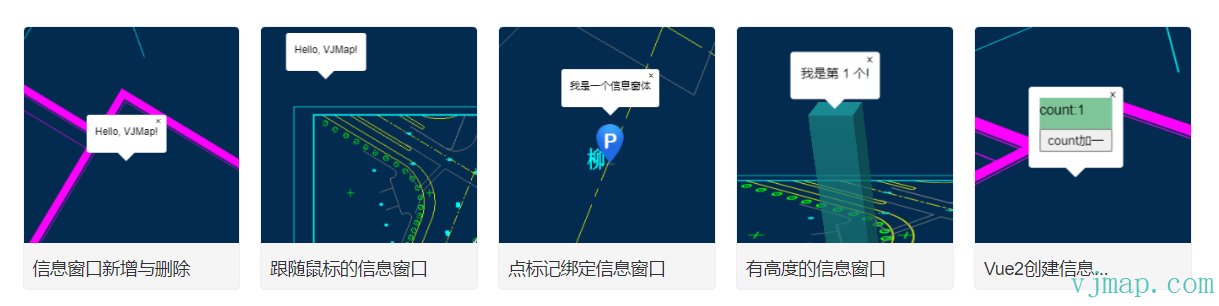
Popup相关示例
类型定义
 /**
   * Popup
   */
  export class Popup extends Evented {

    constructor(options?: {
            closeButton?: boolean | undefined;

            closeOnClick?: boolean | undefined;

            /**
             * @param {boolean} [options.closeOnMove=false] 如果为“true”,则当地图移动时,弹出窗口将关闭。
             */
            closeOnMove?: boolean | undefined;

            /**
             * @param {boolean} [options.focusAfterOpen=true] 如果为true,弹出窗口将尝试聚焦弹出窗口内的第一个可聚焦元素。
             */
            focusAfterOpen?: boolean | null | undefined;

            anchor?: Anchor | undefined;

            offset?: Offset | null | undefined;

            className?: string | undefined;

            maxWidth?: string | undefined;
      });


      /**
       * 设置高度
       * @param height 高度值
       */
      setHeight(height: number): Popup;

      /**
       * 得到高度值
       */
      getHeight(): number | undefined;


      addTo(map: vjmap.Map): this;

      isOpen(): boolean;

      remove(): this;

      getLngLat(): vjmap.LngLat;

      /**
       * 设置弹出窗口锚点的位置,并将弹出窗口移动到该锚点。替换trackPointer()行为。
       *
       * @param lnglat 将位置设置为弹出窗口的锚点。
       */
      setLngLat(lnglat: LngLatLike): this;

      /**
       * 在带有指针设备的屏幕上(将在触摸屏上隐藏),将弹出锚点跟踪到光标位置。替换setLngLat行为。
       * 对于大多数情况,此处还应将“closeOnClick”和“closeButton”设置为“false”。
       */
      trackPointer(): this;

      /** Returns the `Popup`'s HTML element. */
      getElement(): HTMLElement;

      setText(text: string): this;

      setHTML(html: string): this;

      setDOMContent(htmlNode: Node): this;

      getMaxWidth(): string;

      setMaxWidth(maxWidth: string): this;

      /**
       * 将CSS类添加到弹出容器元素中。
       *
       * @param {string} className 要添加到弹出容器中的具有CSS类名的非空字符串
       *
       * @example
       * let popup = new vjmap.Popup()
       * popup.addClassName('some-class')
       */
      addClassName(className: string): void;

      /**
       * 从弹出容器元素中删除CSS类。
       *
       * @param {string} className 从弹出容器中删除具有CSS类名的非空字符串
       *
       * @example
       * let popup = new vjmap.Popup()
       * popup.removeClassName('some-class')
       */
      removeClassName(className: string): void;

      /**
       * 设置偏移量
       *
       * @param offset Sets the popup's offset.
       * @returns {Popup} `this`
       */
      setOffset(offset?: Offset | null): this;

      /**
       * 在弹出容器上添加或删除给定的CSS类,具体取决于容器当前是否具有该类。
       *
       * @param {string} className Non-empty string with CSS class name to add/remove
       *
       * @returns {boolean} if the class was removed return false, if class was added, then return true
       *
       * @example
       * let popup = new vjmap.Popup()
       * popup.toggleClassName('toggleClass')
       */
      toggleClassName(className: string): void;
  }
这篇文档有帮助吗?感谢反馈!